At Home with Tech

Unlock the power of all your technology and learn how to master your photography, computers and smartphone.

Tag: iPhone 6 Plus

Pocket Lint Can Destroy Your iPhone
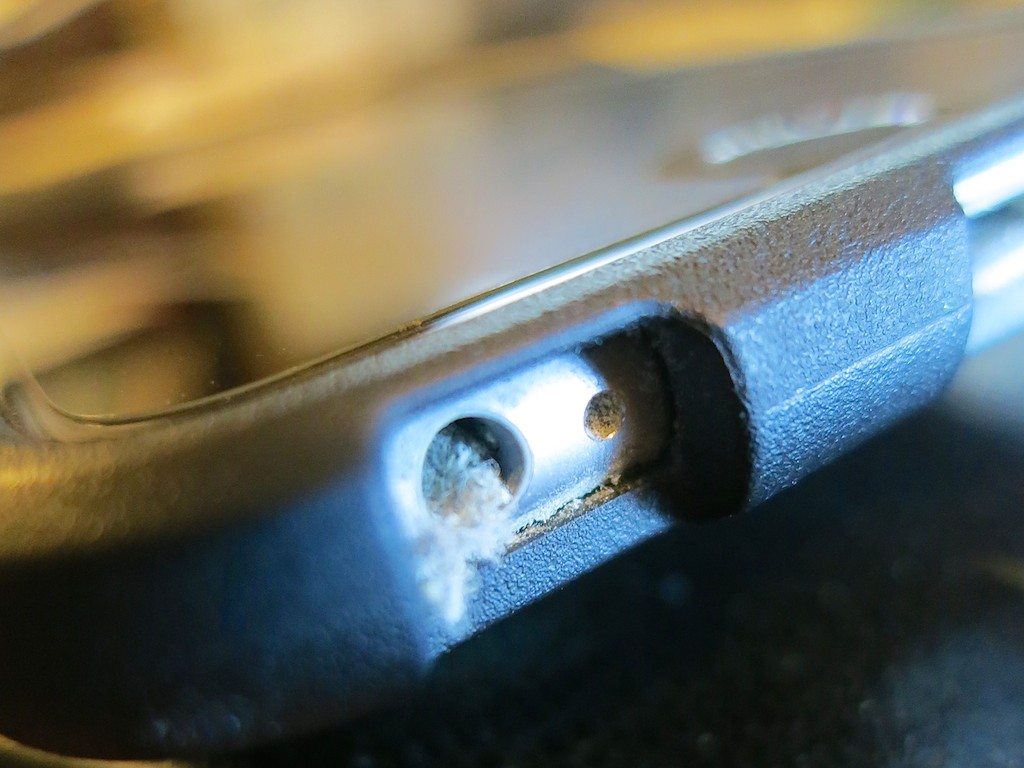
You may not know it, but this dusty mess is growing in your iPhone right now! It’s time to get rid of it…

You may not know it, but this dusty mess is growing in your iPhone right now! It’s time to get rid of it…

Recently, I noticed my year-old iPhone 6 Plus was acting quirky.
(Maybe it’s cranky that it’s no longer the latest and greatest with the new 6S line just released.)

I first started having problems a couple weeks back while using the EarPods. First, the onboard volume buttons on the cable stopped working. Then, the microphone started wigging out. So I figured the earphones had simply gone bad.

I pulled out my backup pair of EarPods.
Same problem.
Hmmm…

Cupertino, We Have a Problem
Then I considered a separate iPhone issue that was simultaneously annoying me. It had to do with my nightly ritual of charging up my trusty iPhone before I went to bed. I began to notice that inserting my Lighting charging cable didn’t create that confident ‘clicking’ sound anymore. The cable went in, but it felt like the connection wasn’t firm. On occasion, I had to push in the cable a second time to activate the charge. It was as if… the connection was failing. As if something was blocking it.

And in fact there was…

A Dusty Blob
I grabbed a flashlight and took a look inside the small opening of the Lightning connector port. I peered closer…

Perhaps not so surprisingly, the hole was partially filled up with pocket link and dust from the right front pocket in all of my pants. I guess it’s been building up over the past 11 months, and it finally grew to a large enough mini-mass, which had been crammed to the back end of the jack hole through my daily charging cycle. Would this prevent the connector from seating properly?

You betcha!

It was time for some emergency surgery.

Calling Dr. Lester!
So I took a pin and carefully extracted portions of the dusty mass until all was clear again.

Bingo!

A toothpick would work too, and I imagine occasionally blowing in some compressed air would be a deterrent to prevent dusty build up.
(I don’t know how durable the inside of the lightning port is to be… so I would tread lightly.)

The Operation Continues
Then I peered into the EarPod jack. Same issue?

It was harder to tell by visual inspection. It just appeared to be a bottomless black hole. So I took the pin and carefully dropped it down like I was a kid again playing my Milton Bradley game of ‘Operation.’

And then I felt it. The spongy muck.
Yep….identical problem… not a surprise.

So I carefully performed the same procedure.
And voilà… my EarPods suddenly worked again!

It’s Not Just Pocket Lint
Who knew pocket lint could be so destructive?

It makes sense that over the course of months, bits of dust and pocked lint will inevitably enter the holes in your iPhone. That said, I never had a problem with the earphone jacks of my older iPhones. Perhaps that’s because they weren’t located on the bottom of the iPhone next to the Lightning jack.
(And in fact, the bottom of my iPhone always touches the bottom of my pocket. So if there’s pocket link to be found, my iPhone will make contact…)

And as for the Lightning connector problem… I jumped from the 4S to the 6 Plus… so this is my first experience with a Lightning port.

Clean Up!
If your iPhone has been living in your pants or purse for a while, you might want to think about giving it a lint inspection.
(It’s probably a good idea to turn your iPhone off first before beginning the operation and don’t use any liquids.)

I guess the other choice is to vacuum your pockets…
(Hey… new tech gadget idea!)

More Vacation with Less Tech

For once, the rusted nut I found wasn't the one in my head. Although my noggin did slide into vacation mode about six hours earlier than I would have preferred...

For once, the rusted nut I found wasn’t the one in my head. Although my noggin did slide into vacation mode about six hours earlier than I would have preferred…

I’m just back from a ‘relaxing’ family beach vacation at a cottage in the North Fork of Long Island… And let me just quickly admit that along with my favorite pair of flip-flops, I accidentally left most of my tech smarts at home.
(It doesn’t help when you pack your tech at the last minute, and you’ve got a ferry to catch!)

Not to pass the buck, but some bad Tech Karma also played a role in what was to come next…

Movie Night Cancelled
I brought along our brand new Apple Lightning Digital AV Adapter to conveniently stream videos from my iPhone onto the cottage’s resident HDTV. But it ended up being an older TV without an HDMI output. So my plan to project videos onto a big screen for a larger crowd was foiled…

No Rocking the House
Then, I realized I had forgotten to bring my portable Bluetooth speaker (Logitech UE Mobile Boombox) to stream Pandora tunes off of my iPhone.
(D’oh!)

That said, the house did have one of those formerly-cool clock radios with an iPhone dock, but again, it was an older model with the old 30-pin connector…not the current Lightning connection my iPhone 6 Plus uses.
(Foiled again!)

Dangerous Beach Exposure
I also forgot to bring my son’s cheap, but waterproof ‘family’ COOLPIX S32 Nikon camera to use on the beach.
(When a typical pocket camera with a motor-driven zoom lens gets exposed to a sandy environment, it can get destroyed by a single grain of sand jamming into the wrong spot.)

Instead, I threw caution to the wind and brought along my aging Canon S100 advanced point and shoot.
(On the upside, it survived and took much better pics than the tough but mediocre Nikon ever could.)

I should also admit my iPhone 6 Plus satisfactorily handled its share of beach-time photo taking… The camera functionality was amazingly zippy, which was useful when my five year old brought over the latest hermit crab he just caught!
(But I was careful not to go too close to the water with my iPhone… An accidental drop in the drink would have really ruined the day!)

Home Alone
Even though my limited vacation brain and a touch of bad luck sidelined a bit of fun, all of my smart-home gear thankfully remained fully on duty. Back at the homestead, this tech did a stellar job keeping me informed that our home was indeed comfortable without any resident humans.

Nest Thermostat Keeps Its Cool
I’m always conflicted about whether to leave the windows open or closed before leaving on a late August vacation. Warm days and cool nights can be a perfect combination for a few open windows to successfully ventilate your house. But if a thunderstorm rolls through, those open windows will welcome in some damaging moisture you’re not around to wipe up…

And if you decide to batten down the hatches, you have to choose between letting your house get all hot and humid without air conditioning or running your AC and feel like you’re throwing money out the (closed) window…

Unless…

With my smart Nest Learning Thermostat, I was able to monitor my house’s internal temperature on my iPhone and remotely turn on the AC at night for a couple of hours if I felt my home needed it.
Sure, any programmable ‘dumb’ thermostat can handle that directive, but I’ve got to admit that having the flexibility to manually control the AC from the Nest app on my iPhone felt amazing.

Nest Connect Glows Green
My Nest app also showed me the happy ‘green circle’ status of my Nest Connect smoke detector. So I was pretty sure my house wasn’t burning down in my absence…

Foscam Camera Keeps Track
And while we’re talking about managing a few ‘irrational’ fears while vacationing…
Remember that Foscam Wi-Fi BabyCam I installed when my now kindergarten-bound boy was just a wee lad in his crib? Well, I’ve given my Foscam a new mission…

Now, the BabyCam just serves as a resident pair of digital eyes (well, just one) when nobody’s home. The FoscamPro app on my iPhone allows me to quickly take a look about whenever I want.

No, I couldn’t see throughout the entire house while simultaneously viewing the beach sunsets.
(I could if I had multiple Foscam cameras set up.)
But it’s still another data point that my house was remaining healthy all by itself.

Vacation Scoop
So I’m pleased to report my house had a wonderful vacation.
And as for me…?

I’m writing this final paragraph on my last full day away…

  • The sun is rising as I look out over the magical inlet in front of me.
  • The warmth of the sun joins the crisp morning beach air.
  • I’ve got my cup of Joe.

Perfection.
(I have found my Vacation Zen.)

Cup of Beach Joe


And I’m happy to admit there was absolutely no technology connected to the moment above.
…Except for the little detail that I was tapping away on my iPhone…
(D’oh!)

It’s good to know that you can be at home without tech.
(Almost…)

How to Feed Video to any HDTV with Your iPhone or iPad

If you want the ability to take over any HDTV in the universe sporting an HDMI connection, your iPhone or iPad can actually do the trick directly without AirPlay mirroring through an Apple TV. Your portable Apple devices just need a little help….

If you want the ability to take over any HDTV in the universe sporting an HDMI connection, your iPhone or iPad can actually do the trick directly without AirPlay mirroring through an Apple TV. Your portable Apple devices just need a little help….

Once upon a time I would go on vacation with a small army of tech gear to create an on-demand multimedia viewing experience for my entire family.
(The irony here is there has never been any demand for this capability. But of course, that hasn’t stopped me.)

First I brought my Panasonic portable DVD player along with 8,012 Lester-documented cable combinations to handle any possible TV configuration in the wild.
(Only slight exaggeration)

When iPads showed up, that made my packing so much easier. Who can argue with bringing a portable TV the size of a book? You just have to make sure it’s preloaded with all the videos you’d need.
(Assuming there’s no local Wi-Fi to stream with)

Problem solved.
(Well, not quite…)

How Many People can Sit in Front of an iPad?
The remaining issue is only one person can comfortably sit in front of an iPad. Maybe two…
(Of course I’d bring an audio splitter for two sets of ear buds, so my wife and I could watch an episode of “Downton Abbey” while our toddler dozed. But in those days, our little guy didn’t really doze, and by the time he got to sleep in a new hotel room, it was time for us to get some Z’s too!)

But recently I was introduced to a more advanced solution by some friends using their own iPad. This family is very much at home with their tech….
(I swear they come from an alternate universe where consumer technology always works.)

Vacationing with the Jetsons
Earlier this summer our two families took a short vacation together at a little beach house in Rhode Island. On the second morning, the adults were busily preparing breakfast.

The kids? Well, they were experiencing some early morning energy ‘bursts.’ They needed some focusing in this new and somewhat compact space. I’m not proud to admit this, but I suggested powering up thirty minutes of Disney Junior programming on my iPad Air 2.

I looked around for the 9.7” screen, knowing it wouldn’t be an ideal solution for our three young viewers.
(two five-year-old boys and a three-year-old girl)

Simultaneously, the other dad reached for a compact case of cables that was conveniently positioned by the large, flat screen TV set in the living room. For a second, I had a flashback to my own monster pile of travelling cables I had long ago abandoned. But it was immediately evident that this moment was about to reveal something entirely different.

A solution that made real sense…

The dad carefully revealed a sleek, white adapter cable. It was barely 4.5”” long. More of a mini adapter box with a short Apple lightning cable attached to it.
(What was this?!)

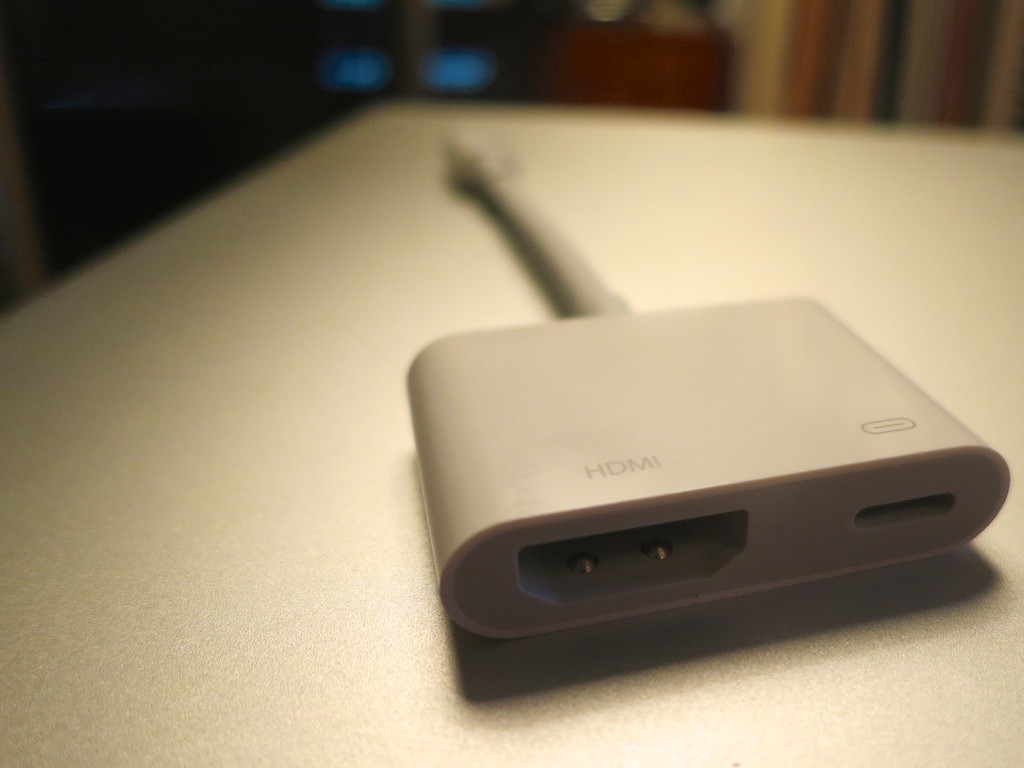
Apple Lightning Digital AV Adapter

It was Apple’s Lightning Digital AV Adapter that allows you to mirror the display and audio from your iPad or iPhone to an HDMI-fed TV or screen.

It looked so simple….
(of course)

It was constructed with a lightning connector on one end for your source Apple device, and a little white rectangle on the other with a hole for a HDMI cable and a hole for a second lighting connector to run power from a plug.
(Keeping your Apple device flush with energy)

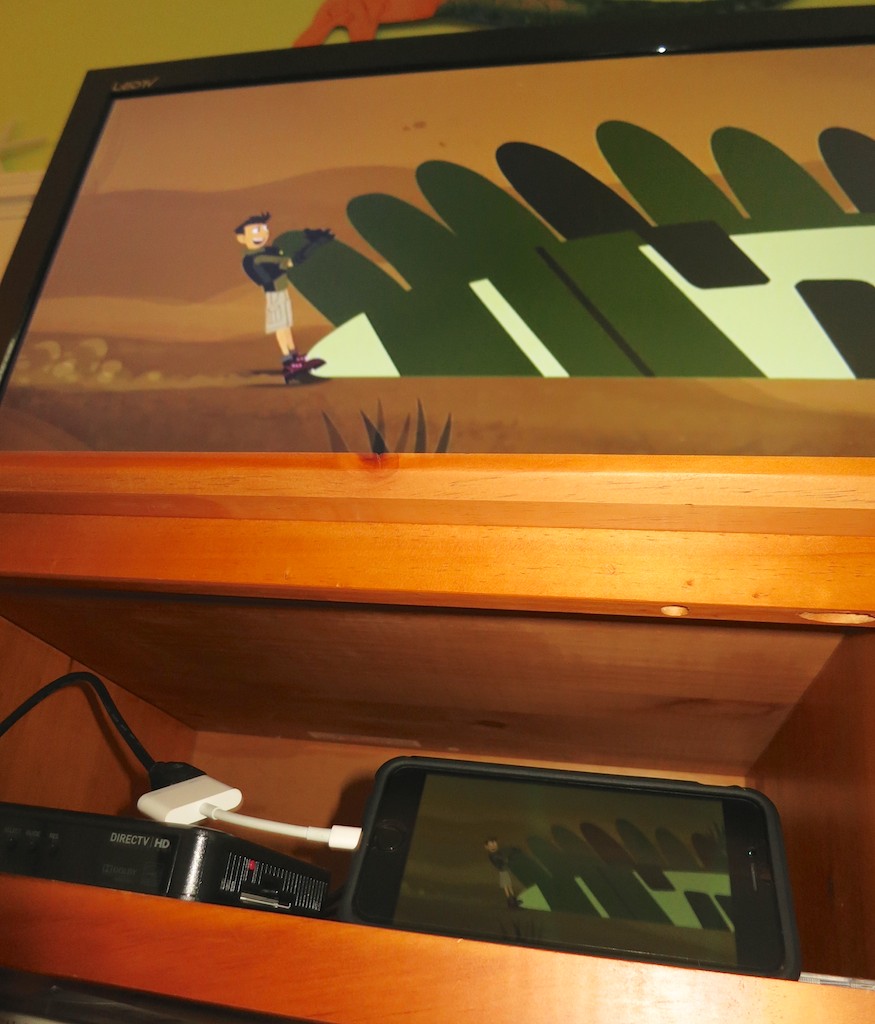
I watched as my friend effortlessly performed a little tech surgery, slipping the HDMI cable out of the back of the DIRECTV box and connecting it to his iPad. And then, as if by magic, the iPad took control of the TV.

I think I heard the three children coo simultaneously. They immediately settled in on the couch to watch their favorite Disney show in this newly created movie theater, powered by the iPad… streaming off of the house’s Wi-Fi.

I started to drool….

Late to the Party
Look, this Lightning Digital AV Adapter isn’t especially new.
Deep down, I think I knew it’s been available for the past couple years. I just hadn’t entirely understood how it could help me.

But to see it in action during a live field test…
Brilliant!

In many ways you can think of it as your own portable Apple TV.
(Without the need for AirPlay Mirroring)

Sticker Shock
But this magical convenience comes at a price.

Apple sells it for $49.
(Really? For just a cable…?)

Yup.

Of course, I Googled about, hoping to find another manufacturer with a knock-off at a lower price point.

Nope.
(Not even AmazonBasics)

I did some additional research and came upon the reason…

Apparently, this adapter is doing some really heavy lifting converting the signal from Apple’s native H264 video format to an HDMI signal for your HDTV. Apparently, if you took a buzz saw to the white adapter box, you’d find something that approximates a mini computer inside.

The exact process of the video conversation is something of a mystery, and whether the video quality is entirely maintained is a bit of a debate online.

All I care about is that it works.
And it’s 49 bucks.

To ease the painful price point a bit, B&H Photo has it for less- $44.99.

Click.

Ready for the Next Vacation
So I now own the ability to take over any TV I come across in the universe with my iPhone 6 Plus or iPad.
(An iPod touch with a Lightning connector works too.)

Will I ever actually do that?
Just knowing I can is worth the two Jacksons.

Call me crazy…