
Why I Replaced My OtterBox iPhone Case with a Pelican
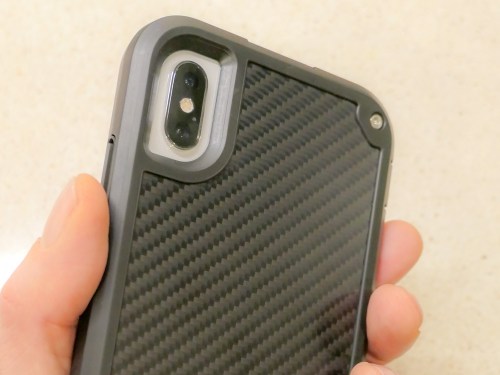
I’ve said goodbye to my Otterbox Symmetry case and turned to the Pelican Shield to protect my iPhone XS Max. Here’s why…
When I bought my iPhone XS Max, I was consumed with the idea of showing off its beauty with a clear case. So, I tried to maintain both its glamor and safety by buying an OtterBox Symmetry Series Clear Case.
Yes, the Symmetry had a slim profile (for an OtterBox). And it offered the legendary drop protection OtterBox cases are known for. I thought I was covered… until I actually started using it.
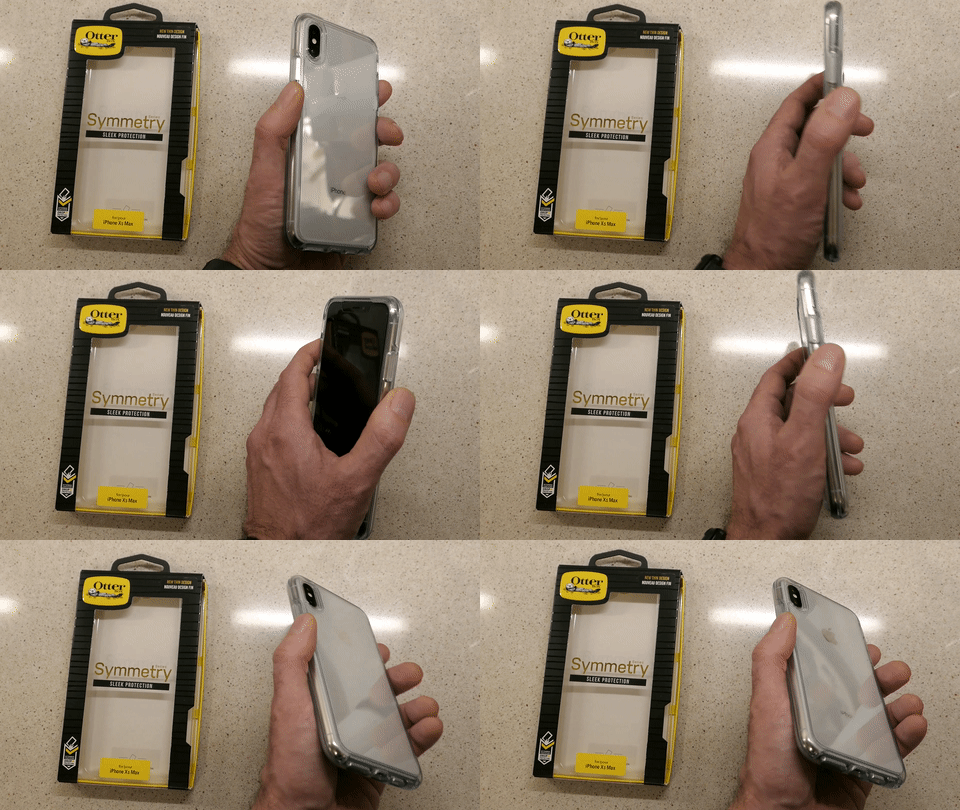
That’s because the clear plastic-like construction of the case didn’t provide enough… grip.
(Though it did attract plenty of finger prints)
Whenever I pulled my iPhone out of my pocket, I never quite felt that I had a firm hold on it. Several times, I experienced that micro-bobble moment where you feel like you don’t have total control of what’s in your hand.
That’s not good.
Sure, I knew my OtterBox could likely handle a drop or two. But I really didn’t want to test that capability on my precious new iPhone.
Plus, whenever I placed my iPhone on a table, it felt a bit like it was resting on ice. That said, the designers of this Symmetry did give the case some rubbery grip on the circumference of the front edge. So, when I placed my iPhone on a flat surface facing down, the Symmetry was much more likely to stay put.
…But then I couldn’t see my iPhone’s screen and notifications.
The evidence was mounting that it was probably smart to get another case. Sure, that created some frustration around my original purchasing decision. But when you consider the larger cost of dropping an expensive smartphone (regardless of how much protection any case provides), it’s the right choice to find another case you feel totally comfortable holding.
Goodbye OtterBox
I had to secure my iPhone in a more ‘grippy,’ non-clear case. Sure, I could easily go with another OtterBox model, but my irrational ‘id’… still in search of a ‘fresh design’ pointed me away from the proven safety but sometimes bulky world of Otterbox.
Yes, I wanted rugged protection… and an appropriately distinctive look too.
It was time to give it another shot…
Hello Pelican Shield
There are the usual suspects of well-regarded tough iPhone cases out there that reviewers talk about beyond OtterBox.
(Such as Supcase, Urban Armor Gear, Spigen and Lifeproof)
But I couldn’t quite ‘connect’ myself to the designs of any of them.
Then, I came upon the Pelican Shield.
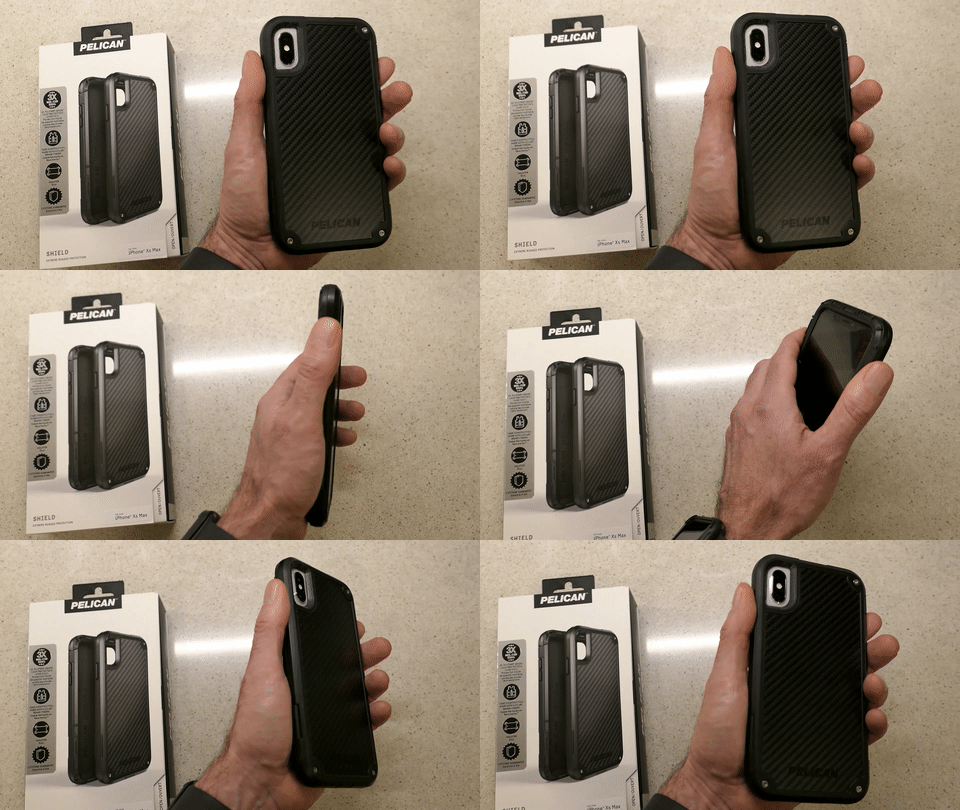
I’m not sure if fatigue was beginning to wear me down or whether I actually liked the Shield’s look more than the competition.
It didn’t hurt that its drop protection capability won a three way tie in a CNET drop-test competition at CES 2018. Maybe I gravitated to it, because it’s made with Kevlar fibers in its back.
It wasn’t so much ‘sleek’ as it was noticeably ‘different’… with the tops of tiny screws embedded and glinting in three of the back corners. Its armor looked like something you might see if you traveled to the alternate universe of the TV series, “Fringe.”
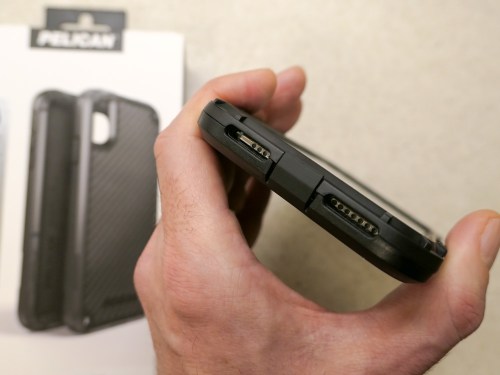
The Shield is also built with a cover protecting the iPhone’s lightning port. That’s there to keep dirt out. But I recognized a long time ago the danger that simple pocket lint accumulating inside the port can pose to iPhones. A port cover greatly reduces the need to clean out nasty pocket lint with a pin. Otherwise, it’s a real nuisance that needs addressing every couple of months.
The Power of a Good Brand
But ultimately, I think what got me across the finish line was the brand… Pelican.
They’re the folks who make those indestructible cases and luggage for outdoor enthusiasts and professionals who travel with delicate gear. And of course, that includes the world of video production equipment.
That’s how I know Pelican.
When you marry a third-party case to your iPhone, there’s usually a logo in plain sight. Maybe that brand in your hand doesn’t say quite as much as your choice to own an iPhone.
(And that isn’t so much a statement anymore either…)
But it says something. Maybe it’s just a fashion statement. Ultimately, I think it boils down to what ‘feels right’ to you… how it complements your own identity.
I think the simple idea of holding a Pelican product in my hand was appealing to me, because it successfully connects back to my professional video world.
All of the other factors follow after that…
Two Choices
So, that’s the psychology of how I landed on my Pelican Shield decision.
(I’ve got to make use my Psych degree sometimes, right?)
Pelican offers an all-black Shield model or black with a white edging.
I went all black.
(It has a black/grey pattern on its back.)
The Pelican Shield for the iPhone XS Max lists for $59.99.
$42.87 on Amazon Prime
Click.
First Impressions
Two days later, I received my Pelican Shield…
The two-piece design secured itself around my iPhone with three latches. How logical it that?!
(It’s not like the one piece design of the Otterbox Symmetry where you have to apply what feels like an unhealthy amount of force to jam all four corner in.)
The Shield’s raised front edging protects the iPhone’s screen when you place it face down on a smooth surface, and the back design protects the camera lenses in the same fashion.
Interestingly, the Shield has a rubbery edge on its back side… so that give you better surface grip when the iPhone is facing up. This is opposite to the OtterBox Symmetry’s design. And while I would ultimately prefer some grip on both the front and back edges, the Shield’s design is more practical…
- It allows my iPhone to face up and not slide around when it sits on my desk.
- It provides more grip in my hand, because the back edge and my index finger make full contact.
And beyond the rubbery back edge, the Shield’s overall design has more bumps and edging that definitely provide additional grip opportunities for your hand.
The Pelican Shield is a little bigger than the OtterBox Symmetry.
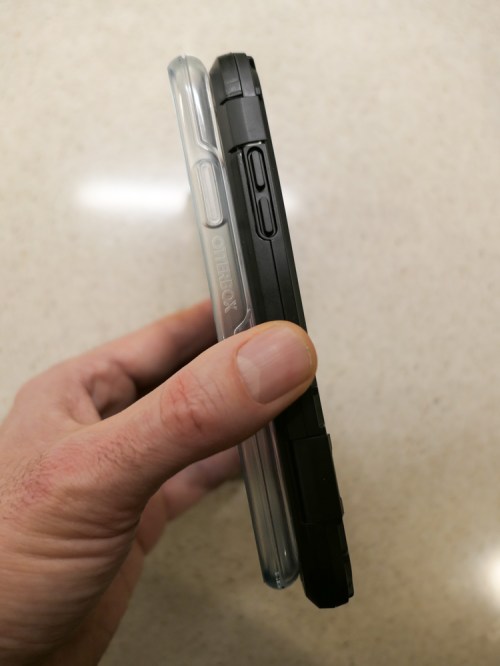
And you can see that the Shield’s extra quarter inch in overall size enables the inside construction design to offer an extra layer of rubbery protection.
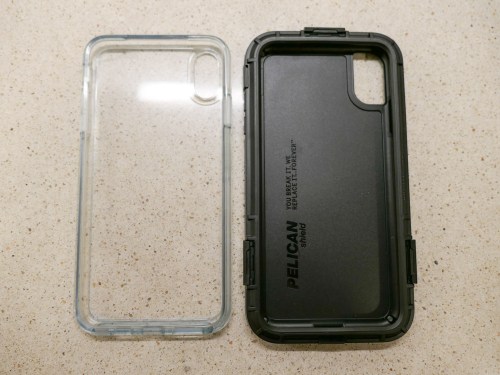
I should also mention that the Pelican Shield also comes with a belt holster, which doubles as a kickstand. I don’t need it, but you never know what the future might require.
The Importance of Finding the Right Fit
The parameters of my journey wasn’t to find the toughest case out there… but to locate protection with appropriate balance between ‘rugged’ and ‘attractive.’
The OtterBox Symmetry clearly attempted to maintain my iPhone’s beauty. It was slim and sleek…but ultimately too slippery for me.
The black Pelican Shield morphed my iPhone into something entirely new… a more angular device that you might expect Walter Bishop from “Fringe’s” more sinister alternate universe to be carrying.
It almost flaunts its utilitarian structure, seemingly designed to disdain the silly notion of maintaining iPhone beauty.
(It even strangely sports a tiny part number on the side of the front edging… MIL-STD 810G.)
But I still like the look.
For the record, I believe OtterBox makes great cases for smartphone protection. There’s even the Defender series, which more directly competes against the Pelican Shield. But this fickle human simply wanted to go down a different path.
And Pelican fit the bill.
Prepare Your iPhone to Travel in Any Universe
I’m happy to report that my Pelican Shield is doing its job quite nicely, but not because I’ve dropped my iPhone (well, not yet). My objective was simply to gain a better grip when holding it.
Goal… accomplished.
As for the design, the Shield certainly focuses more on protection than beauty. But it also manages a unique look that I enjoy.
Now, you must excuse me… I’m late for a conference call in the alternate universe.


 At Home with Tech