At Home with Tech

Unlock the power of all your technology and learn how to master your photography, computers and smartphone.

Tag: iPhone

How to Pay Less and Get More Out of Your Cell Phone Plan
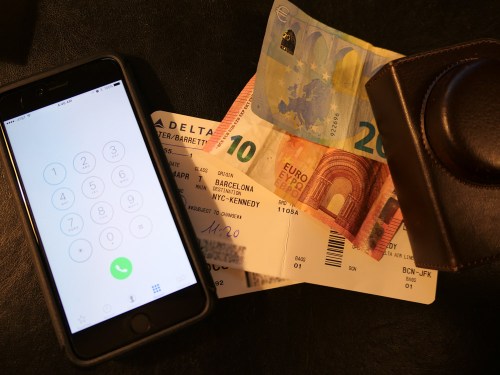
Do you feel you’re paying too much for your monthly smartphone usage for what you’re getting? Maybe it’s time to more closely review your plan…

Here are two clues you’re probably spending too much on your mobile bill… Either you haven’t chosen a fresh deal lately. Or you just opted into a shiny-new plan, and then you inexplicably get more perks for free.
(Like… how often does that happen?)

Here’s a cautionary tale where I tripped over both scenarios…

Data Limits are a Drag
For years, I’ve been holding for dear life onto my legacy unlimited wireless plan from AT&T. Not that I use all that much data…

I do stream the occasional video while I’m commuting on the train to
New York City.
(Netflix/Amazon Prime Video)

But I’m not risking the integrity of the entire wireless network!

I just like the idea of not having to worry about data limits. And when unlimited plans went out of vogue some years back, I clutched to mine even tighter.

Time zipped by, and I thought I still had the deal of the century.

Unlimited Data Plans are Back
But a funny thing happened. I recently spotted some advertising from the competition about new unlimited plans. Huh!
(What’s old is apparently new again.)

Then I realized my legacy plan was no longer such an unbeatable deal…

International Day Pass
I stumbled upon this unsettling realization when I temporarily upgraded my iPhone’s plan to help it operate overseas during my family’s vacation to Barcelona.

In preparation for a lot of Gaudi and a little Cava in Spain, I called 611 on my iPhone to contact customer service and find out about my international-use options.

I quickly realized the best move was to add AT&T’s “International Day Pass” plan to my account for just ten bucks a day. This offering gives you free calling and texting and mirrors the same data plan as you have at home.

For me, that’s a far better deal that AT&T’s older “Passport Gold” plan, which costs a whopping $120/month, plus 35 cents/minute calling, plus a paltry 800 MB for the month. And then 15 cents per MB of overage.
(Ugh.)

So I thought I had the perfect solution…

AT&T Unlimited Plus Wireless Plan
But then the operator told me my existing unlimited data wireless plan was “too old” to ‘accept’ the International Day Pass feature.

What?!

She explained I would have to upgrade to one of AT&T’s newer plans.

I defiantly proclaimed that I wasn’t willing to give up my cherished unlimited data flow.

But then she said the oddest thing…
“What about upgrading to one of our new unlimited data plans that will work with the International Day Pass feature?”

What?!!

“Yes, we just started offering them.”

“It’s really unlimited data… like my legacy plan?”

“Yes.”

“No catches?”

“No, sir.”

“Wow.”

“And our new AT&T Unlimited Plus wireless plan is forty dollars less expensive per month than your old plan.”

“It’s cheaper?”

“And that’s with the wireless hot spot feature.”

“I get the hot spot option too for my iPhone?”
(That’s always an à la carte add on.)

“Yes, sir.”

Still in consumer shock, I finally agreed to let my legacy plan go and entered the less expensive present of wireless phone plans.

But the story doesn’t end there…

Hello HBO Streaming!
A week later, while on vacation in sunny Barcelona, I received a text from AT&T telling me I would also be receiving HBO streaming for free, because I had so wisely joined the new Unlimited Plus club.
(The text didn’t really affirm my consumer prowess… but it’s how I felt.)

Clearly, I had bought into a higher-level tier plan. Deep down, I knew I didn’t really need to take the full boat. But I was paying less per month than I had been. So it still felt like a really good deal.
(Plus, I’ve been meaning to catch up on some HBO programming.)

I’d say you can confidently place me in the column of happy AT&T customers!

Your Old Deal Stinks
The moral of the story is you just need to pay attention when it comes to using consumer tech.
(Buying at a good price is often just the beginning of the journey.)

Is your wireless plan really the latest and greatest?
(Yesterday’s deal never lasts forever, even if the monthly costs do!)

Yes… sometimes it makes sense to hold onto a feature that gets discontinued… but usually the rule of thumb is both tech and tech usage get less expensive over time.

There’s always a better deal waiting around the corner…

So go find it!

How to Quickly Delete Multiple Photos from Your iPhone

If your iPhone is running out of space, one way to find more room is to delete photos. But that can take a lot of time if you haven’t been regularly doing it. Here are tips to help you speed through this digital chore.

You really don’t need all of those photos in your iPhone’s ‘Camera Roll.’  Especially if you always download them to your computer or up to the cloud where they ‘officially’ live and are safely backed up. But manually deleting one photo at a time using the Photos app on your iPhone is a losing battle when you’ve built up thousands of photos.

And eventually, you start to run out of space on your iPhone, and then it becomes a real problem.
(Sound familiar?)

There needs to be a faster way to thin out your photos in bulk.
Well, of course there is…

Time for some digital spring cleaning!

Bulk Delete Pics on your iPhone
First, go to ‘Camera Roll’ in Photos…

  • You’ll see the ‘Select’ icon in the top right corner that allows you to tap and highlight multiple photos at the same time. Tap that.
  • Then, tap the trash icon on the bottom right.
  • Finally, touch the delete tab that pops up and you’re done!

But for me, that simple process still feels somewhat limited when you’re trying to move through so many photos. Plus, I’d prefer a larger canvas to work with than the surface of an iPhone.

Ideally, I’d like to be able to manage this process on my iMac so I can see more photos all at once.

Well, guess what?
You can do exactly that using the ‘Preview’ app on your Mac.

Bulk Delete those iPhone Photos Using Your Mac
First, you connect your iPhone to you iMac or MacBook….

  • Then, open up Preview.
  • Select ‘Import from’ your iPhone’s name.
  • Then click on the photos to delete.
  • And finally, click on the little red delete circle icon on the bottom left.

BAM!

So the truth is both methods are extremely similar. Again, the big difference is you’re working on a larger screen, which makes me much happier.

And if Preview isn’t right for you, the ‘Image Capture’ app on your Mac pretty much duplicates the same process as Preview.

Simple Isn’t Always Easy
To be perfectly transparent, this topic squarely falls right under the
“How Did I Not Know That?” category.

Apple designers have done perfectly fine in setting this up for us.

But sometimes the obvious solution that’s staring right in your face requires a little more thinking on your part.
(Chalk it up to your brain power focusing on more universally pressing issues.)

I must admit… not so long ago, it wasn’t so ‘obvious’ to me either.
Or I’ve never taken the time to want to delete multiple photos from my iPhone.
(I’m not sure which one I should admit to!)

And the fact that you’re still reading this suggests that you also might need a little ‘refresher’ too.

I won’t tell anyone… as long as you don’t!

#ThingsYouShouldKnow

How a Few Photos Will Frame the Story of Your Travels

You know the saying… a picture is worth a thousand words. How you integrate a few key photos into your post-trip conversations can be critical towards charting your saga.

You know the saying… a picture is worth a thousand words. How you integrate a few key photos into your post-trip conversations can be critical towards charting your saga.

The amazing experience of an overseas trip can quickly start to evaporate much like a dream as quickly as the next morning. How are you supposed to lock in all of those great memories and then share them with your family and friends?

Sure, it’s probably not too difficult to relay the major headlines, but what about all of the moments that made your little adventure your own?

I believe that quickly sharing a few photos (and videos) you captured is the best way to lock it all in and help provide the details of your story.

Don’t wait a month to go through your pics and figure out the best ones to share. That’s way too long. People are interested in knowing what just happened to you. Yesterday’s story is old news.
(Yes, even for you)

I say you’ve got a week… max, before your travel photos lose much of their impact in helping you tell your story.

And for those of you who may not be natural storytellers in front of a crowd, your photos can do a lot of the heavy lifting. From there, all you’ve got to do is provide a little more color with your own words…

Seven Days in Thirteen Images
Let’s do a little exercise together to demonstrate how using a little photographic tech can quickly bring your trip to life and easily frame your experience for others…

barrett-lester-in-davosA week ago, I returned from my trip to Davos, Switzerland. I snapped pictures with my new Panasonic DMC-LX10 ‘premium’ compact camera
and my old iPhone 6 Plus.

davos-mountain-view

Those Swiss Alps are really beautiful.

train-ride-to-davosThe train ride from Zurich was a bit surreal.

davos-at-nightDavos is a super cute town.

two-horse-powerSome of the local residents don’t lean heavily on modern tech.

davos-at-dawnIt was wicked cold.
(Like 2 degrees Fahrenheit in the morning)

muesli-yogurtI sampled some of the local cuisine. I made a point to have some Weiner Schnitzel and try the fondue. I really enjoyed muesli yogurt for breakfast.

tiramisuThe tiramisu rocked.
(We also ate some great pizza, which I wouldn’t expect to find in Switzerland.)

swiss-payphone-at-zurich-airportSome of the tech was kind of the same.

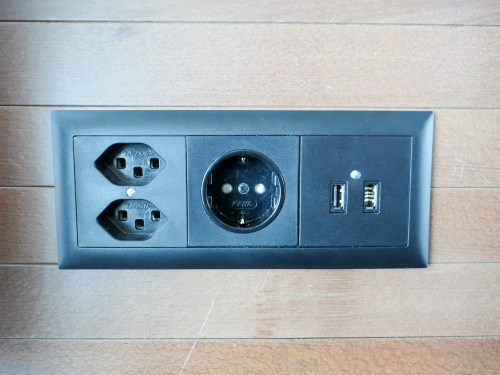
power-outlets-at-zurich-airportOther tech elements were expectedly different.

winston-smoking-loungeThey still have smoking lounges?!
(Zurich Airport)

freshly-baked-bread-at-2amWe passed by a closed bakery at 2am and spotted a mustached man in front of a wood-fired oven making bread for the next morning. He spotted us and sold us a hot loaf for three Swiss francs.
(Yum)

Show the Action!

Davos Tobaggan Race

…And after the end of a busy week on the job, we might have squeezed out a few moments to go tobogganing from the top of a mountain.
(Thanks to my friend Ichiro for capturing the GoPro footage.)

When to Know When
After these thirteen images, don’t you now have a decent sense of my experience?

One last piece of advice:
You’ve got to be deliberate when finding these ‘peak moments’ to capture. And be willing to endure a bit of blowback from others around you, who might be moving through these moments at a slightly quicker rate than you are.

That said, it’s always a balancing act.
There’s a time to take your camera out. And the times to put it away.

It’s always nice to capture a memory, but never forget to enjoy the moment!