At Home with Tech

Unlock the power of all your technology and learn how to master your photography, computers and smartphone.

Tag: iPhone

How to Make Your Old iPhone Act Like New

Is your iPhone having trouble holding a charge? If you’ve owned it for long enough, that’s inevitable. Now it’s time to take your phone on a little trip…

Is your iPhone having trouble holding a charge? If you’ve owned it for long enough, that’s inevitable. Now it’s time to take your phone on a little trip…

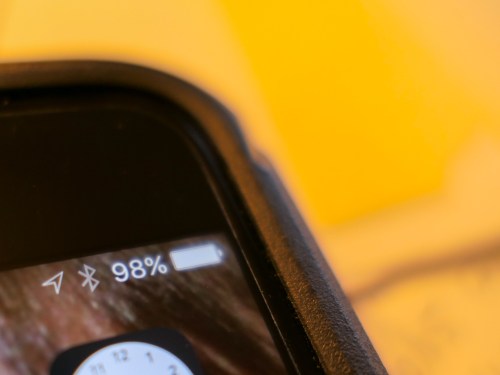
My iPhone was in big trouble. After not even two and a half years, the battery in my old iPhone 6 Plus was showing some serious wear.

It just couldn’t make it as long anymore without a little pick me up. And never for more than a day. Sometimes it couldn’t even get to lunch. And then there were the times the battery level would suddenly go from 30% to zero.
(What?!)

In the cold… forget it. My iPhone would shut down faster than you can say,
“I am one with the Force, and the Force is with me,” five times fast.

Time to Make the Doctor’s Appointment
So I brought my ailing companion to the Genius Bar at the Apple Store. The Genius ran the diagnostics on the battery and reported it was almost due for replacement… but not quite yet. I asked if it would last me until this fall.
(Yeah, I’m planning on pulling the trigger on the latest and greatest then.)

“Definitely not,” she said.

“How much for a new battery?”

“Eighty dollars.”

Huh.
So the way I saw it, I had a choice:

I could nurse my iPhone with a power drip and carry around an external battery or stay close to power outlets for as long as possible. And then rush back to the Apple Store for the operation when there was no longer an alternative…

Or I could electively do the battery swap out now.

Is that even a choice?

The Cost of Living in a Digital World
Look, no battery lasts forever.
It would have been nice for my iPhone to go a full three years on its original power cell, but it’s not like I didn’t get a lot of use out of it.

Is there any other device you depend more on every day?
Exactly.

Is $80 a lot of money for a silly battery? At one level… yes.
But considering the original cost of the iPhone, not at all.

Think of it as a simple maintenance cost…
(The thing doesn’t run on Pixie Dust.)

Tech Zen Restored
So my iPhone was whisked away to the back of the Apple Store for a ‘Battery Replaceadectamy.’
(No, you can’t do it yourself… or at least, you’re not supposed to.)

Now… my iPhone is back to its old self again.
And I’m a whole lot happier… not having to stress about all this.

Look at all of the time I’ve brought back into my life not having to always figure out how to feed my smartphone a little more juice.

I think it’s the best eighty bucks I’ve ever spent.

Which Premium Compact Camera Should You Buy?

If you’re looking to purchase a new point-and-shoot camera, you should consider upgrading to a premium compact camera. You’ll be able to snap superior pictures and successfully battle photo blur, but it’s going to cost you…

If you’re looking to purchase a new point-and-shoot camera, you should consider upgrading to a premium compact camera. You’ll be able to snap superior pictures and successfully battle photo blur, but it’s going to cost you…

You might be wondering why anyone would want to spend an ungodly amount of money on a newfangled compact camera that can fit in your pocket? Haven’t those kinds of cameras been around forever for a couple of hundred bucks? Plus, can’t your smartphone already take care of all your photo-snapping needs?
Well, not quite…

For me, the challenge is still how to capture a great moment in low light without a flash. That eternal blur is killing me. Unless, I’m shooting a bowl of fruit, any kind of motion creates some amount of blur!

I just want to be able to generate a crisp shot!
But for that, I’m going to need a bigger camera sensor. And I want it in a small camera.

Exactly…

The ‘Better’ Pocket Camera
They’re called ‘premium compact cameras.’
And they belong to a relatively new category of camera that’s supposed to solve the blur problem by using a much larger 1 inch-type sensor that’s typically built into larger and better DSLR cameras.

This upgrade provides a massive improvement over all other compact cameras that use smaller sensors.

If you think that ‘premium’ means it’s going to cost you more, it certainly will…

You may recall I recently destroyed my old Canon S100 pocket camera while performing an especially silly and pretty dangerous parenting maneuver. Since then, I’ve been on the market for a replacement camera. I questioned whether another standard point and shoot would really be that much better than the camera on my old iPhone 6 Plus. Not to mention the more advanced camera(s) on the iPhone 7.
(By the way, I think I’m going to wait to upgrade to the 8.)

And here’s the major reason for the creation of the premium compact camera market. Why else would anyone shell out anything for a pocket camera unless that camera could knock the socks off your smartphone?

And with that ‘promise’ in front of me, I decided to shell out some big dough in search of a little more clarity.

How to Decide…
There are essentially three choices to consider:

  • Sony DSC-RX100 V
    This is the fifth generation of the camera that launched the premium compact camera market. By most accounts, it’s still the one to beat.
    Among its superior features, it’s the only one of the three to have a separate pop-up viewfinder in addition to its LCD screen.
    The problem is it costs a thousand bucks!
    (You can save some money by buying an earlier model… The III and IV are still on the market and are solid choices.)
  • Canon G7X Mark II
    At $700, the Canon is a little easier on the wallet. But the jump from what I’m used to spending is still startling.
    The G7X II also has lots of fans out there. So I wouldn’t go wrong remaining in the Canon orbit.
    The one big drawback is it doesn’t offer 4K video like the other two.
    (More on this later.)
    On the plus side, it has a longer 24-100mm zoom lens than the other two.
  • Panasonic Lumix DMC-LX10
    This one will also set you back seven hundred bucks, but it has a slightly brighter lens. (F1.4-2.8 24-72mm equivalent) Every little bit helps when you’re fighting the blur in low light.
    (But you only get the F1.4 boost when you’re framing at 24mm. I really like the 24mm wider angle when trying to handle group selfies.)
    The Panasonic also has 4K-video capability. (As does the Sony)
    But the LX10 can create MP4 video files in addition to AVCHD unlike the Sony, which can only generate AVCHD.
    (I prefer editing with MP4 files in Final Cut Pro X.)
    The LX10 has a cool ‘4K Photo-Burst’ mode, which gives you the option to generate a specific jpeg from a short MP4 clip that’s captured at 30fps.

Process of Elimination
You’ll find tons of camera reviews out there comparing these options. And you’ll probably spend hours (days) trying to digest it all. (I certainly did!)

I don’t think you can really go wrong with any of these three amigos. But each has its own advantages. There’s no perfect choice.
(Is there ever?)

For me the decision comes down to this…

As much as I don’t feel the need to start shooting my family videos in 4K right now, (1080 is just fine, that you very much.) I want to future-proof this camera as much as possible. iPhones already shoot in 4K. I don’t think it’s going to be that long until 1080 HD video becomes yesterday’s dated 720 HD format.

As much as I’ve been a Canon guy for over a decade, I have to make the difficult decision to walk away from the G7X II, because it lacks 4K.

And I just can’t bring myself to spending a thousand smackers on a pocket camera. That means I can’t go with the Sony.

So that leaves the Panasonic…
Though the process of elimination does lead me here, I don’t feel I’m going with a runner up. The LX10 gets its own great reviews.
(And by the way, I don’t mind that it doesn’t have a separate viewfinder. I never have the time to frame like that. I’m lucky if I can pull the camera out of my pocket and point it at a family moment before that moment has moved on!)

Click.
panasonic-lumix-lx10-is-ready-to-go


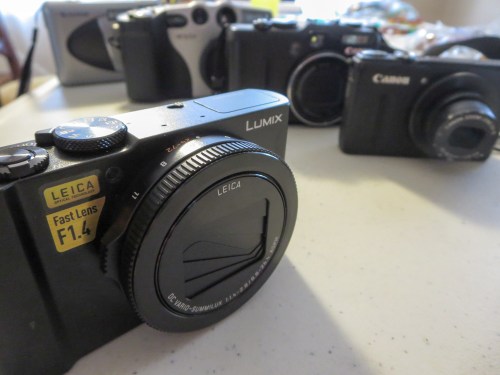
Hello, Panasonic Lumix DMC-LX10!

Consider Yesterday’s Model
So I set myself back $700. And I’m not done yet.
(More on that in a moment.)

But before you take the same financial plunge, you should remember you’ve always got a fourth choice…

If you buy an older camera model, you’ll certainly save some money…
(Newer versions seem to get cranked out every year.)

The popular Sony RX100 III is selling for $698 at B&H Photo. That erases my Sony price premium concern. But it doesn’t have 4K video capabilities.

Amazon’s got the original Canon G7X for a hundred bucks less than the G7X II.
But I figure if I’m ready to spend $600 on a camera, then it’s worth ponying up a little more to get the latest and greatest.

As for the Panasonic LX10, there’s no earlier model that enough of an apples to apples comparison.

Should You Buy the Insurance?
I decided to purchase my Lumix LX10 online at B&H for $697.99.
As I looked at B&H’s check-out screen, there was the option to pick up an insurance plan through SquareTrade. (3-years of Drops and Spills for $128.99)

I quickly dismissed it, as I’m not a big believer of insurance for tech gear, except for my Apple products. My curser hovered over the camera-purchase button, but I just couldn’t press it…

What was wrong?

My subconscious was communicating with my conscious self…
It reminded me that I’ve broken more than one camera since becoming a daddy. The odds weren’t good that this one could go through the next few years totally unscathed.

Why wouldn’t I protect this camera, as I’m sure to be putting it in harms way?

I’m spending a boatload on this camera! It’s not going to be a throwaway item the first time it needs a repair. So why wouldn’t I buy the insurance?

Okay… enough said.
Hello, SquareTrade!

Accessorize!
Remember when I said I wasn’t done spending money…?
Well, there are a couple of important accessories to consider…

  • Soft Pouch
    I’ve got to protect my new precious. It just can’t bang around with all of my spare change in my pocket.
    (What little is left!)
    A stretchy, soft pouch will do the trick. The question is which one?
    (There are dozens out there.)
    So I called up B&H and asked the sales guy. He pointed me to this:
    OP/TECH USA Digital D Soft Pouch – $17.95 at B&H.
    Done.
  • Extra Rechargeable Camera Battery
    I always like to carry one with me. You never know…
    It’s the Panasonic DMW-BLH7 – $39.95 at B&H.
  • Battery Charger
    Guess what? The LX10 doesn’t come with a separate battery charger.
    Surprise!

You’re supposed to charge it in-camera using a supplied USB cable and AC charger.
While that felt like a game changer when I opened the box, after I sat with it for a bit, I realized it wasn’t such a big deal.

That said, I am getting that second battery. It would be nice to have a charger instead of always having to shuttle batteries in and out of the camera.

The B&H guy told me Panasonic hasn’t come out yet with its charger. But you can buy one from this manufacturer…
The Watson Compact ac/DC Charger Kit with Battery Adapter Plate for DMW-BLH7 is $19.95 at B&H.

It’s Not So… Small
And how pocketable is the LX10, really?

Well, it’s quite a bit bigger than my obliterated Canon S100. (R.I.P.)
But it’s smaller than my old Canon G9 (R.I.P.) …not as tall and thick.

Does the LX10 fit in my front pants pocket? Yeah…technically.
But honestly, it’s kind of tight.

I’ll make due…
(There’s no smaller camera with the same specs… especially a fast 24mm lens at the wide end.)

The Bottom Line
So I’ve got three takeaways to review as you consider your own decision:

#1
I love my new Panasonic Lumix LX10. It’s built like a tank, and my early photos look super!
lumix-lx10-hand-and-keyboard-shot


#2
Yes, I’ve been suckered into buying into the world of 4K video to create my family videos.
(But I bet my future self will soon come back in time to thank me for this forward-thinking move.)

#3
If a camera costs a lot… go buy the insurance to protect it! You don’t have to feel good about the fact that you need it. (I still don’t.) Just do it. Trust me.

You can’t control your world. But now, you can certainly take better pictures of it. At some point along your photo-snapping journey through life, I expect you’ll decide it’s worth it to spend the extra money.

As my father likes to say, we go around once.
Get the nice camera…
lumix-lx10-depth-of-field-globe-shot

Six Boring Tech Gifts They’ll Love Getting

This could very possibly be the worst list of gift ideas you’ll ever read. But I believe these five ugly ducklings will bring a smile to anyone’s face.

This could very possibly be the worst list of gift ideas you’ll ever read. But I believe these five ugly ducklings will bring a smile to anyone’s face.

While everyone looks for the latest and greatest tech gifts to buy, I’m thinking you should take a few moments and consider the opposite side of that equation.

Don’t give your friends and loved ones what they want.
Get them what they really need… even if they don’t know it!
And sometimes, it might be a duplicate of what they’ve already got!
But get this… they’ll still thank you for it!

Worried that your gifts are boring?
I say stop worrying!
These could be the six-best uninspired tech gifts you’ll ever give…

#1
Smartphone Wall Charger
How many times a week does someone run up to you in a panic and ask if you’ve got a smartphone charger to use for a few minutes?

Exactly.

I’m not sure what that says about our high-tech society, but apparently much of our tech-enabled planet is always about eleven minutes away from running out of juice…

I’m sure most of your friends would be very pleased to have an extra smartphone wall charger to leave at work.
(So their device doesn’t have to take a mid-afternoon siesta)

Anker can sweeten the deal with a 2-port USB wall charger…
anker-powerport2


#2
Portable Power
Or perhaps consider a portable battery charger to get for that someone special.
They can carry it around whenever their mobile tech needs a little pick me up.
(I know… how romantic)


#3
Extra Memory for Your Camera
How about a spare SD card for a camera?
(Don’t you always need one of these at exactly the wrong time?)
sandisk-32gb-sdhc-uhs-1-card


  • I just picked up an extra SanDisk Extreme 32GB SDHC UHS-1 Card.
    $10.62 on Amazon

When Martians land in your backyard, your family should be ready to capture the moment!

#4
Portable Storage
Some people can never have enough shoes.
Others like to collect memorabilia.
I prefer lots of storage opportunities for my media. Remember, if a digital photo file or home video doesn’t live in at least two or three separate devices/locations, it essentially doesn’t exist.
(I know… that’s deep Tech-Zen to consider)

So I say there’s always a use for another portable drive.
g-tech-3tb-g-drive-mobile-usb


Sure, that may seem a little pricey spending almost $200 on a portable drive.
But wait a minute…
That’s less than two Franklins for three whopping terabytes!

After that, I think you’re done.
It’s a no brainer when it comes to having enough storage in one device.

#5
Rechargeable Electric Toothbrush
I recently had to retire my old Oral-B electric toothbrush, because its non-replaceable battery couldn’t hold a charge anymore.

When I reviewed the newer Oral-B options online, I was overwhelmed with all of the choices. After a little research, I focused on these two models:

The reviews I read zeroed in on the ‘3000’ model as offering the best Oral-B brushing experience without all of the frills and cost of higher-end models.

That said, the ‘5000’ model is actually about the same price on Amazon.
(It was originally more expensive…)

And it’s got a longer-lasting battery and a battery indicator that gives you a better sense how much energy is left…

(Note… I’m not specifically interested in its Bluetooth functionality that can connect to an app on your smartphone… I just want to brush my teeth… not make it a big fitness-tracking project!)

So I bought the Oral-B Pro 5000, and it’s been great.
oral-b-pro-5000


Yeah, I know it’s just a toothbrush… and who would ever think of buying someone a electric toothbrush as a present?

Just offering ideas.
Trying to be helpful.
Let’s move on…

#6
Seltzer Maker
I have a confession to make…
I am officially overwhelmed by all of the empty seltzer bottles and cans at home. My family just loves seltzer!
(Especially our six-year-old son)

The by-product of all of this consumption is all of the recycling of plastic bottles and metal cans. And that requires ongoing trips to the supermarket to visit the picky recycling machines… Which may… or may not… accept your offerings.
(Sometimes you’ve got the wrong ‘brands.’ Other times, the labels are damaged beyond recognition. Occasionally, the machines just say “NO”… for no good reason.)

I say it’s time to stop the madness and just make your own seltzer.
(No more seltzer can/bottle-recycling hassle… Plus it’s good for the environment. And it’s cheaper in the long run.)

When I checked out SodaStream, there were seemingly a zillion models to choose from.
(I hate that.)

But the SodaStream ‘Fizzi’ appears to be the go-to model. It’s sold with a CO2 carbonator, which you can replace with a new one when it runs out of gas. And it comes with a reusable BPA-free plastic bottle…
sodastreamsource


Make someone happy with some bubbly water.
There are worse things you could do!

The Secret to Good Gift Giving

Whether you’ve got twenty bucks to spend or two hundred, there’s a boring tech gift you can give that shows how much you care.

It’s not about the razzle-dazzle.
It’s about supporting the day-to-day.

‘Cause a lot of life is about getting through the day… hopefully with a little smile on your face.

And tech is supposed to make that a little easier.

If you can support that simple equation, however uninspired, you’re going to be a rock star.