At Home with Tech

Unlock the power of all your technology and learn how to master your photography, computers and smartphone.

Tag: parenting

Why You Need to Open Tech Gifts Before Your Kids Do
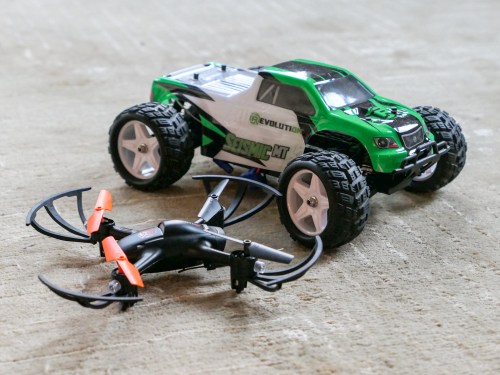
If you’re planning on figuring out your kid’s new RC vehicles and drones right after “Thank you, Daddy!” you may be delirious from all of your shopping. Here’s what you should do instead…

Do you know how to use the tech toys you’re giving your children this year? If you think you’re just going to wing it on the big day, I’ve got a report to share from the front lines of parenting…

It doesn’t matter how technically savvy you think you are. I’ve got a third grader, and let me tell you, his tech is already getting complicated for me.

And even if the toys aren’t that complex to operate, misuse could actually get a little dangerous (if you’re to believe the instructions).

Parenting Tech Tip:
So, do yourself a favor and block some personal time to first teach yourself how the toys actually work. Does that mean you’ve got to unbox each item, play with it and then re-box it?

That’s absolutely right.

Let me share a couple of my own experiences…

New RC Vehicle for My 8 Year Old
This year, I bought another radio controlled car for my boy:

I picked it up our local hobby store… Horizon Hobby.
(How quaint, right?)

I unboxed the mini monster and took a peek at its instruction booklet.
(How hard could it be to operate another RC vehicle?)

Well, it may not be difficult to use, but apparently it’s easy to operate incorrectly. Here are some of the warnings that jumped off of the page…

  • Charge for 9 hours
  • Do not charge overnight
  • Do not leave unattended while charging
  • Do not charge battery in the chassis or battery will overheat
  • Do not lick any parts or death may result
  • Do not run the car slowly or else it will overheat.
    (Must operate as speedily as possible?)

Are they serious?
(All of this reminds me of the old Saturday Night Live sketch…
“Happy Fun Ball.”)

I signed off on what seemed like twenty pages of disclaimers and took the Seismic out for a quick spin…
Whoa!
It is fast… much better suited for outdoor operation in our driveway.

And yes, I’ll pay attention to how its battery is charged, although I’m not going to stare at it for nine hours.

More Drone Flying Lessons
This year, it was time to buy another starter drone for my eight year old.

Three years ago, I purchased this starter quadcopter:

The Inductrix is really tiny, and I had hoped it would be simple enough for my boy to learn with. But when I first tried it out myself, I found it difficult to control and couldn’t keep it hovering in one place.
(I should admit I’d never tried flying a drone before.)

As a result, I actually delayed giving the Inductrix to my young Padawan.

When he finally tried it out last year, he immediately demonstrated decent piloting competencies.
(Must be due to all of that flying he does in Minecraft creative mode on our iPad)

Still, the micro drone would inevitably crash into a wall or the ceiling. My boy loved the Inductrix, but it could only take so many impacts in our family room before one of the propellers stopped working…

Yes, I took it in for repair, but when another propeller stalled, I decided to look for a more durable model that was easier to control…

This year, I went with another Horizon Hobby model…

This quadcopter is bigger than the Inductrix, and it also sports an onboard camera. While the photo and video capability is cool, I’m not at all interested in that… yet.
(Remember, I’m just looking to keep the darn thing in the air!)

So, late one night… I quietly unboxed the Vizo and charged up the battery.
(Yes, the instructions contained battery warnings too.)

And guess what…?
This one is much easier to use…

It’s more stable while airborne and also comes with auto take-off and landing modes.

Essentially… you press a button, and the drone takes off and hovers a foot off the ground. You fly it from there. Similarly, when you want to land… you position the drone just above the floor and press the ‘land’ button. The drone descends slowly and the blades stop turning after touch down.
(It’s a real game-changer.)

I’m sure purists would say that this auto feature masks the heavy lifting of really figuring out how a quadcopter operates, but I’m okay with a little ‘help’ at this stage of the learning curve.

My Inner Child
I’m not sure what it says when I’m gifting my son toys that I can’t operate without some training. I’m sure some would say it has nothing to do with me, and that he should simply figure it out for himself.
(It’s the gift of building self-reliance.)

But what fun is that when we’re playing together?
So again, is this really more about him… or me?

That’s a deep question for another time…

Batteries Not Included
Suffice it to say, this daddy needed to secretly take some driving and flying training to ensure that he was ready to help his son enjoy his new tech toys this year.
(I highly recommend the prep.)

Just another way that as a parent… you’ve got to keep up.

And yes, there are, in fact, instruction manuals.

Should Kids Watch Netflix’s New ‘Lost in Space’ Series?

I still have my toy ‘Robot’ from the original “Lost in Space.” So, you can imagine how excited I feel about Netflix reimagining the series. The big question I’ve tried to figure out is whether my second grader is old enough to watch it with me. If you’re a parent with similar concerns, here’s my take…

I’ve been searching for a family-friendly TV series to watch with my second grader. So when Netflix’s new “Lost in Space” series premiered, I rushed to check it out. Not only because I’m a sci-fi geek who wanted to see how the creators had reimagined this version, but because I was hoping that this could be the new show for me and my boy.

I quickly streamed the full 10-episode season on my own, and it’s the closest I’ve ever come to binge watching.
(Each episode’s cliffhanger certainly contributed.)

Here’s one parent’s point of view…

The New Robinson Family
For those who know the original “Lost in Space” (1965-1968), the basics of the story are mostly the same… The Robinsons are trying to get to Alpha Centauri on their trusty spaceship, the Jupiter 2. They want to start a new life on an off-world colony, because the Earth is becoming uninhabitable. And they run into a whole universe of trouble on their trip… beginning with crash landing on an alien planet.


The major characters have all been brought back with two evolutionary updates…

The mom – Maureen Robinson, played by Molly Parker is essentially the family leader, because the dad – John Robinson, played by Toby Stephens has been out of the picture for a while (more on this in a moment).

Dr. Smith is now a woman, played by Parker Posey. And her dishonest, delusional and rather creepy character is played much closer to how Jonathan Harris did it in the first few episodes of the original series.

Which is to say, Dr. Smith is not at all silly.

This is Not Your Father’s Silly “Lost In Space”
In fact, there’s nothing silly about this “Lost in Space.” Nothing at all like the campy style of the original. This one is quite serious as the journey unfolds.

It’s not as dramatic a reimagining as “Battlestar Gallactica,” but this show certainly reflects some of those influences. The good news is this “Lost in Space” has an optimistic view on its universe, however flawed it has been set up to be…

The better news is at its core… “Lost in Space” is good,-old-fashioned ‘wholesome’ adventure. It has lots of thrills and great special effects with a seemingly limitless number of challenges that this family Robinson must figure out to survive.
(It even retains the original’s upbeat music by John Williams.)

“Lost in Space” has Grown Up
As with any action-packed sci-fi series, these episodes are a little ‘intense.’ Is this PG-TV rated show too aggressive for your younger crowd? I think that depends on how comfortable they are with what they’ve already been exposed to…

My son has seen the original “Star Wars” movies, but not the more violent crop of recent Jedi flicks.

He’s happily watched the first three episodes of “Lost in Space” with me, and he’s eager for more. That said, he woke up recently in the middle of the night with a bad dream after consuming the scarier moments from episode 3.
(Spoiler alert: Icky alien eels invade the fuel tanks and the ship.)

The biggest problem I’ve found is the writers saw fit to throw some salty language into a few of the episodes. Language I would prefer my boy not repeat. The worst offending moment comes about 14 minutes into episode 9 inside a cave, where Penny, played by Mina Sundwall uses the ‘S’ word to punctuate a major plot point. It’s actually pretty funny and entirely in line with her character’s comic timing. But that’s not really family-friendly script writing.
(At least it wasn’t as gratuitous as when the writers of “Star Trek: Discovery” decided to drop the F-Bomb for no good reason.)

Danger, Will Robinson!
Fortunately, there’s not a lot of violence in this “Lost in Space,” though there is an ongoing threat of violence and a whole lot of peril. Each of the Robinson characters face huge gauntlets where they need to step up.

The one brief exception on the violence issue surrounds the ‘Robot,’ played by Brian Steele under all of that metal. I don’t want to give too much away, so I’ll just say this character has different origins than the original Robot. And just by looking at its menacing exoskeleton, you’ll get a sense of the ‘danger’ it may pose.

Let’s just say that the Robot struggles with its core programming. Its journey to ‘do the right thing’ is an easily digestible morality lesson for kids. And the original series’ character connection between Will Robinson, played by Maxwell Jenkins and the Robot is completely maintained here.


What 8 year old wouldn’t be interested in a story about an 11-year-old boy and his own robot?

Of course, my son was immediately drawn to the character of the Robot.

Your Contribution Towards Family-Friendly TV
The story arc of the Robot is in many ways the simplest for kids to handle. Much of the rest of the series deals with more complex ‘human’ issues that you may need to deconstruct and talk through with your kids.

First off, this Robinson family barely starts out as a functioning unit. John Robinson had been away for three years on assignment in the military and that separation had lead John and Maureen to the point of official separation. So they’ve got some marital difficulties to work through.

Be prepared to talk about Dr. Smith and why she’s entirely untrustworthy, even pathologic… though she sometimes puts on a good face.

All of the actors do a nice job making the Robinsons a likable family. You absolutely root for them… even Don West, played by Ignacio Serricchio who eventually becomes a permanent house guest. He pretends to be a selfish rogue, but of course he has a heart of gold.

But just so you know, there are other human characters roaming about who fall into much grayer categories (another opportunity to talk it through with your kids).

The writing uses a number of flashback scenes, (à la “Lost”). So you may need to call out that storytelling device a few times.

The Women on the Jupiter 2
I should also mention that this series is not just for ‘boys.’ In fact, In many ways, this show is more about the female characters. And they’re written with more complexity…

Maureen Robinson is the main hero, but she’s had to make some questionable decisions along the way. Dr. Smith is the villain, but everything she does isn’t entirely premeditated or self-serving… Or is it? The rivalry between Maureen and Dr. Smith is a compelling, ongoing plot element.

And Judy Robinson, played by Taylor Russell is the clever MacGyver of the family.

Simply said, the women of this Jupiter 2 can easily take care of themselves.

Do Your Homework
Do you need to watch the episodes first to make sure you know what your kids are in for?
I did. And it was a good choice for my family.

I recommend you check out the first 2 episodes on your own. You can make a good decision for your family from there.
(Just be on the lookout in episode 9 for that word so you can fast forward past it, as I’m planning on doing.)

This Geeky Dad and his Boy are Enjoying the Journey to Alpha Centauri
I think the best reason kids should watch this series is it demonstrates how nothing is impossible. Over and over again, the Robinsons figure it out and get it done. As a plot device, that can get a little tedious for some adults (not me), but it’s perfect for kids.

If you haven’t figured it out yet, I really like this new and gritty “Lost in Space.” And I predict my boy will continue to enjoy it.

There’s danger at every turn, but once your kids get the sense that the Robinsons are going to make it through, they’ll probably be able to sit back and enjoy the ride.

Of course, the last word uttered at the end of the final episode of season one is…
(I’m not giving anything away.)

“Danger.”

Ultimately, for me… the new “Lost in Space” hits the sweet spot for uplifting
sci-fi family TV watching.

Don’t Ask My Mommy. Ask Google.

How are you supposed to survive in a computerized world? If you’re a seven year old, ask a computer… of course! If this gives you a little agita as an adult human being in the real world, you might want to read on…

So, my wife and I were visiting another family’s house to pick up our seven-year-old son from his play date the other day. The adults were chatting a bit before the handover as the kids wrapped up their activity, which happened to be playing Minecraft, a popular videogame where you create your own worlds.

Then I noticed the kids ran into some kind of challenge in the game, and this is what I overheard…

Human child #1:
“How do you build the portal to the End in Minecraft?”

Human child #2:
“I don’t think my mommy knows how to do that…”

Human child #1:
“Don’t ask my mommy. Ask Google Home. Maybe… Siri.”
(They didn’t have an Alexa in this particular home. But I don’t want to leave Amazon out of the conversation.)

A.I. Always has an Answer
All right. Let’s pause right there to discuss the significance of this interchange. A couple of seven-year old-boys have decided to bypass their parents (moms) and go right to today’s A.I. to solve their problem.

Hey, it’s not like I don’t Google questions all of the time at my computer, but I was a little shocked at how flesh and blood parents were suddenly and completely eliminated from the equation.

Now granted, in this particular situation, these adults wouldn’t have known how to get to the ‘End.’ So, you’ve got to give the kids some points for their instincts.
(That night, after Googling ‘the End,’ I learned that it’s the third and final dimension in Minecraft.)

Okay… the kids were trying to figure out a shortcut to the end of the game.
(Is that cheating? Or is it simply being innovative… like beating the Kobayashi Maru test?)

Anyway…

Google Home couldn’t articulate a useful answer, but the young hackers-in-training got some traction with Siri on the resident iPad. Siri opened up a wikiHow page for them, which held some key details.

Apparently, getting to the End requires you first to go to the Nether.
(I have no idea what I’m talking about.)

The Lesson of the Journey
Guess what… their little online research project worked! The wikiHow page contained instructions on how to build a portal to the Nether, which the kids promptly executed.

I heard… “OMG… we’re going to the End! This is so great!!”

For the record, their progress halted at the Nether. The map to the End remained out of reach. But my son was super excited by the prospect that they were moving in the right direction.
(He really loves exploring this vast digital world. He also enjoys reading Minecraft adventures in physical books and looking through how-to-build Minecraft books.)

Discounted Daddy
To be honest, I felt a little schadenfreude to observe their quest for the End not end in total success.

Because as a parent of a seven year old, I thought Daddy was still perceived as all knowing. Did you notice that neither boy even mentioned his father during the tech query?

No… I didn’t have the answer. And I don’t think the other daddy would have had it either… without Googling a bit.
(That said, he’s very much at home with his tech.)

And no… this is not a gender thing about why the kids bypassed their daddies.
It’s a species thing about why the human adults were circumvented to quickly get to preferred artificial intelligence.

And that seven year olds already expects today’s A.I. to be able to correctly answer any question.

What’s the Truth?
Okay, Daddy…
I suddenly realize this is going to require some immediate focus as a parent.

Because even though yes… there’s an answer to any question you pose to a search engine, there’s actually a thousand answers, if not more.

As an adult, it’s your job to figure out the ‘truth’ on any number of topics.
(And that’s harder today than ever.)

And that’s going to remain an ongoing challenge for every human for the foreseeable future.

For an elementary school-aged child who can now simply project a question into a room, and an A.I. enabled speaker immediately responds, that’s a resource that really needs some adult-level perspective.

Otherwise we won’t have to wait until advanced artificial intelligence or the singularity arrives for humans to hand over all of the keys to knowledge and independent understanding.

Wow.
I’ve got some work to do.

Daddy (human) is on it.