At Home with Tech

Unlock the power of all your technology and learn how to master your photography, computers and smartphone.

Tag: Star Trek

Upgrading the Chandelier from Hell

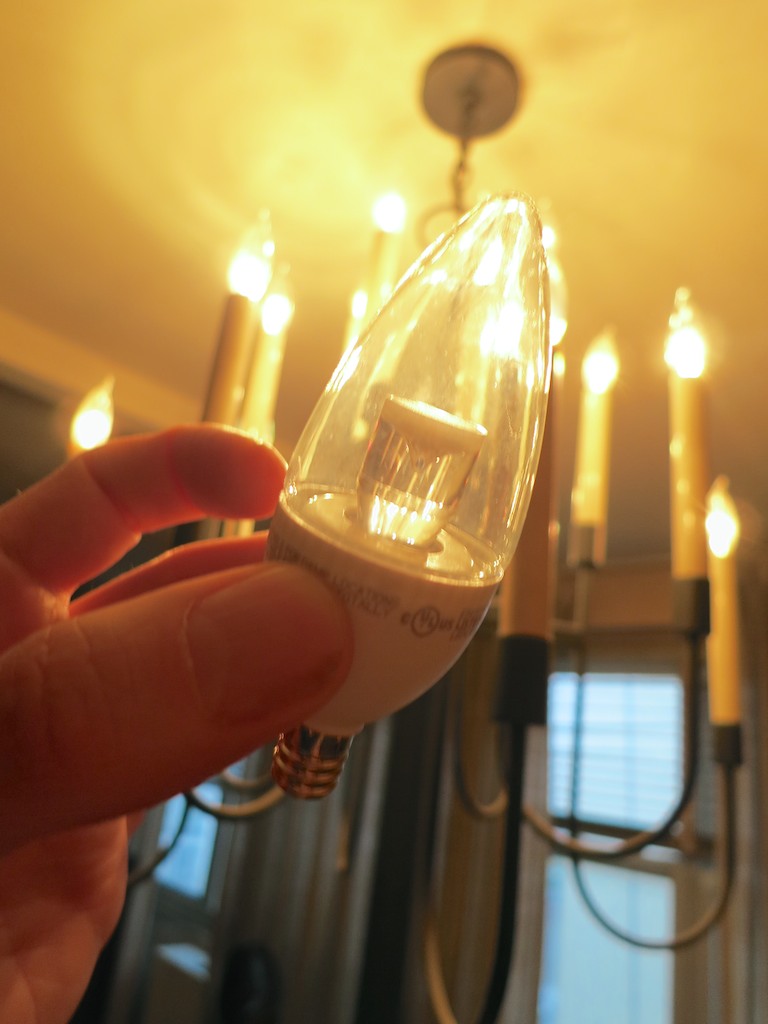
One of these bulbs is not like the other. One of these bulbs just doesn’t belong… The good news is my father’s fifty-year-old chandelier has just entered the 21st century… invigorated with LED bulb tech.

One of these bulbs is not like the other. One of these bulbs just doesn’t belong… The good news is my father’s fifty-year-old chandelier has just entered the 21st century… invigorated with LED bulb tech.

For 50 years, the chandelier in my father’s dining room has been chewing up light bulbs. Year after year… Decade after decade…
It’s like the Guardian of Forever on “Star Trek.” Sitting there… as time streams about it, causing its fourteen bulbs to randomly fizzle.

Poof!
As a boy, I always felt like a day wouldn’t go by when one of these old school incandescent bulbs blew out.

In the chandelier’s early years, my parents happily fed it with a fresh supply of tiny candelabra bulbs. But recently, I’ve taken over the responsibility to maintain this relic.

My dad is quick to whip out his cell phone and call me every time one of the little 15-watt flames burns out…!
(Not that I mind coming by for dinner after I screw in a light bulb or two for him… He’s not quite nimble enough at 82 to climb the stepladder to reach the chandelier.)

And this is not the only electronic antique still hard at work in his apartment…
For example, the Sony cassette player from his ancient sound system was just fixed for the billionth time. Actually, the repair shop gave him a new ‘used’ unit instead of attempting to rebuild the old monster.
(Why a repair shop had a working cassette player hanging around is beyond me. But I digress…)

Time to Upgrade
I’d say over the last half century, the Lester family has literally screwed in over 2,600 bulbs into this freaking chandelier.
(That’s an average of one bulb a week for fifty years.)
Last week, I finally decided I’ve had enough…

It was time to make a change and find a more permanent lighting solution for the dining room.

The fix?
Upgrade to LED bulbs!
You know I have a soft spot for shiny LED tech.
(Plus, these bulbs last for years…)

Unfortunately, as I started to shop around on Amazon, I realized there wasn’t a lot of choice out there for this kind of replacement bulb. Though frustratingly fragile, little candelabra incandescent bulbs with their tiny bases are actually quite elegant. Their simplicity is difficult to replicate with the additional guts baked into the LED structure.

The closest I found in form factor was GE’s Energy Smart Bent Tip LED.
But this handsome replacement costs $15.21 per bulb!

That’s a huge jump in price from the standard GE incandescent 12 pack we’ve been buying. The short-lived beasties are easy to forgive when they net out at just over a buck a bulb.

As I pondered the value proposition of an expensive LED bulb replacement program, I thought I heard the evil song of the ‘incandescent bulb sirens.’ It gently compelled me to continue throwing dollar bills at our chandelier from hell.

But I remained undeterred in my mission…

An Eighteen-Year Fix
I eventually came upon this more affordable LED solution:

The TCP 3 watt non-dimmable bulb
It’s $11.99 for a six-pack.
We’re talking two bucks a bulb.
That’s still a big jump in price compared to Thomas Edison tech.
But it’s a ‘permanent’ fix.
(These LEDs are rated for an eighteen-year life span. When my father hits 100, I’ll buy him more bulbs for his birthday!)

Click.

Problem solved, right?

Not quite…

The Show is About to Begin
This particular LED’s form factor is different from the its incandescent cousin:

  • It doesn’t have a matching bent tip.
  • It’s built with a stubby, white base.
  • And it doesn’t dim.
    (Which isn’t a problem for my dad’s on/off chandelier)

So these TCP LEDs don’t really match the old bulbs…
…At all!!

After I considered the obvious discrepancy, I had a solution…

I decided to simply ignore the problem and rationalize it as a transitionary limitation! One day soon, my replacement program will be complete, and uniformity will be restored throughout the chandelier.

One remaining question:
Would my father actually buy into my evil plan to fuse LED tech onto his 1965 chandelier?
(No, I didn’t tell him I was about to create a ‘Franken-Lamp!’)

Fast forward to the moment of truth as I screwed in the first LED bulb…

It’s Alive!
I stepped back and looked at the ugly duckling.
Its light quality matched the others.
But who was I kidding…? It still stuck out.

The Ugly Duckling LED


Oooh… maybe this wasn’t such a good idea after all.

I turned to my father.
He looked up.
I listened for a response…

“Good. Let’s get some dinner.”
And then he walked away to get his coat…

Did I mention my dad’s vision isn’t quite 20/20 anymore?

Hey… he’s happy.
I’m happy.
The planet is happy. (We’re saving energy with LEDs.)

Our Guardian of Forever is set to shine bright through 2033…

Problem solved.

Does Your High Speed Internet Plan Need a Little Boost?

Those blinking lights on your broadband modem are a soothing reminder your home Internet service is up and running. Whether you’ve got enough bandwidth to handle your family’s needs is another question entirely!

Those blinking lights on your broadband modem are a soothing reminder your home Internet service is up and running. Whether you’ve got enough bandwidth to handle your family’s needs is another question entirely!

SCENE 1:
Fade up from black to a moving star field.
In the distance, we see the ship.
Dissolve to a wide shot of the bridge.
The door whisks open.

Captain Barrett walks in.
He does a quick survey.
All the glowing lights seem to be blinking correctly.
He sits down in the captain’s chair and…

Stop!!!

This is the kind of daydreaming that happens when you’re counting the days until you can finally get to see Star Trek Into Darkness.

Let’s try this again…

I walk into my home office, pet my cat Filbert, who’s always waiting for me, and then sit down in my black swivel chair from IKEA.

Boot up my trusty iMac.
Look at my Optimum Online broadband modem.
Everything seems fine.
I begin happily typing away.

They say ignorance is bliss…

We Need More Dilithium Crystals!
My wife enters our office and walks up behind me.
I sense a disturbance in the Force.
(oops, wrong universe)
(but with J.J. Abrams at the helm of both franchises, does that really matter anymore?)

My Jedi Master speaks.
(Actually, Yoga)
“Hey, how fast is our Internet connection?”

I look up.
(I should know the answer.)

“I’m not really sure. But it seems to be working okay, right?”
(inferior response)

“The IT guy at work says we need at least 30 Mbps download speed.”
(megabits per second)

My wife’s job sometimes requires her to use powerful web publishing tools early in the morning or late at night from home.
So our Internet bandwidth download speeds have to be beefy enough for her software to work.

So I quickly go to speedtest.net to double check.

It’s clocks in at only 18 Mbps.

Red Alert!!

The IT guy is in the doghouse.
(and I’m not talking about the friendly IT expert at work!)

Upgrading Optimum Online
So I call Cablevision’s Optimum Online tech support to complain about our obviously slow Internet connection.

My complaint is short lived, because I quickly find out our current Internet plan is only designed to provide a download speed of 15 Mbps.

Cablevision was actually exceeding its service level commitment.
Shame on them!

So now what?

Was there a higher level of service I could buy?
(of course)

It’s Optimum Online Boost Plus, and for $14.95 more a month, you get up to 50 Mbps for downloads.
And the upload speed improves from 2 Mbps to 8 Mbps.
(Upload speeds are always designed to be slower.)

This tier also comes with web hosting features and additional mailboxes, but for now, the pure, raw speed was all I cared about.

So I gave the order and made it so.
(translation: I upgraded to the new Warp Factor 8 plan.)

Problem solved?
Yes…
Though I have to admit, I was cranky to be shelling out even more to Cablevision as a triple play customer.
(TV, Internet and phone)

The Internet piece alone was $49.95/month.
(with $5 multi-product discount)
(New customers get the first year for $29.95.)

Now, I’m dropping $65/month for my faster Internet connection.

I’ll remind myself that’s the price of a cup of coffee a day and move on…
(and who doesn’t need their cup of Joe?!)

One Size Doesn’t Fit All
So I had restored my family’s tech harmony, but my Optimum upgrade got me thinking about my family’s growing Internet needs…

Once upon a time, one broadband plan was enough…set it and forget it.
15 Mbps?
Sounded good to me.
I thought we were covered.
And I never thought of us as heavy data users…

  • Stream a movie on Apple TV
  • Maybe a little Netflix on my Roku box
  • Some Bob the Builder cartoons on my laptop in the mornings for my three- year-old on Hulu Plus

But the explosion of streaming, online gaming, and social media for all of us has created an ever-growing demand on the broadband pipe.

The Internet Innovation Alliance, a coalition of business and non-profit organizations, has put together a fun little video the kids might enjoy that demonstrates this Internet data explosion.

The Relative Size of Internet Data

So you can see how it makes sense that high speed Internet service tiering would necessarily evolve to keep pace.

Have I Got a Deal for You!
The good news is every service provider is ready to sell you higher data speeds at home to accommodate your growing bandwidth needs.

  • Comcast’s Xfinity Internet service gives you up to 20 Mbps
    Their upgraded Extreme 50 service offers you up to 50 Mbps
  • Time Warner Cable has a whopping six Internet plans ranging from an itty-bitty 1 Mbps to their ‘Ultimate’ plan with 50Mbps
  • Then, there’s AT&T’s High Speed DSL(Digital Subscriber Line)
    Their U-verse High Speed Internet has 5 plans ranging from 3-24 Mbps.
  • Verizon’s Fiber FiOS plans range from
    15 Mbps to 300 Mbps download (Quantum)
    (and 5-65 Mbps upload!)
    That’s crazy fast!
    (and expensive…over $200/month!)
  • And not to be totally outdone, Cablevision has it’s own ‘Uber’ plan:
    Optimum Online Ultra
    Up to 101 Mbps

How Much Bandwidth Do You Really Need?
So how much speed is fast enough?
The bad news is there is no simple answer.

It’s all about what you’re doing online and then doing the math.

  • Apple TV – 8 Mbps for a 1080p HD movie stream
  • Netflix – 5 Mbps for 720p HD viewing
    and 7 Mbps for their ‘Super HD quality’ (1080p)
  • Hulu Plus – 3 Mbps for HD viewing
    (Basic Hulu doesn’t offer HD)
  • Skype Video- 1.5Mbps

It starts to add up pretty quickly!

Is 15 Mbps Enough?
You’re probably saying to yourself, “I can only do so much damage on my own!”
So 15 Mbps should cover it, right?

That’s true if you’re the only one online.

Families quickly turn the equation upside down, because the real data drain occurs when the usage is ‘cumulative.’

Ask Big Brother
Our government happens to agree with this simple logic.
Yes, believe it or not, the United States of America has an official opinion about all of this!
Keeping up with the times, The FCC has published its own
Broadband Service Consumer’s Guide.

Here are a few of its key points:

  • 1-2 Mbps is enough for email, web surfing and basic streaming video
    (whatever ‘basic’ streaming means)
  • 6-15 Mbps is enough to add either HD streaming, video conferencing, or online gaming
  • More than 15 Mbps is needed if you go with two of the above three data hungry activities
  • Basic web browsing doesn’t improve much after 10Mbps

Fascinating
So it all boils down to this:

  • If you’re on your own, 15 Mbps will probably cover you.
  • If you’ve got company at home, simultaneously sucking from your broadband spigot, it’s time to upgrade!

Or shall we say, you’ll need a little ‘boost.’

You may continue to dream about the day you’ll cut your cable cord, but your high speed Internet is already securely hardwired into your life.

It’s not going anywhere…

Resistance is futile.

Five Tips to Rescue your Best Summer Family Photos

Your family vacation is over. Now, you’ve got hundreds of photos to organize after you track in sand to your bedroom. Still feeling relaxed? Don’t burst your vacation bubble. It’s time to rescue your best photo memories!

Remember the Star Trek episode titled “The Trouble with Tribbles” where those cute furballs kept replicating like rabbits? Everyone loved them, but those darn tribbles quickly clogged up the Enterprise. At the end of the episode, the tribbles find their way into a poisoned storage bin of quadrotriticale (grain) destined for a hungry human colony. All the tribbles have a big feast and then get a huge stomach ache. (A lot of them actually starve surrounded by all that food, but I guess the AHA wasn’t on the set that day.)

What does this have to do with your digital photo collection from your summer fun?

Here’s today’s cautionary warning:
You too can starve with a computer full of amazing family photos.

The Quadrotriticale Paradox
We all want to share our best vacation moments with family and friends. But I’ve discovered an ironic phenomenon, which I’ll coin the
“Quadrotriticale Paradox.”

It suggests the more vacation pictures you bring home that clog up your computer, the smaller the chance you’ll actually share your best photos.
There is a clear inverse probability.

I just got back from a weeklong family beach vacation.
And I’ve been known to snap a photo or two. This time, it was more like 522.
We shared a beach house with another family. And they had their own ‘photoholic’ who took really great pictures. At the end of the trip, we swapped our respective photos through Dropbox.

Now, I was blessed with 692 photos!
That’s a whole lot of tribbles to manage, even for me.

Where do you start?
Well, many folks just upload their snapshots someplace where people can take a look.

I often watch with envy as some of my friends regularly share their photos on Facebook and other social platforms.
But, honestly, some of the photos seem a little half-baked. Not quite ready for prime time.

But who really cares?!
They’re not submitting their photos to an amateur photo competition.
My friends are successfully sharing their lives in the moment.
That’s the only point, and they’re getting the job done!

But if you’re a photoholic like me, you can’t do that.
Nobody wants to look at hundreds of your vacation photos (especially my dad).

And what about your best photos… your little magic gems?
You know, the ones where people say, “Wow, how did you get that?!”

The Curse of the DSLR
Capturing magic shots of your toddler requires the fine art of snapping away and waiting to get lucky. This is especially true using a DSLR. But you’re inevitably creating an excess of mediocre shots in search of the perfect photo.

So maybe you get fifty gems (not a bad catch).
But they’re all buried under hundreds of inferior versions.

Now what?

Tip #1 – You Must Sift through all your Photos to Find the Gems

There’s No Magic Bullet
You have to go through each photo to choose the best ones. Sorry.
I use a numbering system. 1 through 5.
Both iPhoto and Apple’s Aperture allow you to do this.

Here are my rating rules-

1- Total failure. Give it an immediate appointment with the trash bin.
2- Really bad photo. Trash it unless it’s the only shot of something special.
3- Just okay. Decide whether to trash it another time.
4- Good photo, but there’s a better version of it.
5- The better version or simply a great picture.

Once I’m done with this evaluation, I adjust the photo album to display in an ascending order based on the ratings I’ve just assigned the pictures.

Then, I review the 2’s again just to make sure I wasn’t too harsh before I delete them. Sometimes a few of them get a reprieve and get bumped up to a 3.

Then I move the 1’s and 2’s into the trash, and DELETE!
Your worst photos are now gone forever.
Now it’s time to focus on the pictures you want to show off.
And those are your 5’s.

Tip #2 – You Can’t Share Your Photos if You Lose Them

Preparing for the End of the Mayan Calendar
I occasionally take the 5’s and put them in a folder called “Best of 2012.” That folder is what I use for my end of year photo books as well as my “end of world” photo back-up strategy.

Sure, I’ve got Time Machine on an external Lacie hard drive for my iMac. But when you’re on vacation, does anyone else have nightmares about coming home to some disaster?

So to start my vacation with peace of mind on the photo archiving front, I do a second back up of all the 5’s to another portable hard drive, which I then pop into a small SentrySafe firebox.

I’m not sure if that will protect against an invasion of angry mutant tribbles.
But I always sleep a little sounder my first night away on vacation.
Don’t judge.

Tip #3 – Share Your Photos Quickly

Your Family Photos have an Expiration Date
I’ve learned a painful lesson capturing photos of my toddler over the past two years. Children grow up fast. No one is interested in last month’s photo. They want to see what he did yesterday!

Case in point…

On the Monday after I returned from vacation, I hadn’t yet had time to take the hour needed to do the prep I describe above.
All I could do was quickly choose three pictures that jumped out and print them to show off at the office. (Colleagues want to see!) I figured a few hard copies should cover it. I also downloaded the complete mass (mess) to my iPhone as part of my normal data syncing process.

So I almost got through the day…
But before I headed home, I went to get a haircut.
(I had gotten a little shaggy over vacation.)

As soon as I mentioned the beach trip to my hair stylist, she immediately demanded to see pictures. I warily pulled out my iPhone and flipped to the middle of the 692 where I knew there were a few good shots back to back. I thumbed through them and swiftly made my move to put my iPhone away, hoping I had satisfied her.

Not quite.

Instead, she took the phone out of my hand and kept flipping through what seemed like hundreds of number 3 photos. I was mortified.
These photos weren’t supposed to be seen! They were 3’s!!
Holy frak… that one was a 2!! Stop!!!
Time crawled to a halt.

Finally, she had her fill, and handed back my phone.
She was beaming. “You have such a beautiful family,” she said.
And my haircut continued. Perhaps I had overreacted.

But I decided I wasn’t going to get cornered unprepared again.

Tip #4 – Perfection of Process is Overrated

Throw Out the Handbook
Sometimes, when time is working against you, you’ve got to just get it done.
That means forget about Tip #1.

So that night, still without the requisite hour to whip my photos into shape, I quickly browsed again, found ten more photos, threw them into a folder, and synced them to my iPhone with the original three I had printed out.

The next day, I got pressed twice to give up the goods, but now I was ready. Having the hastily prepped photos ready to display on my iPhone was all it took to satisfy my paparazzi.

The lucky thirteen weren’t necessarily the best of my 692.
But in the moment, they did the job.

I suddenly feel the urge to offer a relevant quote from a movie-
“Fate rarely calls upon us at a moment of our choosing.”
(Transformers: Revenge of the Fallen)

You’re welcome.

I know I’m not saving the universe here, but in my little world…
Mission accomplished!

Tip #5 – Finish the Job and Tame the Beast

Show off your Photo Bling
After the firestorm of immediacy subsides, you may return to your regularly scheduled programming.
(And don’t forget to quickly share the baker’s dozen online or via email.)

So you’ve got your all your 5’s.
Time to buff out the gems to perfection. (color balance, brightness, crop, etc.)
This will take some time. But it’s worth it, because these are the pictures you’ll print and distribute, and use to create your photo books.

Remember, don’t wait too long to share or suffer the consequences of an indifferent audience.

The other downside to delaying this part of your photo organization is you’ll eventually develop such a backlog of pictures you’ll never catch up.
You’re always taking new shots, and the wild of your disorganized photo jungle will continue its creep!

Over the course of time, you’re easily managing many thousands of pictures.
It’s a beast that needs to be kept under control.

Or else.

Now go tame your jungle and hunt down your best summer pictures!

And if you come across a wild tribble or discover a way to stretch the fabric of time, please let me know!