At Home with Tech

Unlock the power of all your technology and learn how to master your photography, computers and smartphone.

Are You Wasting Money Buying Multipack Ink for Your Printer?

The secret weapon against the evil ink conspiracy is supposed to be ‘buying in bulk’ with ink-cartridge multipacks. But there’s a problem with this purchasing strategy…

The secret weapon against the evil ink conspiracy is supposed to be ‘buying in bulk’ with ink-cartridge multipacks. But there’s a problem with this purchasing strategy…

We all know the major cost to owning a home photo printer is the sickening price of those darned ink cartridges. And when you’ve got five different colors to keep track of and replace, (Cyan, Light Cyan, Magenta, Light Magenta and Yellow on my Epson Artisan) you’re almost always about to replace at least one them.
(Different colors deplete at different rates.)

One way you’re supposed to save money when replenishing your ink supplies is to buy the multipacks instead of getting each ink cartridge a la carte…

Here’s the pricing on Epson’s website:

  • The 5-cartridge color ‘high-capacity’ multi-pack costs $79.49 ($15.98 each)
  • The 6-cartridge color and black combo-pack costs $94.09 ($15.68 each)
  • The individual cost for one of these ink cartridges is $17.59
    ($18.49 for black)

So, in fact you do save a few bucks on each ink cartridge if you buy as part of the multipack. But the problem is using this strategy will inevitably cause you to build up a surplus of certain colors.

Ink Imbalance
I just took a look at my ink inventory, and after three years of using my Epson Artisan 837 printer, let’s review my existing cartridge supply:

  • Cyan – 3
  • Light Cyan – 1
  • Magenta – 4
  • Light Magenta – 0 (D’oh!)
  • Yellow – 2

Okay… so it looks like magenta is my color culprit.

One big question is will these extra ink cartridges stay ‘fresh?’
(It looks like I’m not going to get through all of them for some time to come.)

Eternal Expiration?
And what if they go past their expiration dates?
(Yes, they all have “Best Before” stamped on their boxes.)

I looked at one of my Epson ink cartridge boxes… “Best before 7/15.”
(Uhhh… that’s not good.)

Does the ink turn into pumpkin sludge on the anointed date? Or is it like powdered milk, where you can allegedly go years past the expiration date?
(Is that really true?)

Epson says its printers will still take ‘expired ink cartridges,’ but results may vary…

Online, I’ve found a wide range of opinions concerning how safe it is to use expired ink cartridges.

Some report these cartridges just won’t work. Others say old ink creates color abnormalities in your photo prints. And the commentary then continues…

  • Will the ink dry up?
  • Will it clog your print head?
  • Will that damage your printer?
  • I think the logical bottom line is you shouldn’t be hoarding expired ink cartridges. At some ‘undetermined’ point, they’ll become a liability to you…

So use at your own risk…

Future Trash
And even if these extra ink cartridges do successfully survive into your distant future, another question is will you ever even use all of them?

Eventually, you’ll have to replace your printer with a newer model.
(Perhaps due to a misplaced penny)

And remember, cartridge models are always morphing over the years along with their printer masters.
(How convenient)

So if you’re always following the multipack-purchasing rule, you’re inevitably going to be left with a stash of ink cartridges you’ll have no choice but to throw away.

The Painful Truth
This leads to the simple conclusion that you shouldn’t always buy the multipack. Sure, it may seem like a deal in the moment, but you’ve got to take the long view…

You’re immediately going to begin collecting an excess of at least one of your colors that you may never use. And the cartridges may not function if you finally get to them years later.

So after your first multipack purchase, buying future multipacks isn’t really such a deal, is it?

But then again who wants to buy ink cartridges a la carte as you need them?
That’s always an expensive choice.

It seems like a lose/lose proposition.

Exactly.

“Only now at the end do you understand…”

A Little of This… A Little of That
Taking pictures these days may be free, but printing them out with your printer is going to cost you…

So what are you supposed to do?

I say you need to intentionally sprinkle in some individual cartridge buying to maintain a level inventory. That will allow you to get to your older cartridges before it’s too late.

Sure, you can pick up a multipack every so often, but not as a standard practice.

And yes, this all means you’ve now got to pay attention to the little detail of your personal ink inventory.
(Marvelous)

You’ve got to fight the evil ink conspiracy as best you can. I didn’t say it was going to be fun.

Now, please excuse me…
Apparently, I need to pony up for some Light Magenta ink.

Joy.
Is Your Smartphone Safer with the iRing or Bunker Ring?

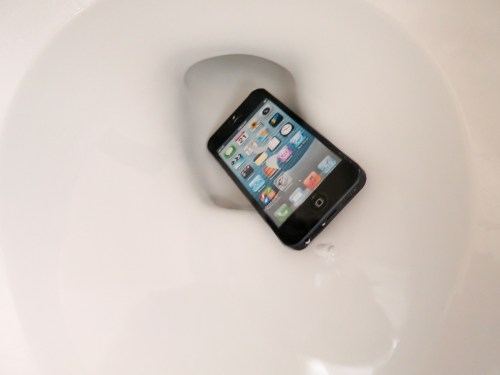
Do you worry about dropping your smartphone in the toilet? You should if you often practice a one-handed grip. If you’re also using a stick-on ring for total security, you may want to rethink your plan…

Do you worry about dropping your smartphone in the toilet? You should if you often practice a one-handed grip. If you’re also using a stick-on ring for total security, you may want to rethink your plan…

Ten months ago, I experienced a watershed moment… I attached an ‘iRing’ to the back of my iPhone 6 Plus. (Actually, my Tech 21 case.) And I immediately felt invincible. Of course, this tiny plastic square absolutely ruined the perfect sleek profile of my Apple device.

Sacrilege.

But let’s face it, these plus-sized iPhones are huge, and I must admit they’re a little difficult to handle one handed.

Now, don’t get me wrong. I love my little phablet.

But I’m the first to admit that I’m a multitasker throughout my day. I often find myself balancing my iPhone in one hand while my other hand is doing something else. Dropping my digital companion while trying to ‘one hand it’ would be something of a game-over moment.

So the ideas of attaching a ‘non-destructive’ stick-on plastic square with a ring to the back of my iPhone and then sliding my finger through the ring for extra support seemed simultaneously strange and brilliant.

So, I gave it a go…
And quite honestly, it was a game changer.
To be able to hang your iPhone from your finger…. Whoa!

Plus, you can use it as a kickstand to watch videos on a table with others.
Like…. “Hey, look at this.”
(Plop.)
(Play…)

So Weird, It’s Cool
I simply loved my iRing. Not to mention I discovered this $20 add-on became something of an unexpected fashion statement.

More than a few folks asked me,

“Hey, what’s that on the back of your phone?”

“Oh this little thing…? It’s an iRing.”

“Ooh…”

Suddenly, I’m the cutting-edge, ‘early adopter’ guy.
(When I often choose not to be)

And all I’m actually trying to do is not drop the darned thing in the toilet!

These were halcyon days.
Until….

My iRing Lost Its iPhone Connection
A couple of week’s back I was holding my iPhone using my fabulous iRing…
In no particular strange way or stressful positioning…
And my magical power circle… It… just… popped off.

What?!
(I was sitting at a table. So, my iPhone only had an inch or so to drop. I was insanely fortunate.)

It had been ten months since I first stuck the iRing to my life.
I would have thought the heralded ‘restickable’ adhesive would have lasted longer than that…

But have no fear… The iRing’s makers say you can reuse the iRing ‘hundreds’ of times.

Really?
Okay then…

So I ran the adhesive section under running water to ‘recharge’ it as per the instructions.
(No I don’t understand how that works either.)

And I pressed it back on.

Two days later, the iRing came off again.

A third attempt lasted for only 24 hours.
(By this time, I was mostly palming my iPhone to protect it from what seemed like the inevitable.)

No doubt about it – My iRing had reached the end of its useful life.
‘Cause really… If you can’t trust the ‘stick’… it’s simply a liability.

So now what?

Plenty of Other Choices
I could buy another iRing and hope to get a year out of the next one. But just the knowledge that it is doomed to fail, suggested I should try my luck elsewhere…

Actually, there are plenty of other competing smartphone ‘rings’ on the market.
Here’s a bunch I quickly found on Amazon:

Hello, Bunker Ring
As I did my research, all of these stick-on rings all started to look the same…
And maybe some of them actually were!
(Plus, you’ve got to wonder if the adhesive technology they’re all using comes from the same ‘sticky-goo’ lab.)

My brain started to feel fuzzy, and I began to loose focus on my quest to regain my grip.

Then, I happened upon another choice –

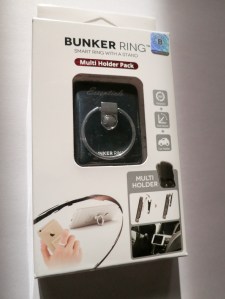
Bunker Ring in Box


Hmmm…

  • It had a solid name.
    (Not unimportant)
  • The product was supported by a professional-looking main website.
  • And it’s received better overall user reviews than the competition on Amazon.

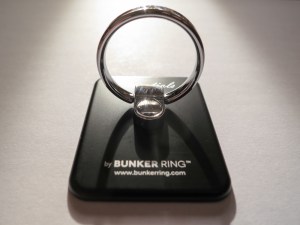
Bunker Ring Essentials


The Bunker Ring seemed like the real deal… as opposed to some reseller popping their own name on a generic unit.

That said, the Bunker Ring is more expensive than the other choices above.
(I certainly hope that means it’s got more going for it.)

A couple other details:

  • The ‘Essentials’ model is a fifth generation design.
    (Maybe the fifth time is the charm?)
  • The flat ‘super pad’ is a little larger than the iRing’s.
    (Hopefully that will give it more sticking power.)
  • The outside of the ring part is circular as opposed to having one flat edge like the iRing.

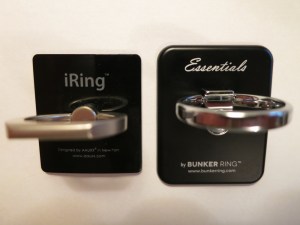
Bunker Ring Vs iRing


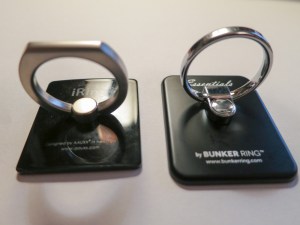
On that last point… the iRing had won out in my first search last year, partly because that one section on the outside of the ring was flat, theoretically making its ‘stand’ functionality more stable.

Meh.

Ironically the Bunker Ring is marketed on Amazon as a “kickstand,” and while I’ve used that trick a bunch of times, the one-handed ring maneuver is really what I need to perform flawlessly multiple times every day.

Déjà Vu?
After going through all of this mishegoss, I realized I had actually considered the Bunker Ring Essentials my first time around, but the iRing’s flat edge was more appealing and took the prize.
(Hey, it was ten months ago. Sometimes, I can barely remember yesterday.)

Bunker Ring Vs iRing angle shot


Maybe it was time to give the runner-up a shot…

Click.

Never Dismiss the Strength of Five Fingers
So I’m happy to report I’m again one-handing my iPhone with confidence. My Bunker Ring Essentials is firmly attached, and my hand is back in control of my huge smartphone.
(For now)

But really… who am I fooling? Do I really expect any super-stick voodoo to last forever?

Before, the iRing made me feel totally secure. I didn’t need a net…
My iRing’s failure says more about me than its chemical engineers. That I would totally entrust the safety of my iPhone to some marketing promise was silly.

Perhaps I should actually thank the iRing for its sticky failure. That experience will now force my hand to pay a little more attention when relying on the support of my Bunker Ring Essentials.

Yes, tech is there to make our lives better… but it’s rarely perfect. You should never give up total control…

Or else one day… you could find your life in the toilet.

How to Join a Conference Call without Remembering the Code

When was the last time you had to remember someone’s phone number? These days, your smartphone is used to handling all that. Right? Did you know it can also dial the complex code at the right moment when you’re joining a conference call? As long as the human ‘leader’ remembers this lesser-known step…

When was the last time you had to remember someone’s phone number? These days, your smartphone is used to handling all that. Right? Did you know it can also dial the complex code at the right moment when you’re joining a conference call? As long as the human ‘leader’ remembers this lesser-known step…

So I’ve got to first admit I didn’t know about this little trick when joining a conference call using your smartphone. I’m sure it may be an obvious point to the majority of you. I’m embarrassed to even bring it up…

But this blog is intended to be a safe space to discuss how to navigate our tech-infused world… no matter how ‘advanced’ you may or may not feel.
(Okay… there’s the disclaimer. So don’t hurl any “Duhs” at me, please.)

Okay, here goes…

The Power of Three Commas and Your Next Conference Call
Who really prefers dialing manually into a conference call when you can tap the listed number on your smartphone, and your phone dials the number for you?
(No, that’s not the trick. Come on. Wait for it…)

You’ve got to believe the entire smartphone-enabled human population is quickly losing its collective ability to memorize any phone number, because smartphones now do all of that heavy lifting for us.

Then, you’re forced to tap in the participant code.
(The password to get in)

And how easy is it to remember another set of seven or more random digits?
(I’ve often had to double check the participant code at least once while tapping the numbers.)

Recently, while joining a conference call, I stumbled across the ‘better way…’
(Thanks to someone a bit more At Home with their Tech)

After I tapped the conference call number with my index finger, my iPhone somehow grabbed and dialed the entire line, which also included the participant code.

Then, magically, my iPhone waited the perfect amount of time to offer up the code, and I seamlessly joined into my call without doing anything more.
(It was like butter…)

How did all that happen?

Was it due to some new iOS update?
No…

I looked more closely at the conference call invite and noticed three commas between the phone number and the participant code.

Was that some kind of typo?

No… that was the trick.

The three commas are what simply directed my iPhone to pause long enough and then dial the participant code.

Huh.

Okay… you can say it.

“Duh!”

Hashtag It
So the next time you set up a conference call, use the ‘three comma rule’ to speed up the day of your smartphone participants on iOS or Android.

Remember…. three commas.

Oh… and don’t forget to include the pound sign at the end of the participant code.
For all the cool kids on the block, that’s a hashtag.
As in…

#HowToSetUpAConferenceCallForDummies

This Post will Self Destruct in Ten Seconds
Okay… Now, you can take your right hand down from above your head with your index finger and thumb extended.
(I just did.)

Remember, this blog is a safe space.

But let’s not discuss this again.
Really.
Enough said…