At Home with Tech

Unlock the power of all your technology and learn how to master your photography, computers and smartphone.

Five Tech Tips to Keep Your Life in Order
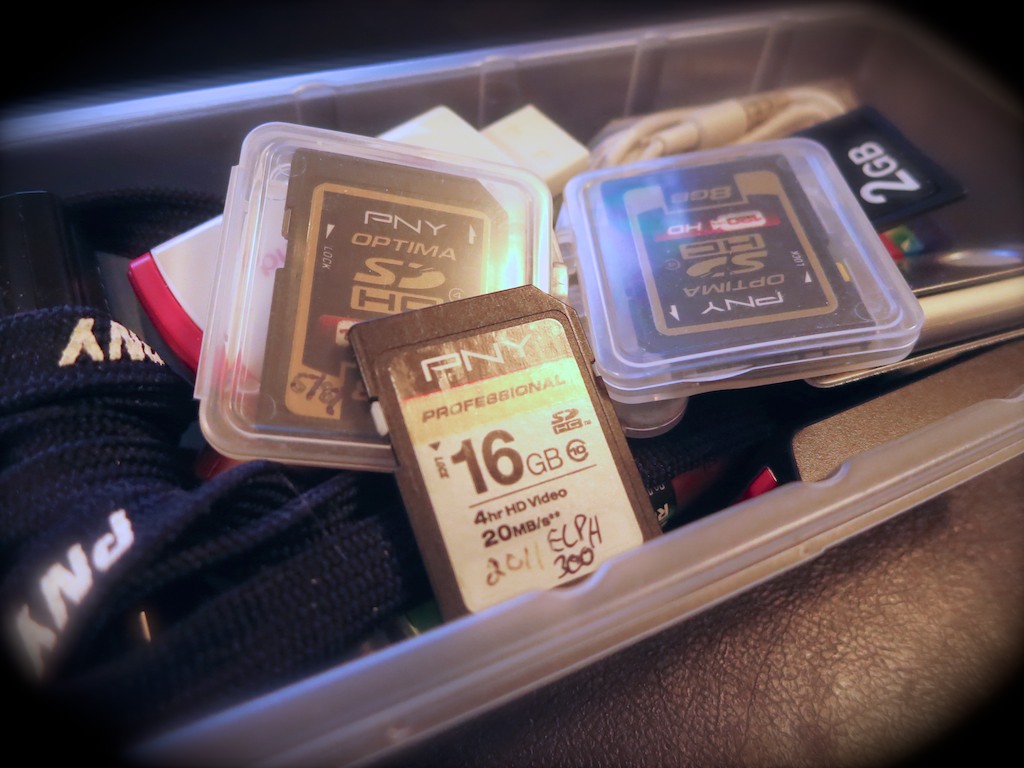
Is this mound of forgotten flash memory a sign of clutter or organization? Well, it depends on what you’ve previously done with the digital files. That’s where the battle to maintain some digital harmony in your life must be fought…

Is this mound of forgotten flash memory a sign of clutter or organization? Well, it depends on what you’ve previously done with the digital files. That’s where the battle to maintain some digital harmony in your life must be fought…

Don’t let cold spring breezes freeze your good intentions to get organized.
For many, the annual cleaning ritual is about to begin. So I propose it’s also a perfect time to tidy up some of your zeroes and ones. Just because your digital files don’t take up a lot of physical space doesn’t mean they’re not cluttering up your life!

1.
Delete Half of Your Email
Have you lost an important email recently? If so, I bet you’ve got too much hanging around.

Let’s face it… you don’t need to hold onto most of your personal email. Much of it is probably unwanted marketing messages anyway.
(Usually from companies you naively gave your email address to in the first place)

And if you’ve got thousands of unread emails stacked up, that’s also a sign it’s time to thin out your in-box.

My favorite way to keep the job manageable is to simply sort by sender, select huge email chunks, and then delete away.
Don’t be shy…
(And it feels so good!)

2.
Organize Your New Family Photo Files at Least Once a Week
There’s really only one way manage the hundreds of photos you’re likely snapping a month:

  • You’ve got to regularly go through them on your computer and organize them into content buckets.
  • And to be really effective, you’ve got to delete the mediocre pics.
    (They’re never going to get any better!)

I think rolling up your sleeves once a week should do it.
Here are a few tips on getting the task done.

3.
Buy a New SD Memory Card for Your Camera
Have you realized that SD cards have become so inexpensive?

Case in point:
On Amazon, I found this
16GB Class 10 SDHC SanDisk flash memory card for $8.10.

Originally, the magic of digital photography was the mind-blowing concept that it didn’t cost you anything to snap a photo. You’d just delete the older photos on the card and your camera could keep on going… forever.

But no matter how much memory your card’s got, it does eventually run out of space.
(Especially if you like recording videos)
Because who’s really got the time to pay attention to how many megs are left?

It takes some ongoing effort to delete the hundreds and sometimes thousands of photo and video files… unless you want to simply clear the whole card and start over.

I don’t know about you, but time is always something I need more of…

Have you ever found yourself struggling to quickly delete the old photos off your camera’s SD card right before you want to capture a priceless moment?
(It’s maddening.)

So here’s a radical concept…

  • Don’t try to keep up with your nearly filled memory card. When it’s time, just replace it.

It’s okay to buy new SD cards every so often to make sure your camera is ready for action. Sure, that’s a bit wasteful, but it’s not like having a tiny stack of old SD cards lying around is going to mess up the house.

Plus, SD cards don’t last forever. So it’s probably a good idea to recycle out the older ones every couple of years.
(You really don’t want to wait until a card with priceless photos turns into an unreadable plastic square.)

4.
Update the Software on Your Computer
Pop Quiz:
How often have you dropped what you’re doing to comply with this message on your screen: “Updates Ready to Install.”

Exactly.

Nobody wants to take the time to update your software.
But you’ve got to do it!

I’m not saying you should be the first to install an update.
(That can also lead to problems…)

But if you wish to keep your computer healthy, updated software should be part of your plan…

5.
Get Rid of Your Old VHS Tapes
If you haven’t yet converted all that old content off your dusty tapes into digital files, it can’t be that important.
VHS is dead tech. Let it all go…

Enough said.

Bonus Tip!
Remember that new piece of tech you recently bought?
Register it online now, while you still know where the receipt is!
You don’t want to lose out on the manufacturer’s warrantee…

The Endless List
If you’ve got all of these digital projects already handled, congratulations.
(You must not be the parent of young children.)

So let me throw one more task onto your ‘to do’ list.
Are you caught up on making all those photo albums you’ve been meaning to create online?

Uh huh.

Get to work…!

Create Your Own Springtime Photo Mosaic

While you wait patiently indoors for the remaining spring snow to melt, you might want to consider making a spring photo mosaic.  If you’re organized, it may only take fifteen minutes or so…

While you wait patiently indoors for the remaining spring snow to melt, you might want to consider making a spring photo mosaic. If you’re organized, it may only take fifteen minutes or so…

It’s hard to believe it’s officially springtime…
As I write this, light snow has appeared outside my window. But to be fair to Mother Nature… We’re still some time away until the local terrain typically begins to catch up with the calendar…

So I figured it might be a good time to pay homage to the season by creating my own image of springtime.

Photo Mosaic
A couple years back, I discovered the fun world of computer-generated photo mosaic software and settled on Photo Mosaic as my own tool of choice.
It goes for $30 on the Mac App Store, and though it may not be the most advanced product available, it gets the job done for a reasonable price.
(Though there are other opinions out there…)

But as I gathered up all my spring nature shots from the past decade or so in my computer, I recognized a certain unremarkable uniformity to all of them.
(After all, I’m not a professional flower photographer.)

To properly represent the burst of enthusiasm that ‘spring’ should inspire, I decided I would have to expand the photographic definition.

What Does Spring Mean to You?
The essence of spring can mean so much more than blossoming flowers.

  • It’s about new beginnings!
  • Fresh ideas
  • Origin stories
  • Developmental milestones
  • The spark of intellectual creation
  • And of course, youth

I’ve currently got a whole lot of youth around me these days. My nearly five-year-old son is blooming in any number of ways right in front of me.
He’s even developed into a little budding photographer.

So with the inspiration of ‘family,’ as well as the idea of the past as the foundation to any future, I began adding photos to my ‘spring collection.’

Inspired by Tulips
Then, I snapped the perfect picture to represent the foundation of my little photo mosaic project… My son was drawing right behind a vase of yellow tulips.
As he lifted the paper to evaluate his work, I was right there with my Canon PowerShot camera to capture the moment.

Click.

Tulips Spark Creation

I loaded this image along with my group of spring-inspired pictures into Photo Mosaic.

Then, the fun really began…

With a few more clicks on some presets and an open attitude towards a little experimentation, I quickly created three unique photo mosaics…

Tulips Spark Creation Photo Mosaic 1
Tulips Spark Creation Photo Mosaic 2

Tulips Spark Creation Photo Mosaic 3

Which one do you prefer?
(I’ll probably print out all three!)

Flowers are Everywhere, Even if You Can’t See Them…
So… Happy Spring! It may not be particularly warm yet, but as long as you remind yourself that spring is much more than the flower bud outside your window, you’ll likely end up in the right frame of mind to greet the season… when it actually shows up.

Until then you might want to have some fun creating some cool photo mosaics!

Why You Shouldn’t Buy Your Next Watch Online

Are you searching for the perfect watch to wear to work? If so, you’re going to have to look further than the timepiece images glowing from your computer screen…

Are you searching for the perfect watch to wear to work? If so, you’re going to have to look further than the timepiece images glowing from your computer screen…

I’m overdue. Months. Maybe even years… Let me just say I’ve been wanting to buy a new watch to wear to work for quite a while. But life gets busy… right?

I’ve needed a new ticker for my wrist to share the daily burden with a silver Casio I own. I’ve relied on my trusty Casio WVQ-500 since before the financial crisis. That’s longer than any of my previous Casio watches have survived.

Usually the watchband would give out, and the replacement would never be quite as good as the Casio original. Or I’d be too lazy to drive to a jeweler and replace the battery when it gave out. (Casios weren’t that expensive back then. So I’d move on to the next model…)

But my current stainless steel-banded workhorse has benefited from its solar-recharging battery. And it’s waterproof.

And it’s still going strong…

My Casio Watch

But the charm of my Casio’s cutting-edge tech from the pre-smartphone era has worn thin. I don’t need its four alarms or timers anymore. Nor must I know what time it is in 37 cities around the world.
(I’ve got my iPhone 6 Plus for all that.)

And though the ‘Wave Ceptor’ tech that keeps it synced with the time calibration signal transmitted from Fort Collins, CO is nice, it’s not perfect…
Especially on the two days a year when our clocks spring ahead or fall behind.

I used to be a wizard at understanding every which way to use the four side buttons to enable the 84 (or so) functions. But honestly, I’ve forgotten most of them, and now, it’s more than a little frustrating to get the watch to follow my most basic directions.
(Apple’s UI design is much more user-friendly.)

I’ve been wearing Casios all my adult life. Three decades later, I was finally ready for something different…
Believe it or not, what I actually wanted was a watch to simply tell me the time. No gimmicks. It didn’t have to be made for James Bond. Nor was it going to be an Apple Watch.
(That’s a different conversation to address a different ‘need’…)

Another Online Rabbit Hole
So I began my research online. But the choices quickly became overwhelming. Every ‘expert’ has a different point of view. Plus, you can spend 100 bucks on a decent quartz watch or ten times that amount for a quality timepiece. Then double that. And the choices will keep appearing…

But I wasn’t in the market for a luxury watch. I just wanted a solid, everyday watch for the business casual environment at work. And something I wouldn’t cry over if I whacked my wrist into a doorknob.
(which I’ve done many times)

But I still wanted my timepiece to look sharp…

You Need to Try On the Watch
I finally narrowed my search down to three manufacturers:

  • Citizen
  • Seiko
  • Victorinox

Online, all watches seem beautiful. But unless you know exactly what you’re looking for, I eventually came to the conclusion that buying a watch online is a completely flawed proposition.

First off, you don’t know how the watch is going to feel on your wrist. And just as importantly… how is it going to look?

I originally figured I’d save some money by doing a deal on Amazon, but then I got a little freaked out regarding the potential for ‘fakes’ or whether I would be buying from a non-authorized dealer. That’s supposed to void the manufacturer’s warrantee.
(If it’s all a marketing scare by the manufacturers, they’re doing a good job.)

I finally came to the conclusion I needed to go old school:
Schlep to a brick and mortar store and try on a bunch of watches.

A Man Who Doesn’t Know What He’s Looking For
So I drove down to my local Macy’s and was pleased to see there was a sale going on.
(What a coincidence)
And then I rolled up my sleeve and got to work…

Granted, I didn’t have access to the full online lineup, but there was a sufficiently representative selection of the manufacturers I was interested in.
(The nice saleslady was exceptionally gracious when I admitted I was one of those men who didn’t really know what he was looking for.)

And do you know what I discovered?
I wasn’t at all excited by what I saw.

Half the watches had hands that blended in too closely with the coloring of the face. The other half had ‘complications’ I didn’t really need, which also interfered with the readability factor.
(I should acknowledge I wear reading glasses… so younger eyes might not be as challenged by the littered landscape of some of these watches.)

Finally, I realized I didn’t like ‘big’ watches. I’ve grown used to wearing a 40mm diameter face, and everything else looked huge on my wrist.
(Though I might be able to handle a timepiece with slightly more heft)

I have to admit, I was drawn to Victorinox’s ‘Night Vision’ watch, which looked super sharp and had a built-in LED min-flashlight.
(good for reading menus in a dark restaurant)
But it’s a pricey watch, ranging from $600-$700, depending on the band. And last I checked, my birthday isn’t coming up anytime soon…
Plus, I’ve got some other home tech projects to focus on that require funding.
(Can you say, ‘time for some Sonos speakers?”)

Citizen Eco-Drive
I was ready to walk out in defeat, but then I spotted a relatively simple-looking Citizen watch in the corner of the display.

It was a ‘Men’s Strap’ model AU1040-08E with a MSRP of $175.

Citizen Men's Strap Watch

It had a black leather band, and its uncluttered 40mm face was easy to read. There was little window for the date, but nothing else to obscure the time.  A big bonus with this otherwise minimalist watch is its solar-powered ‘Eco-Drive,’ with a rechargeable battery that can provide a six-month power reserve.
(If you choose to spend the next six months in a pitch-black environment)

One downside: It’s only splash resistant. So no swimming or full submersion during my four year old’s bath time.
(But you probably wouldn’t want to get a leather band wet anyway)

As I peered down at the watch, I suddenly experienced my very own “Charlie Brown Christmas” moment… By most accounts, this was the plainest watch in the display case. Who could possibly want it?!

That said, I wasn’t thrilled with any of the other watches, most of which were drizzled with bling.

No, this simple watch didn’t absolutely blow me away either. But it had this solid, clean look.

It didn’t cost a boatload. Yet, it looked great on my wrist.
I think the apt descriptor is ‘elegant.’

And it would be appropriate for either business or business-casual settings.

I said to the patient saleswoman, “I’ll take it.
She smiled, and I think I detected a small sigh.
(My lengthy selection process had taken her past her lunch break.)

There is No Perfect Watch
Yes, I’m satisfied with my simple Citizen watch, and I’m psyched it comes with nifty solar-charging tech.

But it’s not perfect… I’ve still got to manually adjust the date every month if it doesn’t have 31 days.
(I haven’t had to worry about that since way before Y2K.)

Honestly, the entire watch is a very retro experience…
But I think that’s exactly what I need in this moment of my life. A break from too many complications. I don’t want it to answer my email. I just want it to point to the correct time of day…

Eventually, I’ll probably want go back to the future…
(Hello, Apple Watch?)

The reality is I’m not done with my search. My Citizen is a solid addition to my wardrobe, but man cannot live by two watches alone.

My Casio that can't tell time anymore

(I also own a sporty weekend Casio with a rubber black band.

But this waterproof WVA-470 recently suffered some sort of circuit stroke, and now it’s off by three hours and five minutes. And I can’t figure out how to reset it.)

I’m not quite sure how I got this far in life surviving only on Casio tech.

I think I wore a couple of forgettable dress watches in my 30’s, but they’re long gone.
(the watches and my 30’s)

Now I’ve dipped my toe back into the infinite watch-verse and finally moved forward in my journey to build out a more diversified watch collection.

I’ve got two respectable work watches, but my weekend Casio is essentially useless.

Any suggestions on a replacement…?