At Home with Tech

Unlock the power of all your technology and learn how to master your photography, computers and smartphone.

Why a Terrible Camera Can Be the Best Gift for Your Child
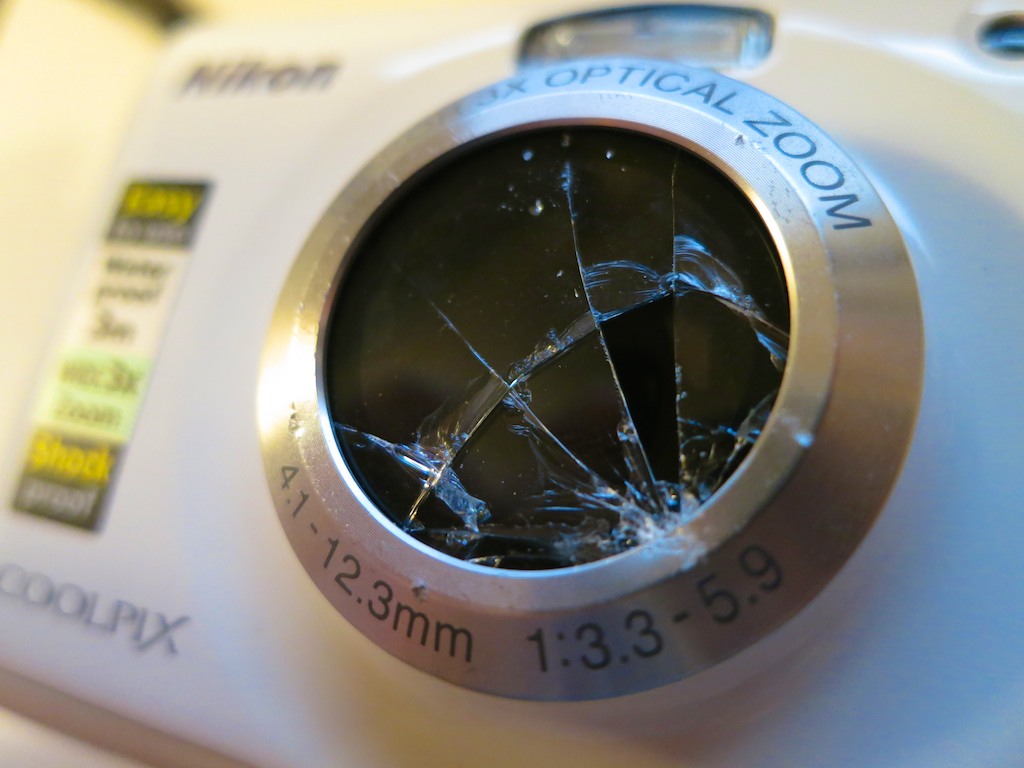
Behold the premature end to my son’s first camera. Winston Churchill once said, “Success is stumbling from failure to failure with no loss of enthusiasm.” In the spirit of the British Bulldog, I decided it was time to get my boy another camera…

Behold the premature end to my son’s first camera. Winston Churchill once said, “Success is stumbling from failure to failure with no loss of enthusiasm.” In the spirit of the British Bulldog, I decided it was time to get my boy another camera…

My four-year-old boy broke his new Nikon COOLPIX S30 family camera last month after dropping it on our driveway. He was running with great enthusiasm and holding it with one hand to take a picture of the full moon. But he stumbled and his prize possession fell…

Though this ‘tough’ camera is built to handle a reasonable fall and even survive comfortably underwater, its glass lens housing shattered on impact. Yes, the interior lens was still intact, but there were shards of glass everywhere.

As ‘Junior’ and I stood over his fallen tech, I declared it a goner.
(No, I hadn’t bought insurance on the camera, and the cost to repair it would likely be more than buying another one.)

A horrible moan befitting a small Klingon clan permeated our neighborhood, and then he shuffled upstairs.

It was a terrible loss. My son cried himself to sleep that night…

He hadn’t had his Nikon for six months but had quickly become quite a budding junior photographer with it. I bought him this particular camera for his birthday, because even though it was an older model at the time,
(The S32 was already out.)
…The S30 was priced on Amazon to move…$70!

Plus, this Nikon was the real deal.
(not some crummy toy camera)
I figured for twenty bucks more, it was worth getting him a decent piece of adult tech…

The Many Downsides to the Nikon COOLPIX S30
As good a decision as I thought I was making, I’ve got to say that the S30 is quite simply the worst camera I’ve ever purchased:

  • The pictures were barely average.
  • There was a dead pixel in the middle of the sensor.
    (So you always see a little speck in the same location of most of the pictures.)
  • The audio from its recorded videos sounds like an empty Campbell’s Soup can and string was used instead of an onboard microphone.
  • And the camera’s functionality assumed you had the smarts of a four year old.  (It was really clunky.)

But my son figured out how to use it in about 10 minutes.
And he was taking pretty cool pictures up until the unfortunate ‘moon incident.’
(He actually started taking snapshots when he was two years old using my old iPhone…)

You might be asking right about now what I was expecting out of a $70 camera when the other point and shoot cameras I own cost at least twice as much.

The irony is even though it was a terrible camera… it was perfect for my son.
He just loved it.
(And its capabilities were light years ahead of any toy camera out there.)

A Life-Changing Moment
First of all, it wasn’t an obvious decision to simply reload and hand over another adult camera for my son to use. You’ve got to wonder how long a life span any camera will have in an eager child’s little hands…

But I thought back to one of my own childhood stories, when I was a few years older than my son. I desperately wanted an audio cassette recorder, and my parents didn’t think I would remain interested in this adult tech beyond a few days. I pleaded for weeks, and eventually my mother softened.

In hindsight, it was the most important gift I ever received as a child. If, for some reason, you wanted to change the path of my entire life, all you’d have to do is jump into your time machine, go to February 1970, and make sure I never received that Sound Design cassette recorder.

My career would be very different today…
(I might be the dentist my mother always wanted.)

So I decided to get my little guy another camera for the holidays.

Where’s the Choice?
Today’s market for a cheap, durable camera is well… almost non-existent.

In the sub $100 range, I think Nikon still is it with the COOLPIX S32.
(The S30 has fallen out of the ‘new camera’ sales cycle, and the S31 is only ten bucks less on Nikon’s website.)

Panasonic also has its Lumix DMC TS25,
which you can get on Amazon for $125.
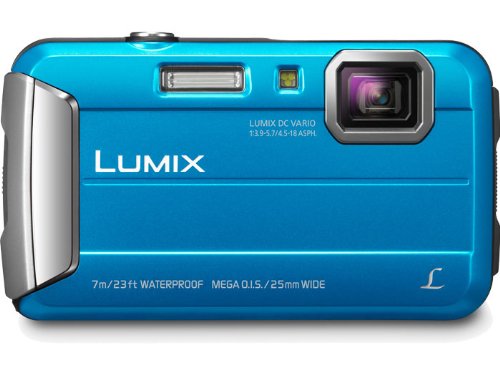
Panasonic Lumix DMC TS25Even though it looks to be a better camera than the S32, spec wise, it’s got really small buttons and a different interface, which might not be as child-friendly.

It wasn’t a slam-dunk as the better choice, and it also broke my $100 rule.
So ultimately, I sided with the devil I knew vs. the devil I didn’t.

And the S32 is two generations better than the S30. That should count for something.

But the bottom line is there’s really nothing else I’ve found that’s supposed to take a licking and keep on ticking that breaks the $100 price point…

Grandson of the COOLPIX S30… the S32!
So I bought the Nikon COOLPIX S32 at Target on Black Friday for $99.99.
(on sale from $129.95)

It should work well enough; my son will know how to use the S32, and it’s even the same color as his first one.

He will be exceptionally happy.
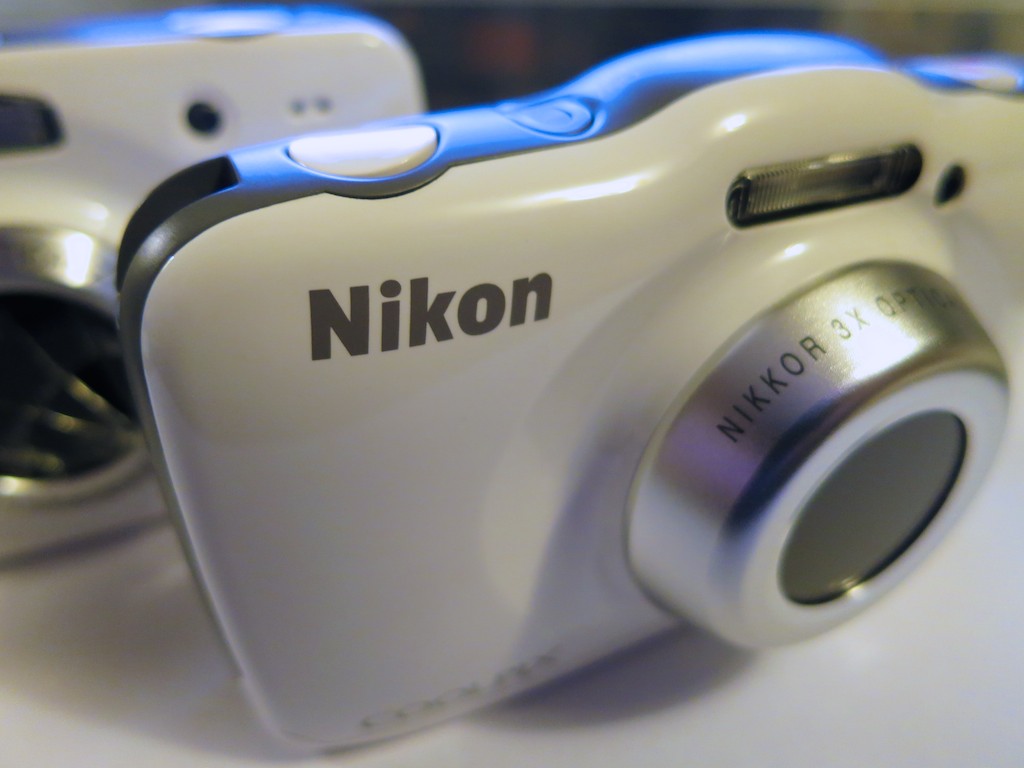
Nikon COOLPIX S32

The S32 might even prove itself to be a big improvement over its not-so-distant ancestor. The jury is still out for me, though according to Snapsort.com, the S32 has clear improvements.

Competition for the future COOLPIX S33?
But even if the S32 performs at a higher level, there shouldn’t be only one sub-$100 camera out there in this market segment for kids and families to use…

Where are the rest of the choices?
What ever happened to good old fashioned capitalistic competition?!
(Maybe the profit margin in this camera category is too small….)

And no, I’m not going to follow the rest of the herd and buy my lad a toy camera.  I don’t think anybody who’s bought one has ever been a happy customer.
(I’ve done the research.)

So if you’re a camera manufacturer in this already over-saturated consumer market, here’s a product pitch for you in this unexplored niche:

Junior will be turning five in half a year. So will 3,999,385 other four year olds. Please come up with a decent, tough camera at the right price that they all can use.

Because I’ll probably be needing to secure another one for my son’s next birthday!
Please hurry it up…

How to Handle a Lost Email

Who has the time to process an endless avalanche of incoming emails?  So a few are bound to fall through the cracks.  The question is what to do when an important one gets lost.

Who has the time to process an endless avalanche of incoming emails? So a few are bound to fall through the cracks. The question is what to do when an important one gets lost.

Once upon a time, I would send an email to someone…
And if I didn’t receive a quick response, I’d wonder what was up.
Then if a week or two went by, I’d think, “What the #@%?!”

Of course, now I understand there’s a silent, evil force at play…

Email Overload!
Actually, there are really no bad guys here. It’s simply the result of the ever-increasing volume of emails we’ve all got to deal with, both at home and at work…

  • Whether it’s the mass of marketing emails you’ve inadvertently invited to invade your home email…
    (In store: “Sir, would you mind giving us your email address for those pair of socks you bought?”)
  • Or those pseudo-spam emails…
    (“Since you purchased a widget at our parent site, we thought you’d like to receive daily-deal emails from our seven partner sites.”
  • Or the constant chatter of your work email’s Inbox…
    (“Thank you.” Copy all. “You’re welcome.” Copy all. “Looking forward to the next project.” Copy all.)

…The plain fact is your email’s Inbox has exploded.
There’s simply too much email to completely get through in a day.

And certainly not enough time to perform perfect email maintenance by organizing your important emails into folders and deleting the rest.

Who among us still starts their day with zero emails in their Inbox?
(You there… in the back… put your hand down!)

Start Digging
So more often than not, I find myself searching through old emails down the steep slope of my Inbox to find what I need.

Usually, it’s simple enough. Search by ‘From’ or by a ‘Subject’ string.
No, it’s not the most efficient use of your time, but it usually gets the job done.

Typically, the emails you need are relatively current. But if you’ve got to drill deeper into your past and further down the email mountain, you could find yourself in big trouble….

Lost but Not Forgotten
I was driving to work last week, and going through a little mental exercise emptying my head of the logistical issues for the day ahead. Occasionally,  this creates more space for my mind to do a little productive wandering. And sometimes, a good idea pops into my head.  Now and then, I remember something I’ve forgotten to do.

This time, my noggin reminded me I had to respond to an email… an email that was at least a couple weeks old.

My delay in itself didn’t reflect a huge oops on my part. It was one of those emails that didn’t require an immediate turnaround. But I needed to get to it eventually. And two weeks is pushing it, no matter what email etiquette you follow.

The email in question contained the name and phone number of someone I had committed to calling. Suddenly, I felt an adrenaline rush.

Where was that email?!
It was buried.

Deep.

And guess what?
I had forgotten the name of the sender.

The Rescue Begins
So now what?

Quickly, I tried to remember what the ‘Subject’ was.
All I had to work with was I knew it was about setting up a meeting.

“Meeting.”
Hmmm…. That’s a long shot. How many hundreds of unsorted emails contain that word in the title? But I typed it in anyway.

Pop.

Whoah. There it was!!
(Apparently “Meeting” isn’t such a popular title after all.)
Still, I’d call this an early holiday gift from the email gods.

And so I finally responded and successfully masked my little faux pas.

Flag It!!
Of course, one simple way to hold onto an old, unsorted email is to flag it with a color stamp. That way, at least it will stand out.

But you’ve got to use this technique sparingly or else your email program will start to look like one of my son’s coloring books.

Send a Reminder
So what’s the takeaway here…?

I’m losing your emails.
You’re losing my emails.
We’re all losing emails!

The solution: If you don’t hear back, send out a reminder email!

What?!
How rude is that?!

It’s not inappropriate at all. I’d say you’re being helpful!
Just pen your message politely.

And I think it’s okay to reframe your messaging:

  • Add a little more urgency
  • State specific needs more clearly
  • Add why you require a more timely response

Even if your original email didn’t get lost, some of the critical details might not have been correctly absorbed.

And here’s the best part:
Reminder emails get the job done!

Can I let you in on a little secret?
Remember that lingering ‘meeting’ email I lost and then found?

It was his reminder email!

Why iPhone Slow-Motion Videos Need the iMovie App

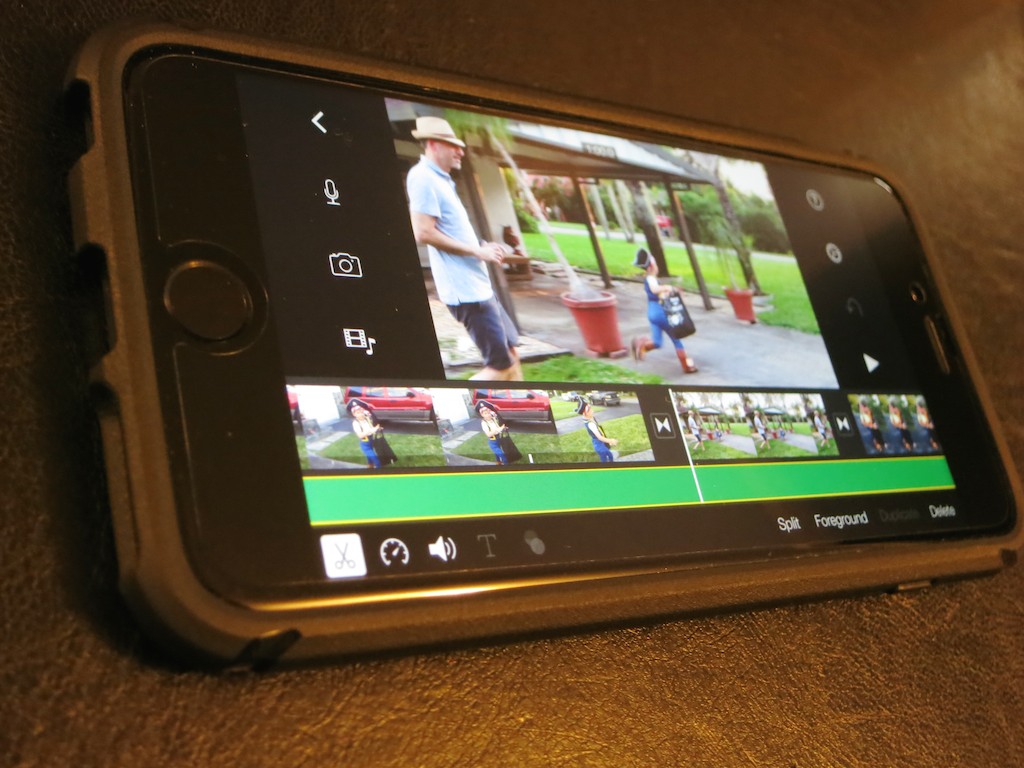
iMovie on your iPhone can lock in that selected area of slow motion you want to keep from that otherwise boring slo-mo clip you just shot.

iMovie on your iPhone can lock in that selected area of slow motion you want to keep from that otherwise boring slo-mo clip you just shot.

When iMovie came out as an app, I scoffed at what I believed was a preposterous idea that complicated video editing software could successfully be shrunk into an iPhone. I come from a world of multi-core, decked-out computer monsters that often ‘render’ their imagery overnight to crank out their completed videos on deadline.

I viewed the iMove app as little more than a toy.

Then, Apple gave it to me for free as part of my new iPhone 6 Plus purchase.

So I had it.
But I would not open it.

Then, I discovered the wonders of my iPhone’s slow motion video capture capabilities.

And I was especially taken with my iPhone’s ability to isolate a particular portion of a slo-mo clip and then only play that part back in slow motion.
(The rest runs normally.)

Some may consider this little more than a parlor trick, but I really like it…

Now, you can utilize slow motion only when a particular moment needs it.
(Because a long and boring slow motion clip is pretty painful to endure!)

How to Lock In Selected Slo-Mo
But there was a problem…
I couldn’t export the clip to my iMac and retain the selected slow motion.
Yes, my computer accepted the clip recorded at 240 frames per second.
Yes, QuickTime offered me the choice to play the clip either at normal speed or in slow motion on my Mac.
But the ‘selected slo-mo’ clip I had created in my iPhone had vanished.
That metadata didn’t make it through the transfer…

Sure, I could recreate the effect on my computer with editing software, but that’s doing the work all over again!

The question was how to lock in all that work before doing the export…

iMovie is Cooler Than You Think
So I looked again at the iMovie app on my iPhone.
(I think it winked at me…)

I opened it up…did a quick tour…and imported the clip in question.
Yep, it played back just the way I liked it…

Cool.

Then I realized I could simply export the clip out of iMovie in its native resolution to lock in the selected slow-motion moment.
You can save it right back to your Camera Roll or to iTunes. AirDrop is another option…

Using iMovie in this way is indeed an extra step…. But it’s not that arduous.
And it solved my dilemma!

Then, did I lightly touch ‘export’ and chalk up another minor victory for humans co-existing with their tech?

Not quite yet…

Taking iMovie Out for a Halloween Test Drive
I decided to continue my journey down the tech rabbit hole…

The clip in question was one of three I had recorded of my son having fun on Halloween night as a pirate. All three had been shot in slow motion…more as part of an experiment than anything else.

I performed some selected slow-motion tweaks on the other two clips, then brought them into iMovie as well. I quickly drizzled some dissolves between the clips, imported a Halloween night photo for the top of the video and blended in a Ken Burns’ zoom/pan.
Then I typed in an opening title, selected a pre-existing iMovie ditty for a background music track, and faded the ending to black.

Huh.

It was twenty minutes later.
(much of that was looking at the app for the first time)

…And I had easily created this cool little video.

The Evolution of Video Editing
So I am happy to report you can teach an old dog new tricks.

No, I’m not going to forget about using uber-powerful Mac Pros in favor of the iMovie app on your iPhone.
But indeed, I finally recognize there’s a lot you can do on the fly editing short videos on your iPhone or iPad.
(And another reason I’m happy I supersized it to the iPhone 6 Plus.)

If I’m not the last human on earth to have this epiphany… you should know you’re carrying a legitimate video editing station in your pocket right now.
(And it also makes phone calls.)

Unbelievable…