At Home with Tech

Unlock the power of all your technology and learn how to master your photography, computers and smartphone.

Category: Tech Diary

Four Ways Technology Changed My Life this Year

I’m happy to report that my use of these tech devices has indeed improved my day-to-day life. Here’s why…

Technology is usually meant to make your life better. While it can often be more frustrating than anything else, I find that it does occasionally have a clearly positive impact.

Here are the four tech innovations that made a meaningful difference for me this year…

#1
Apple Pay on My Apple Watch Replaced My Credit Card

I didn’t really feel the impact of Apple Pay when I had access to it on my iPhone. I still had to pull my iPhone out of my pocket… so the physical exercise was mostly the same as sliding a credit card out of my wallet.

Plus, I was still locked into the mindset of having to use my credit card and chipping/swapping it. The concept of contactless payments still felt foreign, and I just couldn’t get comfortable with it.

Then I tried Apple Pay with my new Apple Watch, and I finally experienced my ‘breakthrough.’

By simply double clicking the side of my Apple Watch to activate Apple Pay and then holding my wrist near the payment terminal to complete my payment… that simplicity and convenience really opened my eyes to the obvious benefit of Apple Pay.

It’s so fast. Plus, I don’t have to play roulette with the payment terminal to see if my credit card’s chip (or the payment terminal) is going to malfunction again.

#2
GoPro Became My New Family Vacation Camera

My GoPro allowed me to finally go on vacation with my family and not stress over the possibility of destroying my camera if I tried to snap a photo.

I used to treat the beach like the landscape of a hostile foreign planet. The corrosive nature of salt water was clear and if nothing else , the salty, moist air would quickly cloud the lens. A tiny molecule of sand could fly by and wedge itself into the lens mechanism, immediately immobilizing it.

In short, the beach was a clear danger zone for my vacation photography.

But my new GoPro was essentially impervious to these threats.

  • Sand? HA!
  • Underwater? Now we’re talking!!
  • How about some slow motion video? Yes, please!

I should mention it’s a good idea to wash your GoPro with fresh water after a day of action at the beach.
(Dried salt moisture can seal the little watertight doors in place, making it difficult to pop the battery or memory card out.)

This year, I was finally able to capture some fun family shots at the beach and also have fun while doing it…

Thanks, GoPro!

#3
I Generated Whole-House Wireless Internet Using Mesh WiFi

I lived for years with spotty WiFi in our house. The weakest WiFi signal was actually in our bedroom. That’s such a bummer, right?

I thought about extending the signal of my Apple Airport Extreme many times, but I was concerned about degrading my WiFi. So, I did nothing…

Until I read that Apple had exited the WiFi router business. And I finally decided to make a change…

I retired my Apple Airport Extreme.

And upgraded to a new WiFi mesh system:

My Orbi consists of a base unit, which essentially replaced my Apple Airport Extreme and a satellite device, which I placed in the center of my house. Together, the two devices successfully created a large enough WiFi bubble to reach all corners of our little house.

Suddenly, whole-house WiFi became the standard throughout the Lester universe.

I can’t tell you how satisfying it is to check your email before your head hits the pillow and see strong WiFi bars.

#4
YouTube TV Made Me Cut the Cord

I cut the cord this year.
…Can I say that again?

Yep, I cut the cord this year.
(Thank you.)

I replaced my cable service with YouTube TV, which is an app that streams all of the cable networks I want for just $40/month.

Yes, I’m still paying Cablevision for my internet… so technically the cord is still technically tethered.

But I returned my cable box, and my decades long relationship with an industry that helped to define my existence finally entered a more enlightened reality.

I’m saving money, only paying for what I want, gaining a sense of control and successfully trying something new.

I highly recommend it.

Don’t Forget the Human Factor
I know these ‘headaches’ that technology has helped to alleviate are First World problems.
(I do understand that.)

And I’m thankful I get to complain about these particular issues.

That said, if you’re fortunate enough to have the resources to play with technology, then technology should simply play nicely with you.

And sometimes, you’ve got rely on the human equation to figure out how to really make technology work… for you.
Why You Need to Open Tech Gifts Before Your Kids Do

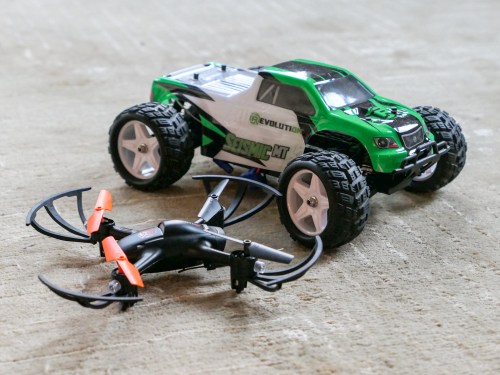
If you’re planning on figuring out your kid’s new RC vehicles and drones right after “Thank you, Daddy!” you may be delirious from all of your shopping. Here’s what you should do instead…

Do you know how to use the tech toys you’re giving your children this year? If you think you’re just going to wing it on the big day, I’ve got a report to share from the front lines of parenting…

It doesn’t matter how technically savvy you think you are. I’ve got a third grader, and let me tell you, his tech is already getting complicated for me.

And even if the toys aren’t that complex to operate, misuse could actually get a little dangerous (if you’re to believe the instructions).

Parenting Tech Tip:
So, do yourself a favor and block some personal time to first teach yourself how the toys actually work. Does that mean you’ve got to unbox each item, play with it and then re-box it?

That’s absolutely right.

Let me share a couple of my own experiences…

New RC Vehicle for My 8 Year Old
This year, I bought another radio controlled car for my boy:

I picked it up our local hobby store… Horizon Hobby.
(How quaint, right?)

I unboxed the mini monster and took a peek at its instruction booklet.
(How hard could it be to operate another RC vehicle?)

Well, it may not be difficult to use, but apparently it’s easy to operate incorrectly. Here are some of the warnings that jumped off of the page…

  • Charge for 9 hours
  • Do not charge overnight
  • Do not leave unattended while charging
  • Do not charge battery in the chassis or battery will overheat
  • Do not lick any parts or death may result
  • Do not run the car slowly or else it will overheat.
    (Must operate as speedily as possible?)

Are they serious?
(All of this reminds me of the old Saturday Night Live sketch…
“Happy Fun Ball.”)

I signed off on what seemed like twenty pages of disclaimers and took the Seismic out for a quick spin…
Whoa!
It is fast… much better suited for outdoor operation in our driveway.

And yes, I’ll pay attention to how its battery is charged, although I’m not going to stare at it for nine hours.

More Drone Flying Lessons
This year, it was time to buy another starter drone for my eight year old.

Three years ago, I purchased this starter quadcopter:

The Inductrix is really tiny, and I had hoped it would be simple enough for my boy to learn with. But when I first tried it out myself, I found it difficult to control and couldn’t keep it hovering in one place.
(I should admit I’d never tried flying a drone before.)

As a result, I actually delayed giving the Inductrix to my young Padawan.

When he finally tried it out last year, he immediately demonstrated decent piloting competencies.
(Must be due to all of that flying he does in Minecraft creative mode on our iPad)

Still, the micro drone would inevitably crash into a wall or the ceiling. My boy loved the Inductrix, but it could only take so many impacts in our family room before one of the propellers stopped working…

Yes, I took it in for repair, but when another propeller stalled, I decided to look for a more durable model that was easier to control…

This year, I went with another Horizon Hobby model…

This quadcopter is bigger than the Inductrix, and it also sports an onboard camera. While the photo and video capability is cool, I’m not at all interested in that… yet.
(Remember, I’m just looking to keep the darn thing in the air!)

So, late one night… I quietly unboxed the Vizo and charged up the battery.
(Yes, the instructions contained battery warnings too.)

And guess what…?
This one is much easier to use…

It’s more stable while airborne and also comes with auto take-off and landing modes.

Essentially… you press a button, and the drone takes off and hovers a foot off the ground. You fly it from there. Similarly, when you want to land… you position the drone just above the floor and press the ‘land’ button. The drone descends slowly and the blades stop turning after touch down.
(It’s a real game-changer.)

I’m sure purists would say that this auto feature masks the heavy lifting of really figuring out how a quadcopter operates, but I’m okay with a little ‘help’ at this stage of the learning curve.

My Inner Child
I’m not sure what it says when I’m gifting my son toys that I can’t operate without some training. I’m sure some would say it has nothing to do with me, and that he should simply figure it out for himself.
(It’s the gift of building self-reliance.)

But what fun is that when we’re playing together?
So again, is this really more about him… or me?

That’s a deep question for another time…

Batteries Not Included
Suffice it to say, this daddy needed to secretly take some driving and flying training to ensure that he was ready to help his son enjoy his new tech toys this year.
(I highly recommend the prep.)

Just another way that as a parent… you’ve got to keep up.

And yes, there are, in fact, instruction manuals.

5 Steps to Simplify Your iPhone XS Max Purchase

If you’re feeling a bit paralyzed about your next iPhone purchase, I’ve got a few tips that might help you finally pull out your credit card…

I love my Apple tech, but I’ve got to admit that it’s getting more complicated to decide exactly which features and options to buy these days. Take my new iPhone… Yes, I’m now the proud owner of a silver iPhone XS Max.
(Applause)

But that virtual applause isn’t for my choice to get Apple’s latest and greatest device. It’s more about the fact that I finally made it through my decision tree!

If you’ve been delaying your own purchase, because there are so many pieces to the iPhone decision-making process, perhaps you’ll find the details of my recent Apple Store shopping experience helpful…

Advantages of an Unlocked iPhone
My Apple Genius at the Apple Store told me that buying my iPhone XS Max outright from Apple would enabled me to get an unlocked iPhone and avoid a $30 AT&T (upgrade?) charge.
(So, there’s some upside to an all-in purchase vs. monthly payments with 0% interest.)

But perhaps more importantly, an unlocked iPhone provides more flexibility down the line should you want to switch carriers.

Shopping note: If you go with the iPhone Upgrade Program, you’ll also get an unlocked iPhone.

Step 1:

  • I bought an unlocked iPhone.
    (My Apple Genius simply popped my AT&T SIM Card out of my old iPhone 6 Plus and inserted it into my iPhone XS Max.)

Theft and Loss Protection
I’ve always attached AppleCare+ to all of my Apple products. Why quibble over the extra cost if you’re already spending so much money? You want to protect your expensive Apple gear!

Have I ever used AppleCare+? Yep.
Enough said.

But AppleCare+ with Theft and Loss?
Another hundred bucks adds loss and theft protection to the plan.
That’s great, right?

Hang on…
If you end up walking into an Apple Store without your iPhone and a sad tale of loss, there’s a $269 replacement fee (deductible) for a new iPhone XS Max. You pay the deductible instead of the cost of a whole new iPhone.

That’s $269 plus the original $100 in the plan.

So, it’s essentially a $369 insurance plan against loss.
Is that a good deal?

Well, I guess that depends on the odds of your iPhone XS Max leaving you over the next two years.

I’m hoping not to attract any attention from the evil ‘Fates of Bad iPhone Luck’ by talking about this.

Step 2:

  • I added AppleCare+ for $199 instead of the $299 AppleCare+ with Theft and Loss option.

Let’s move on…
(Cough)

256GB of Memory
Look, I know I agonized over this a particular topic when the iPhone XS Max first came out… and I pledged that I would go all in with the 512GB model.

The most storage… the greatest ability to shoot and hold onto 4K video content. More is always better, right?

Well, yes…
…and no.

The truth is I quickly started to struggle with my choice.

And the simple reason is cost. I had difficulty justifying to myself the extra $200 to supersize to 512GB. These iPhones are just so expensive. You’ve got to draw the line somewhere.
(You’ll notice I’m not even mentioning iPhone pricing. If you’ve done any research, I’m sure you know how much they cost.)

I questioned my Apple Genius on the 256GB vs 512GB choice. He agreed that more people have gone with the smaller capacity. Then, he said, “But if you never want to worry about your storage, then go with 512GB.

Ironically, that’s what sealed it for me… but not how you’d think.

Here’s my truth… if you’re planning to capture 4K videos of your family, you’re eventually going to run out of storage, no matter the capacity. It’s just a matter of when.

And it’s actually more important to have a media management plan that forces you to offload and organize your content rather than let it sit gathering digital dust in your iPhone’s massive internal storage.

Step 3:

  • Yes, I changed my mind… and went with the 256GB model.

Screen Protection
Of course I wanted a screen protector for my new iPhone…

Sure, there are several out there you can choose between. But that will send you down another decision rabbit hole.

The Apple Store sells Belkin InvisiGlass screen protectors for $39.95. And an Apple Genius professionally will install it for you.

I’d say that’s totally worth it…
You’ve got a perfectly-positioned screen protector and no worries.

Step #4:

  • I went with Belkin InvisiGlass and professional installation.

iPhone Armor
I’m not exactly sure why I’ve covered up all of my previous iPhones with black cases that obscured all of the iPhone’s design beauty. Perhaps that wasn’t an such important factor to me, and protection was.

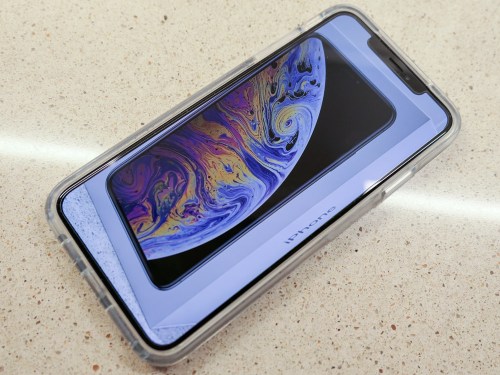
With my new silver iPhone XS Max, I suddenly wanted to retain the cool silver edging. So, after I left the Apple Store, I shopped for a clear case and landed on OtterBox’s Symmetry Clear Series Case for $49.95.
(You can find it for less online… D’oh!!)

It took a little work to pop my iPhone into the Symmetry case, but once the job was done, I felt my new companion was properly prepared to face its new life with me…

I’ve been a big fan of OtterBox over the years, and even though the Symmetry design is more minimalistic than the typical OtterBox, I feel comfortable that my new iPhone is plenty safe.

Step #5:

One usability note:
My iPhone in its Symmetry Clear Case is a little slippery on smooth surfaces when you rest it on its plastic back. But if you flip the iPhone over so the screen faces down, the Symmetry’s rubbery front edges provide much better grip.

And a note about OtterBox…
The Apple Store I visited carried a couple OtterBox models (not the Symmetry). Apple and OtterBox is an interesting business relationship that I think is great from a consumer perspective…

Why Not an iPhone XR?
I’ve read a lot of great reviews about the iPhone XR.
Why didn’t I just go that way?
(It would have surely saved me a lot of money…)

…I wanted the advanced camera capability of the XS line with the 2X optical zoom. I believe that punch-in feature without pixel loss really offers value. I also craved the more advanced portrait-mode ‘background blur’ muscle of the XS line. For example…


These features should enable my new iPhone to better handle more of my day-to-day photography opportunities when I’m not carrying another camera with me.

In my eternal quest to capture great photos of family and friends, I’ll take all of the help I can get!

Cutting Edge for Now…
So that’s my story that put a new iPhone XS Max in my pocket. I hope it helps to simplify your own decision-making process, because I expect you really don’t want to delay.

Every day that passes is a day closer to next September when your new iPhone becomes last year’s iPhone.

If you’re going to go for it, that time is now.