At Home with Tech

Unlock the power of all your technology and learn how to master your photography, computers and smartphone.

Category: Tech Fixes

How to Handle a Compact Camera That’s Still Too Big
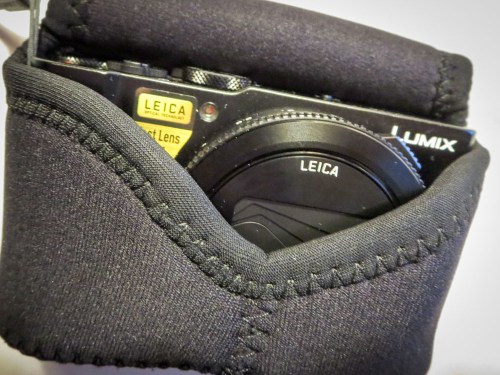
Premium compact cameras are larger than you think. How you carry them can make all the difference in how you use them…

I have a confession to make. My shiny, new premium compact camera (Panasonic Lumix DMC-LX10) isn’t really… all that compact. Sure it’s a whole lot smaller than a DSLR, and it does just fit in the palm of my hand. Plus, it takes great pictures.
(For the price tag, it should!)

Technically, it fits the description of a pocket camera. But here’s the thing… It’s really too big to fit into the front pockets of my pants.
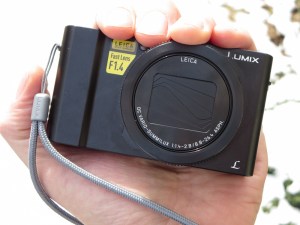


Sure, you can jam it in. But come on… that’s not comfortable. Especially if the pocket is already holding something else like your wallet.

My LX10 fits a little better sliding into my back pocket, but that still feels a little precarious. Especially if I were to sit down and forget it’s there.
(Crunch!)

Which Pocket?
To be fair, I’m using a neoprene case with it, which adds some bulk.
(OP/TECH USA Digital D Soft Pouch, Micro – $17.95 at Amazon)

The material stretches tight around the camera, which creates something of an odd shape, because the lens juts out a bit. Still, it can slide in and out of a pocket as long as the pocket is large enough.

Jacket pocket?
Fine.

Coat pocket?
No problem.

But ideally, I want to be ready for action when I’m out and about. And the only way to guarantee that is to carry the camera in my pants like I do my iPhone.

And I don’t want it hanging off my shoulder with a strap. That’s not as convenient a solution.
(I think of a DSLR for that.)

Premium Compact Cameras Aren’t So Compact
You know what…? You can’t always get what you want.

I’m sure camera technology will get there one day, but if you want a big-time sensor in a small camera with a wide enough lens (24mm), today’s ‘premium compact camera’ is going be a little bigger than a true pocket camera or a lot thicker than your smartphone.
(I believe this also applies to the Sony RX100 V and Canon G7X Mark II competition.)

So deal with it.

How Fast Can You Get Your Camera Out of Its Case?
That’s the question today… How can I best handle the little beasty?

One way is to see if there’s a case with better functionality.

My OP/TECH USA is fine, but the fit is a little snug, requiring me to take an extra few seconds to pull the camera out. And as parents of young kids know, those priceless moments you want to capture only last for a few seconds. Fumbling with your camera to get it out of its case will often let that perfect picture slip away…
(I’m sure OP/TECH USA would remind me that you don’t want your camera to easily fall out of its case. That kind of defeats the point of having a protective covering to begin with.)

Also, this particular case has two snaps. And sometimes it’s a little wonky snapping them both once the camera is back in. Often, I just go for one. So that’s not perfect either…

MegaGear to the Rescue
The obvious choice is to buy the case that Panasonic makes for its Lumix LX10 camera, right?

Wrong.
Panasonic doesn’t make one. Not yet…
(Really)

So you’ve got to continue to travel the third-party route to see if there’s a better case solution.

In my research, I came upon ‘MegaGear,’ which appears to design camera cases for specific camera models.
(As opposed to generic cases that will ‘generally’ work. Ugh.)

I found their version of the stretchy neoprene case…

What’s the difference compared to the OP/TECH USA version?
It’s got a Velcro strip instead of two snaps to close the flap.
Is that significant?

Well, you’d probably save two seconds or so pulling at the Velcro instead of two snaps. And assuming the fit is a bit less snug, I think you’d have the camera out and focused on the ‘moment’ while it’s still happening.

I’d say that’s worth fifteen bucks.
Click.

Back to the Future
Then, there’s an old-school MegaGear leather case option that connects to the bottom of your camera and has a molded flap with a snap release that covers the lens. What I like about this choice is it offers more protection since you’re not sliding the naked camera in and out of a case.
There’s always that instant where if you momentarily lose your fine motor skills or you perform a clumsy handoff, the camera could enter free-fall mode.
(No, that’s not in the manual.)

On the down side, this MegaGear case is definitely not going to make the Lumix LX10 any more svelte. I don’t think it’s going to be hanging out in pants.

But if you’re already resigned to that reality, why not add some protection to your solution? Plus, the one snap flap release design satisfies my speed requirement.

And yes, if you’re okay with the idea of swinging it over your shoulder, this case is perfect for that too…

Click.

Functional Upgrade?
So I picked up a couple extra cases for my Panasonic Lumix LX10.
Is that extravagant?

More importantly, will they really upgrade the camera’s usability and safety factor for this parent of a six-year-old boy?

I think we should all agree on a firm “Maybe.”

Until someone offers me a better solution, I’ll take those odds.

#FiguringItOut

Why I Bought This GE Microwave Oven

I won’t deny I was attracted to the few tech tricks it offers beyond heating up food fast. And it all starts with a little circular logic….

I won’t deny I was attracted to the few tech tricks it offers beyond heating up food fast. And it all starts with a little circular logic….

I said goodbye to our glitchy Samsung microwave oven last week. As some of you know, I’ve had something of an ongoing rocky relationship with this temperamental unit.

Since my wife and I were doing some other work in our kitchen, we decided it was finally time to move on.
(Across five years, there were multiple pain points… First, the microwave’s control panel blew out after two years and was repaired for free. Then, the turntable mechanism stopped working… and more recently, the vent control has become glitchy.)

Yes, technically, the microwave still works, and yes, I could pay more to repair its existing nuisance problems, but it was an easy choice just to say, “Toodle-oo!” and start again.

I expect that microwave reviews probably aren’t top of mind for Samsung these days as they try to move beyond ‘Galaxy-gate.’
(That said, I really liked Samsung’s commercials at the Oscars.)
But I’ve seen ongoing interest in my 2013 Samsung microwave post.
I do hope the future brings better news…

Hello, GE Microwave Oven
So we decided to buy a GE Profile series 1.7 CU. FT. over-the-range microwave oven (Model PVM9179SKSS) to join our year-old GE Profile series gas range/oven (Model PGB940ZEJSS).
(Blogger’s note: Why don’t companies come up with a simple appliance model-naming convention?)

One reason for this particular choice was to create a matching range/microwave pair from the same manufacturer.

Not that it’s wrong to mix manufacturers, but after our Samsung experience, it seemed like a safer bet to go with a brand we felt more confident in.
(Yes, simple brand loyalty to GE)

Chef Connect
I wouldn’t exactly say this GE was a ‘smart microwave,’ but it does come with a Bluetooth feature called “Chef Connect” that pairs it to our GE range.
(Cool!)

But what exactly does that get you?

Three features:

  • The microwave’s clock will automatically sync to the range’s clock.
  • The microwave’s surface light can automatically pop on when you turn on one of the range’s burners.
  • The microwave’s vent can automatically turn on when you use one of the range’s burners.

Huh.

Are these upgrades really that useful? Or are they more like parlor tricks? A synced clock is always helpful, but do I really need more light and fan support every time I turn on the range?

Well, I certainly don’t need the fan every time I decide to boil an egg, but the automatic light trick intrigued me. So I activated it:

  • You just hold the “Chef Connect” buttons on the range and microwave for three seconds to activate the pairing mode. And then they magically find each other!
    (Whoah!)

And then you select which of the three tricks you want to turn on
Easy as pie.
(Sorry for the pun)

The only wrong turn I made was incorrectly assuming that Chef Connect was somehow related to the “WiFi Connect” feature the range possesses, which allows me to monitor the range with an app on my iPhone.
(No… Chef Connect and Wi-Fi Connect are totally different.)

More Tricks
You might be thinking… a microwave is a microwave is a microwave.
It just needs to work!

True enough. But beyond “Chef Connect,” this microwave’s got a few other features I’m already warming to:

  • You’re able to ‘mute’ that horrible electronic pinging sound you hear every time you press a button on a microwave or oven these days.
    (I really don’t need an audible confirmation for every finger action I make.)
  • The addition of a ‘selection dial’ in lieu of an ‘all keypad’ panel is a more advanced design. This little circular knob reduces the number of times you’ve got to ‘push’ the keypad to get things going…
  • The ‘Beverage’ button is a dream… One tap heats up your cup of tea to the perfect temperature.
    (Not quite as spiffy as Captain Picard saying out loud “Earl Grey Tea… Hot.” But we’re getting there…)

But Wait…There’s More
This particular model is also a ‘convection’ oven. While I honestly don’t know how often we’ll be using the feature, it seems like a valuable functional upgrade for our kitchen to have two ‘ovens.’ So if we’re cooking dinner in the main oven below, and there’s a sudden craving to bake some chocolate chip cookies, we can now do that using the convection oven feature in our new microwave.

Convection tech does push the price tag up a hundred bucks to a ’pricier’ $599 MSRP.
(You can get a base-level GE microwave for less than three hundred bucks.)

But I had already decided to spend a little more on this unit, hoping it would stand up better to the test of time than my not-so-old Samsung did.
(However untrue that logic may be)

The Internet seemed split right down the middle when I did a little research on how the world feels about convection tech baked into microwave ovens.
But I decided to go for it anyway.
(Any feedback out there on my choice?)

At Home with My Kitchen
So we’ve got a new GE microwave/convection oven.
Whoop de doo…
my-new-ge-microwave-oven


And it’s got a few tricks up its sleeve using Bluetooth tech.
Good enough.

And for now… I feel like my shiny, new kitchen tech is there to
‘improve my life.’  Translation: It’s not a headache… not yet.

Still, that’s a win in my book… So let’s move on!

A Quick Way to Fix a Corrupted Word File

Why does it always seem that technology will fail you at the worst moment? Here’s a trick to help you the next time disaster strikes…

Why does it always seem that technology will fail you at the worst moment? Here’s a trick to help you the next time disaster strikes…

Repeatedly saving your Microsoft Word document doesn’t always help if your PC laptap unexpectedly runs out of power. Yeah, that happened to me last week at work…

My .docx file containing the results of a productive 90-minute team script-writing session got trapped when the file became corrupted. Well, it was kind of my fault, because my laptop was only running on battery power.

But to be fair to the faulty human, there was no warning… none at all.
Now, come on!
(My Apple products always warn me when I’m dangerously low on power.)

“Khaaannnn!!!”
Then, when I plugged in my laptop and rebooted, I couldn’t open up the script.
The computer ‘suggested’ the file was unrecognizable or it had been corrupted.
Uhhhh…
What do you do?
What do you do??!

We needed to get this script right over to our video editor as we had a really tight deadline. But part of the team was about to disperse to meet other commitments.

So I couldn’t just magically say, “Reassemble!”
That would take time. And time we didn’t have…

Suddenly, I was facing my own Kobayashi Maru* scenario!

Fixing the File, Stat!
The only option was to take the dead file into surgery and try to extract the data. So I brought the challenge to two tech experts in the room. I looked at them both and said, “You’ve got to come through on this. Please… work the problem!”
(I felt like Ed Harris in “Apollo 13.”)

For the first fifteen minutes, it didn’t look good.

But then, within a few moments of each other, they each came back, offering up a new file of mostly unreadable gobbly gook. But buried in their horrible ‘creations’ were the magic sentences from the script I needed.

We were saved!

Try This at Home
So of course, I was interested in the tech voodoo they used. They took different paths to the finish line, but the solution that surprised me the most was the one that used a Mac. And it was so straightforward.

The secret?

With your Apple computer, simply open the damaged Word file using TextEdit…

  • Do a ‘Control Click’ on the damaged file
  • Go to ‘Open With’
  • Then click on the ‘TextEdit.app’ option

And Voilà!

I tried it myself…
No, the results didn’t look pretty, but what I wanted was all in there.
(I just had to sift a little.)

TextEdit to the Rescue
So what did I learn from my little ‘experience?’
(Get your fortune cookie folder out.)

Yes, Murphy’s Law is alive and well.
But don’t forget it’s always darkest just before the dawn.

Never trust your PC laptop to run on battery for too long.
(Using pen and paper may not yet be such an antiquated concept.)

Always bring in the team to help you beat your Kobayashi Maru* test.

And most importantly, remembering Apple’s simple TextEdit as a repair tool can really save your day!

*This is a “Star Trek II: The Wrath of Kahn” reference about handling the
‘no-win’ scenario.
(Apologies, if I’ve just stated the obvious. “Qapla!”)