At Home with Tech

Unlock the power of all your technology and learn how to master your photography, computers and smartphone.

Category: Tech Fixes

Why Do PCs Display iPhone Photos Upside Down?
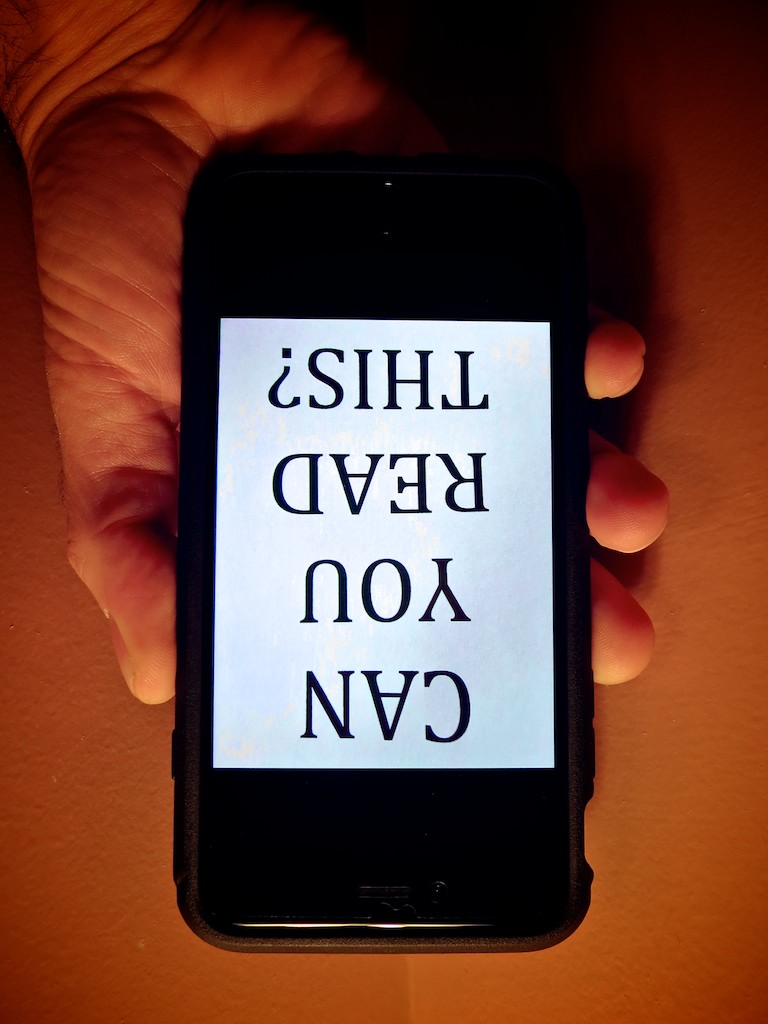
If this is how your PC displays a photo snapped with your iPhone, you know it’s time to determine the culprit. And you may be surprised what you find….

If this is how your PC displays a photo snapped with your iPhone, you know it’s time to determine the culprit. And you may be surprised what you find….

At work, I often snap an iPhone photo or two at video shoots. It takes two seconds, and then I quickly email them to an offsite colleague or client for immediate feedback on the set or background.
(I often forget that the smartphone is such an incredible work collaboration tool that didn’t exist so long ago.)

Unfortunately, a problem I often run into is my pictures inexplicably show up upside down on computer screens. More specifically… PCs.

They always display correctly on Macs… just not PCs running Windows.

Your World is Topsy-Turvy
So you’ve got to imagine the response I sometimes get when my pictures play their little dance.
(How easy would it be to evaluate an image if you had to stand on your head?!)

I’ve always taken the privileged position that the problem is somehow caused by the evil PC.
(It couldn’t possibly be the fault of the perfect iPhone!)

The reality is most folks are going to also assume that you’re somehow the culprit. That you’ve made a mistake and you don’t know how to use your own iPhone.

Guess what…
Up until now, I didn’t!

Which Way is Up?
What I didn’t know is there is actually a right side up to the iPhone when you hold it horizontally.
(I assume we all understand how to hold it vertically, since the ‘home’ button is always there on the bottom to orient you.)

Horizontally, I’ve always gripped my iPhone 6 Plus with the two side volume buttons facing up. That’s because I often like to press either of the two volume buttons to take the photo instead of the white circle on the screen.
(If I’m holding my iPhone with only one hand, it’s more effective to press down on a button.)

As it turns out, positioning your iPhone that way is upside down!

It seems counter intuitive to grasp your iPhone the other way when snapping a pic… and then ‘squeeze’ the button from underneath…. But that’s the correct orientation according to Apple’s engineers.

Clever Apple
But even if you’re accidentally documenting your life upside down, how do Macs know to correctly display your picture?

That’s because your iPhone includes an EXIF tag with each photo that says which way is up. According to iPhone Photography School, every Apple device that displays your photo is going to know how to read that metadata.

The problem is lots of software in PCs can’t.

That’s the huge rub.
It’s simply a compatibility problem.

Well, technically, it’s still your fault if you’re holding your iPhone incorrectly. Apple just fixes the problem for you, and many PCs won’t.

How to Correctly Hold Your iPhone
So what’s the fix?

Well, first off… this problem has actually been around since the iPhone 5.
(Wake up, Rip Van Lester!)

There are various PC methods to manually adjust the orientation of pictures, but do you seriously expect anyone to take additional steps to flip around your mistake after experiencing the annoyance of trying to view your inverted photo?

Own the problem!
When you want to snap and send a photo to a PC, just turn your iPhone so the buttons are on the bottom… and then proceed.

Yogi Barrett?
Yes, I could blame Apple for a design flaw.
(It’s more natural to push the button down like with any camera in the known universe!)

But the truth is, I didn’t know which way was up.
(An important lesson that Apple has been so considerate to remind me of.)

I am not the center of my known universe.

Maybe I’ve begun a journey to a higher plane…
…or the story of my gaff has no place other than perhaps a fortune cookie:

“Wise man holds iPhone with volume buttons down.”

No?

I Bequeath My CD Collection to My Five Year Old

But before I do, I need to buy a new portable CD boombox, so my son can continue to listen to all of those near-abandoned discs I have yet to rip to my computer. The question is… which boombox should I get?

But before I do, I need to buy a new portable CD boombox, so my son can continue to listen to all of those near-abandoned discs I have yet to rip to my computer. The question is… which boombox should I get?

When my five year old was just a baby and beginning to crawl, he wasn’t really moving more than a few inches. One day, he spotted our old Sony CD boombox on the other side of the family room. It was playing a nursery rhyme. He stared at the magical device, and it was love at first sight. Now, he had some real motivation to advance his locomotion.

He had to touch it. In that moment, he crawled an entire foot towards it.

Over the next week, I watched him repeatedly return his attention to the CD player, and observed his effort to crawl over and touch it. When he eventually made it to the singing device, his face lit up as his stretched hand made first contact.

It felt like my son taught himself to crawl at an accelerated rate, because of this need to get to his CD boombox.

Yes, his boombox.

Music to His Ears
Since then, his attachment to the wonderful music box has never waned. He’s learned that pressing buttons makes it sing, and that there are different songs.

Eventually, he mastered the entire interface, plus the CD track numbers. He also enjoyed popping different CDs in and out to create a seemingly endless supply of music.

Like a boy and his dog, it was my son and his music.
(A dog is a conversation for another day.)

End of Life Lurking
But now there’s trouble lurking in his magic kingdom…

Our boombox is over a decade old, and his sometimes rough handling of it over the years has taken its toll. It’s finally starting to malfunction.

And before the CD player totally breaks down, I’ve got a decision to make.

Should I replace the Sony or introduce my son to the more current world of iPods and MP3 players?

Hanging on to CDs
It should be an obvious answer, but part of the problem is I still haven’t ripped all of my old CDs to iTunes. There’s a whole bookcase of them waiting for rainy days that never come… thanks to busy parenthood with other priorities.

Plus, somehow he’s picked up his own personal CD collection over the past few years. (Gifts, mostly)

My conundrum is CD use is still alive and well throughout the Lester household. As much as I want to, I can’t pull the plug… not yet. So I decided it was time to get a new boombox for my boy.

You Get What You Pay For
What made the decision a bit easier was the expected low price point of this near dead tech.

Sure CDs are still selling at the same prices as a decade ago.
(Odd)
But who’s really buying CD boomboxes anymore?
(Besides me?)

And in fact, Amazon has a whole host of no name CD boomboxes to choose from in the $30-$50 range. But user reviews are absolutely terrible for the whole lot of them.

Whatever I buy is going to take its share of wear and tear from my son’s use.
It needs to take a little licking…

Hmmm…

A Sony CD Boombox on Steroids
So expanded my price point and took a look at what Sony had to offer…

Of course Sony is selling its current boombox model for a hefty 100 bucks.
(You pay more for the brand, right?)

Sony ZS-RS60BT Boombox


But as it turns out, the black Sony ZS-RS60BT CD Boombox has a few updated tricks up its sleeve.

  • It has Bluetooth connectivity. So I can stream music to it from my iPhone.
    (Much like my nifty Logitech UE speaker)
  • It can play music files from USB devices.
  • It can rip CD files to USB devices.
    (As MP3s)

Not too shabby…

Sticking with Sony
Okay… so I’m spending twice as much as I need to… but I’m technically getting a superior unit with newer tech to future proof it somewhat.
(Plus, Daddy can use it too.)

Okay, let’s shop it…

Click.

No Magic Bullets
Most portable CD boomboxes on the market today have seemingly become glorified toys at ludicrously cheap price points. But if you want a good one, you’ve still got to spend some coin.

Does my son need a premium ‘Sony’ product? Well, I’d like it to last for a few years, and the Amazon reviews on this one are mostly solid.
(And don’t forget, my last Sony held up to normal toddler abuse like a champ.)

Equilibrium Restored
So my five year old is getting a new CD boombox.
(The holidays are just around the corner…)
No, he won’t be the coolest kid on the block, but thankfully, he doesn’t know that yet.

Soon, I will expose my son to newer musical tech. But for now, my boy will continue his reign as the CD king of our household.

He’s happy. I’m happy.

Yes, I blew some bucks on dead tech.
But I got a Bluetooth speaker along the way…

Rock on.

Pocket Lint Can Destroy Your iPhone

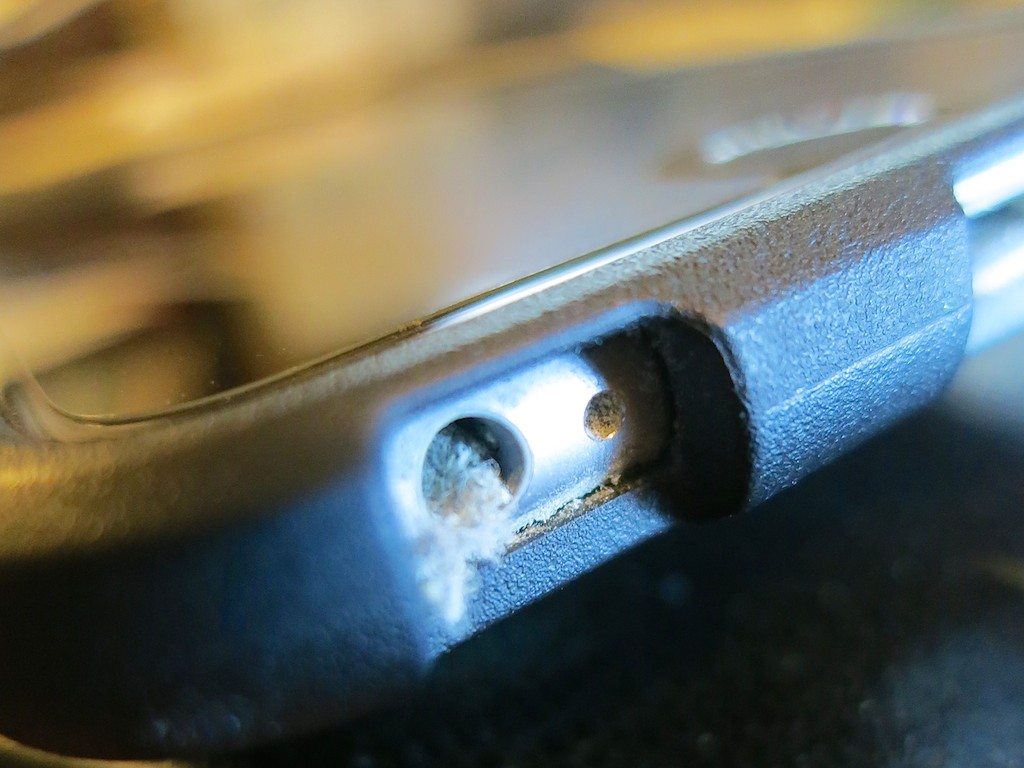
You may not know it, but this dusty mess is growing in your iPhone right now! It’s time to get rid of it…

You may not know it, but this dusty mess is growing in your iPhone right now! It’s time to get rid of it…

Recently, I noticed my year-old iPhone 6 Plus was acting quirky.
(Maybe it’s cranky that it’s no longer the latest and greatest with the new 6S line just released.)

I first started having problems a couple weeks back while using the EarPods. First, the onboard volume buttons on the cable stopped working. Then, the microphone started wigging out. So I figured the earphones had simply gone bad.

I pulled out my backup pair of EarPods.
Same problem.
Hmmm…

Cupertino, We Have a Problem
Then I considered a separate iPhone issue that was simultaneously annoying me. It had to do with my nightly ritual of charging up my trusty iPhone before I went to bed. I began to notice that inserting my Lighting charging cable didn’t create that confident ‘clicking’ sound anymore. The cable went in, but it felt like the connection wasn’t firm. On occasion, I had to push in the cable a second time to activate the charge. It was as if… the connection was failing. As if something was blocking it.

And in fact there was…

A Dusty Blob
I grabbed a flashlight and took a look inside the small opening of the Lightning connector port. I peered closer…

Perhaps not so surprisingly, the hole was partially filled up with pocket link and dust from the right front pocket in all of my pants. I guess it’s been building up over the past 11 months, and it finally grew to a large enough mini-mass, which had been crammed to the back end of the jack hole through my daily charging cycle. Would this prevent the connector from seating properly?

You betcha!

It was time for some emergency surgery.

Calling Dr. Lester!
So I took a pin and carefully extracted portions of the dusty mass until all was clear again.

Bingo!

A toothpick would work too, and I imagine occasionally blowing in some compressed air would be a deterrent to prevent dusty build up.
(I don’t know how durable the inside of the lightning port is to be… so I would tread lightly.)

The Operation Continues
Then I peered into the EarPod jack. Same issue?

It was harder to tell by visual inspection. It just appeared to be a bottomless black hole. So I took the pin and carefully dropped it down like I was a kid again playing my Milton Bradley game of ‘Operation.’

And then I felt it. The spongy muck.
Yep….identical problem… not a surprise.

So I carefully performed the same procedure.
And voilà… my EarPods suddenly worked again!

It’s Not Just Pocket Lint
Who knew pocket lint could be so destructive?

It makes sense that over the course of months, bits of dust and pocked lint will inevitably enter the holes in your iPhone. That said, I never had a problem with the earphone jacks of my older iPhones. Perhaps that’s because they weren’t located on the bottom of the iPhone next to the Lightning jack.
(And in fact, the bottom of my iPhone always touches the bottom of my pocket. So if there’s pocket link to be found, my iPhone will make contact…)

And as for the Lightning connector problem… I jumped from the 4S to the 6 Plus… so this is my first experience with a Lightning port.

Clean Up!
If your iPhone has been living in your pants or purse for a while, you might want to think about giving it a lint inspection.
(It’s probably a good idea to turn your iPhone off first before beginning the operation and don’t use any liquids.)

I guess the other choice is to vacuum your pockets…
(Hey… new tech gadget idea!)