At Home with Tech

Unlock the power of all your technology and learn how to master your photography, computers and smartphone.

Category: Tech Trends

Try This Time-Lapse Idea with Your iPhone

I’ve found numerous opportunities over the past couple of years to shoot slow motion videos with my iPhone. (My six-year-old boy usually moves so fast… it’s often fun to slow some of that down.) But time lapse? Not so much.

In fact, I’ve rarely attempted time lapse. Part of the challenge is you’ve got to plan for it, and it’s going to take you some time to capture.
(That’s the whole point.)

Imagine my glee when I spontaneously generated a time-lapse sequence over the weekend during one of my more mundane of chores… recycling cans and bottles at my local Stew Leonard’s supermarket.

The new variable this time was my son had accompanied me…

What makes this 28-second movie more than the sum of its parts is the fact that my first grader took over all of the heavy lifting.
(I quickly realized I was just along for the ride.)

Take a look at the top of this post!

DIY Tripod
Being an observer for fifteen minutes allowed me the opportunity to try this time lapse.

The hard part was figuring out where to put my iPhone without a tripod. I ended up propping it up against a two by four near the ground, hoping it wouldn’t fall over.

Repetition is the Key
I think this movie is fun because it magnifies repetition to tell its story…
What is boring in normal time is something entirely different sped up.
(Though it’s clear my son was not particularly bothered by the challenge of popping over 300 cans and bottles into the recycling machines. I suppose it didn’t hurt that I told him he could keep all of the redeemed nickels for his piggy bank.)

My difficulty with time lapse to date has been my limited belief that time lapse is supposed to show something grand that’s playing out very slowly.
(You just can’t do that in the moment without some planning.)

Something like this turns that equation on its head. Now we’re looking for repeating, ‘simple’ moments to capture that are anything but grand.

But by collecting the sum of them, you’re creating more of a ‘point of view.’

Now that’s interesting.
(And if you find this obvious, please cut me some slack. We all learn at our own pace!)

Lots of Cans
You might be wondering…
Why so many cans and bottles?

One word – seltzer.
My family loves the stuff.
(But to be fair, I was long overdue for this recycling trip. This represented all of our summer seltzer fun.)

Find More Time Lapse in Your Life
So keep an open mind as you traverse your day to day.
If you find yourself thankfully sidelined during an otherwise mundane series of moments, that series could have some fun visual value as a time-lapse video.

Try it out!

Ode to iPhone 7

Your closest Apple Store is never that far away. As you stare, it calls out like the Sirens…”Buy our new iPhone 7. What’s your move? Well, I’ll tell you what I did… I wrote another poem!

Your closest Apple Store is never that far away. As you stare, it calls out like the Sirens…”Buy our new iPhone 7. What’s your move? Well, I’ll tell you what I did… I wrote another poem!

You are simply the best
Your frame so cool and sleek
The magic in your guts
You’re now the one to beat

The camera’s the thing
Plus has even got two
I think it may be time
To send Elph* to the zoo

Old earphone jack is gone
Who cares that it’s lightning
Except when you’re charging
And tunes blare frightening

Still, here’s the solution
AirPods are invented
You can listen and charge
No looking demented

Now water-resistant
That would be great in rain
But don’t test the toilet
That could drive you insane

Jet black is cool and hip
Yet now you’ll have to wait
It may be Thanksgiving
Until it’s near your plate

I really love the Plus
It’s size giant and bold
All should own big phablets
(Be sure your hand can hold)

I am two steps behind
Just the iPhone 6 Plus
Should I buy the 7?
Is it really a must?

A thousand is a lot
Full RAM and Plus for me
Dollars don’t grow on trees
No tech in life is free

A trade-in program, wow!
Apple will give some bucks
To take your old iPhone
You cannot say that sucks

My old iPhone 6 Plus
Can fetch me some* smackers
To help me feel better
When eating my crackers

But I don’t feel the pull
There’s other gear I want
A DSLR lens
That can snap pics to flaunt

Hey, a new Apple Watch!
Don’t have one of them yet
And it’s waterproof too
I would not be upset

The 7 is mighty
That’s an obvious fact
If your iPhone is cracked
Tiny and three steps back

I’ve not pulled the trigger
My 6 Plus is just fine
I’m okay with old bling
I’ll pour myself some wine

So the choice is now yours
I think my move is clear
This phone is not for moi***
I’ll wait another year

*Canon Elph camera
**$225 for an iPhone 6 Plus in good condition with 128GB of RAM
*** Never say never.

How to Use Dropbox on Your iPhone to Listen to Podcasts

If you’re not into iTunes to help transfer a podcast from your computer to your iPhone, then you should think about moving that file up to the cloud where your phone can find it.

If you’re not into iTunes to help transfer a podcast from your computer to your iPhone, then you should think about moving that file up to the cloud where your phone can find it.

My wife recently invited me to listen to an hour-long podcast that she was interested in discussing with me. “An hour?!” I wondered. Where would I fit that into my busy day? The obvious choice eventually percolated to the top of my narrowly focused brain…

Listen on my way to work on my iPhone!

Whether I was driving or commuting on the train, I could consume this content on the go.

Great!
Now the question was how…

Stream It
The podcast lived on a website… so I could simply stream it directly from there. Sure… that’s the easiest way. But when I travelled through dead zones in cell coverage, I’d be stuck.

iTunes is Always There for You…
The podcast creator, having already thought through this limitation, invited its Apple listeners to download the audio file onto their respective Macs. From your computer, you can move the audio file to iTunes and then manually sync your iPhone/iPad with iTunes to move the file over.
(And no… this particular podcast can’t be automatically accessed and downloaded online from iTunes. That, of course, would make it easier…)

The whole ‘transfer in… then transfer out’ process with iTunes on your computer seemed like an unnecessary amount of work, since I was intending to listen to this podcast only once.

Look to the Cloud
Hmmm…
It all felt so yesterday. I immediately thought that a cloud solution should be able to better handle the challenge….

And of course it can!
Here’s how I did it…

Four Steps to Easy Podcast Prep

Dropbox is my personal cloud-sharing solution.
(There are many others out there.)

Step 1
So I downloaded the audio file from the website to my iMac and then simply dragged the file to a new folder I created in Dropbox.

Step 2
Then, I picked up my iPhone and opened up the Dropbox app…
(Can you believe it… the audio file was magically right there!)

I was already at the finish line in two steps, but the file would only stream when I tapped on it. I wanted to listen locally…

Step 3
There’s a ‘Make Available Offline’ option in the Dropbox app.
I tapped that, and Bam!
Now, I was ready to listen, regardless of cell coverage…

Step 4
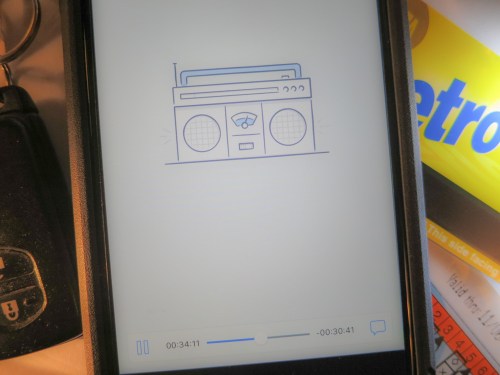
I tapped the ‘downloaded’ file, which I could also access in the ‘Offline’ section, and a Dropbox audio player opened up.

My podcast began to play.

Sweet.

Happy Listening
Again, there’s nothing wrong with moving your podcasts into the iTunes ecosystem. I was just too lazy to take the time to get it there.

Dropping the file into Dropbox was so much quicker.

And that’s more time you can put towards your podcast listening!