At Home with Tech

Unlock the power of all your technology and learn how to master your photography, computers and smartphone.

Category: travel

Five Ways to Enjoy Your Metro North Commute to New York City

If this is a snapshot of your world every weekday morning, you may need a few tips to help you on your commute. Good news…

How hard is the commute into New York City on Metro North? Well, the train experience is not exactly a walk in the park. But there are ways to ‘smooth out’ the trip. If you’re a novice suburban commuter trying to make it to Grand Central Terminal every day, I’ve got five tips that should improve your trek.

#1
Never Buy Your Ticket on the Train
This is rookie-mistake stuff. The conductors charge a significant surcharge to make on-board ticketing especially painful. So plan ahead and keep more money in your pocket! And now with the MTA eTix app for smartphones, you can always buy yourself an e-ticket before the conductor shows up.

#2
Get Used to the Center Seat
If you’re traveling during rush hour, usually only a few seats will be left when you show up. And I guarantee they will be center seats. There is absolutely nothing wrong with politely asking the person sitting in the aisle seat to let you in. Otherwise, you’ll be standing for the entire trip, and how fun is that? I know some may say their personal-space requirements prevent them from squeezing into the center seat. If you’re going to be a regular rush-hour commuter, I’d recommend you try reducing the size of your personal-space bubble. After a while, you’ll find it isn’t as uncomfortable as you’d think.

#3
Expect Weak Cellular Spots Along the Way
Once upon a time, you’d see an ocean of open newspapers during the morning commute. No more. Now, everyone is on a digital device, many of them streaming movies and TV shows. If you don’t have work to do, streaming your favorite content is a great way to spend your time on Metro North. The only challenge you’ll face is the reality that the cellular signal is not evenly strong along the way. (There are multiple 1-bar pockets.) So, you’ll need to rely on buffering to keep your show playing smoothly. That means you shouldn’t randomly jump in and out of watching your content. Once you begin, keep going! If you happen to receive a non-critical text while streaming the last episode of “Stranger Things” on Netflix, I highly recommend that you wait to respond until after that end-credits scene is over.

#4
Admire the Great Work the Conductors Do
I’ve watched a variety of Metro North conductors in action across many years. Without exception, each one has brought professionalism and a friendly attitude with every commuter interaction. That doesn’t mean they’re not sometimes tough when they need to be if a commuter gets a little out of line. It’s clear that the conductors are always in charge. That psychological hierarchy maintains the necessary calm for any public transportation commute.

#5
Buy the Best Muffin at Grand Central Terminal
Once you arrive at Grand Central Terminal, I say it’s time to reward yourself! The best breakfast muffin you’ll find is the ‘apple cranberry walnut muffin’ at Magnolia Bakery on the plaza level. It’s simply amazing.

The bakers seem to only cook up one batch of these muffins on any given morning… so you’ve got to show up early to get one. Any time after 9am is a gamble.

Bonus Tip: Maintain a Flexible Mindset
So, after many years as a ‘train warrior,’ I’m not currently commuting into New York City. (Instead, I brave the unpredictable parking lot known as I-95 to Stamford, CT.)
But as much as everyone I know loves to complain about I-95, it’s not really half bad if you expect the hideous traffic and always have a good podcast to listen to while driving.
(I highly recommend Malcolm Gladwell’s “Revisionist History.”)

I also suggest that you apply the same flexible attitude towards commuting on Metro North to New York City on any given day. Combined with my commuting tips, you could even ‘enjoy’ your train experience!
Good luck!

The Hidden Problem when your Camera’s Internal Clock is Wrong

Don’t forget to take this important prep step with all of your cameras before your next trip to a different time zone…

It wasn’t that long ago when you had to think about the accuracy of your watch and whether it needed to be adjusted. Most watches used to drift a bit. Remember that?

But now, with smartphones and smartwatches infused into our lives, the need to worry about the precise time has been removed, because they’re all synced to ‘network time.’ So, carrying around ‘time’ has become something of a set it and forget it phenomenon.

But you really shouldn’t ignore how the rest of your tech interfaces with time, even if that tech isn’t designed to operate using it as a primary factor. Because when your gear loses track of time, it can really mess you up in unforeseeable ways…

A perfect example is the internal clock in your digital cameras…

What Time Does your Camera Think It Is?
When I snap photos with my iPhone, they always get a perfect time stamp. It doesn’t matter if it’s Daylight Savings or whether I’m on my family vacation in London. Smartphones always know to adjust to the local time.

But if you’re also using other cameras to take some of your pictures, their internal clocks that you probably set a while back may now be inaccurate. And if you haven’t updated them for Daylight Savings Time (guilty) or the different time zone you’re traveling to (guilty), they will be way off.

So what?

The Importance of Maintaining the Sequence of Time
Well, if you’re shooting photos across a defined period, maintaining the sequence of those pictures may be important, such as the order of activities on a family vacation. Without accurate digital time stamps in your photos, you’re going to be in real trouble when you get home and start to go through and organize your pictures.

If you’re using only one camera, this problem won’t matter, because all of your pictures will be consistently off, and their proper sequence will still be maintained.

But if you’re adding in smartphone pictures too, that’s when the perfection of ‘network time’ can create a huge headache for imperfect humans.

Multiple Camera Time-Stamp Paradox
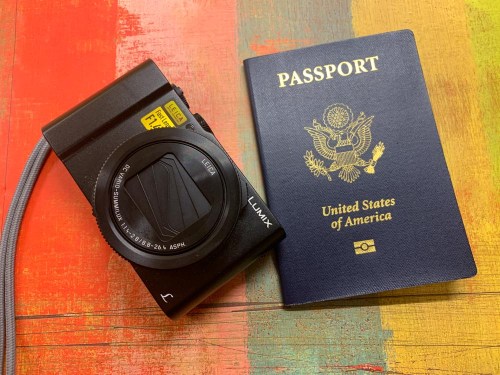
That’s what happened to me after our London vacation from earlier this year. In addition to taking pictures with my iPhone, I also used my GoPro and my Panasonic Lumix LX10.

Granted, my iPhone did a lot of the photographic heavy lifting. But there were moments to use my other gear too.

When I later went through my mountain of vacation pictures in Adobe Lightroom on my iMac, I worked hard to identify a smaller group of show-ready photos. Then, I was horrified to realize that many of them lined up significantly out of sequence. because I simply hadn’t reset the internal camera clocks forward five hours.

I had inadvertently created a ‘multiple camera time-stamp paradox!’

So, what did I have to do to fix the problem?

I needed to go through all of those pictures and manually adjust the capture-time metadata via Lightroom. And believe me, that took time. Time that I didn’t enjoy spending.

Said another way… It was a big waste of my time!
But what was more painful was knowing how unnecessary this stumble was.

Travel Prep Tech Tip
So, here’s a little tech tip before you take your next trip to another time zone…

  • Always adjust your camera’s internal clock to the correct time.
    (And then don’t forget to reset it when you get home!)

Then, when it’s time to display your pictures on your computer or smartphone, they’ll organically remain in the correct order.

Organizing all of your photos throughout life is difficult enough as it is. Don’t make it harder for yourself by accidentally destroying the natural organizing constant of time.

4 Revelations from my Family Vacation to Niagara Falls

If you’re doing a little research about vacationing to Niagara Falls, I’ve got a few tips to share that should improve your experience…

My family and I have just returned from a great vacation to Niagara Falls. Yes, we stayed on the Canadian side, as it was clearly nicer. That said, we did spend one day on the U.S. side, and it was well worth it… The state park surrounding the American Falls is absolutely beautiful, and the “Cave of the Winds” experience where you walk right up to the base of a section of the Bridal Veil Falls was my favorite from the whole trip.

Warning: you will get soaked if you attempt to walk into the section of the wooden walkway called the “Hurricane Deck”… so dress accordingly. (It’s a big clue when they give everyone souvenir sandals and a plastic rain poncho to wear.)

If you’re planning your own trip, here are four other learnings from my experience…

#1
Canadian Money
The way I understand it, the going wisdom when you use your American credit card is to try to pay in U.S. dollars as opposed Canadian dollars. That’s supposed to end up costing you less in conversion fees. But I found that most of the mobile credit card terminals I came across slapped a 5% tax on top of my purchase if I selected the U.S. dollars option. So I ended up just charging in Canadian dollars.

#2
Tourism Tax
Speaking of taxes, did you know that businesses in Niagara Falls, Ontario have the choice to add an optional “Tourism Tax” to your purchase? And I don’t mean optional as in some businesses do it and others don’t (which is true).

I mean… you as the consumer have the option to pay it… or not. That’s right, you don’t have to pay the Tourism Tax. You just have to politely say you’d like to decline paying it. And then they take it off your bill.
(We got this tip from a waitress at a restaurant. Thank you!)

It’s actually an optional tourism fee that’s generally 3% of your bill, although it can be much more, and it looks like just another tax.

It’s not a tax. So, buyer beware.

#3
Taking Photos with All that Water
You might expect I took a ‘few’ pictures along the way. And let me tell you, it wasn’t difficult to take a magnificent photo by just pointing my camera in the right direction. That said, it was sometimes hard to capture exactly what I wanted.

Why?

In three words… all that water.

If you’re going to ride on the Maid of the Mist or the Canadian Hornblower boat, it’s about all that water… up close and spraying in your face and onto your camera.

Most of our best Niagara Falls moments were connected to the visceral experience of the power of Niagara Falls and the spray from all that water.

If you want to capture those moments with a photo, you’re going to need a waterproof camera. Using a newer iPhone? No problem. They’re waterproof.

But let me tell you, the touch screen doesn’t work so well when it’s dripping wet. And you really need to keep water droplets off the lens. Otherwise, your photos will look like your phone was covered in Vaseline. But quickly wiping off a tiny smartphone lens is hard to do when your fingers are all wet.

The only option I had was to find the driest piece of clothing I was wearing and then rub off the lens on the precious cotton fibers.

#4
The Limitations of your Smartphone
Ultimately, I think you should prepare for the need to take more action photos vs. scenic pictures. It’s easy to take a shot of Niagara Falls. It’s much harder to get the shot of your family experiencing Niagara Falls.

That said, I also had my GoPro with me, and that was a great choice. I don’t know about you, but as ‘bulletproof’ and waterproof as smartphones have become, they can still break if you drop them (even with a protective case).

And the risk of being so up-and-close to Niagara Falls is there’s no net… for either you or your smartphone. I wonder how many smartphones have been dropped by careless tourists and taken the infamous plunge.

I’ve happily used my GoPro with the expectation that one day, it could get swept away in one of our family adventures. As sad a moment as that will be, I’ll take solace that it wasn’t my iPhone.

Don’t Give Up
This all leads to my conclusion that to capture your experience as opposed to a few simple family selfies with Niagara Falls in the background… you’ll need to take lots of shots. Many will fall short… and if you’re lucky, you’ll capture a few gems.

That’s what I did, and I wasn’t entirely disappointed…


Keep it Real
It was ironic that all of the tourist activities include an almost mandatory green screen “say-cheese!” photo opportunity while you wait on line. And when you’re done, they’ve magically got your family digitally keyed into a beautiful shot of Niagara Falls… that you can buy.

While you might consider this option and not have to worry about risking your own gear to get a similar shot, you need to know that it’s not at all the same!

Smiling in front of a green wall does not at all approximate your truly disheveled, drenched and delighted look when experiencing the real moment.

Hold on tight to your camera, bring a dry cloth for the lens and go capture your moment!

Enjoy your adventure to Niagara Falls!