At Home with Tech

Unlock the power of all your technology and learn how to master your photography, computers and smartphone.

Tag: Apple Watch

Four Ways Technology Changed My Life this Year

I’m happy to report that my use of these tech devices has indeed improved my day-to-day life. Here’s why…

Technology is usually meant to make your life better. While it can often be more frustrating than anything else, I find that it does occasionally have a clearly positive impact.

Here are the four tech innovations that made a meaningful difference for me this year…

#1
Apple Pay on My Apple Watch Replaced My Credit Card

I didn’t really feel the impact of Apple Pay when I had access to it on my iPhone. I still had to pull my iPhone out of my pocket… so the physical exercise was mostly the same as sliding a credit card out of my wallet.

Plus, I was still locked into the mindset of having to use my credit card and chipping/swapping it. The concept of contactless payments still felt foreign, and I just couldn’t get comfortable with it.

Then I tried Apple Pay with my new Apple Watch, and I finally experienced my ‘breakthrough.’

By simply double clicking the side of my Apple Watch to activate Apple Pay and then holding my wrist near the payment terminal to complete my payment… that simplicity and convenience really opened my eyes to the obvious benefit of Apple Pay.

It’s so fast. Plus, I don’t have to play roulette with the payment terminal to see if my credit card’s chip (or the payment terminal) is going to malfunction again.

#2
GoPro Became My New Family Vacation Camera

My GoPro allowed me to finally go on vacation with my family and not stress over the possibility of destroying my camera if I tried to snap a photo.

I used to treat the beach like the landscape of a hostile foreign planet. The corrosive nature of salt water was clear and if nothing else , the salty, moist air would quickly cloud the lens. A tiny molecule of sand could fly by and wedge itself into the lens mechanism, immediately immobilizing it.

In short, the beach was a clear danger zone for my vacation photography.

But my new GoPro was essentially impervious to these threats.

  • Sand? HA!
  • Underwater? Now we’re talking!!
  • How about some slow motion video? Yes, please!

I should mention it’s a good idea to wash your GoPro with fresh water after a day of action at the beach.
(Dried salt moisture can seal the little watertight doors in place, making it difficult to pop the battery or memory card out.)

This year, I was finally able to capture some fun family shots at the beach and also have fun while doing it…

Thanks, GoPro!

#3
I Generated Whole-House Wireless Internet Using Mesh WiFi

I lived for years with spotty WiFi in our house. The weakest WiFi signal was actually in our bedroom. That’s such a bummer, right?

I thought about extending the signal of my Apple Airport Extreme many times, but I was concerned about degrading my WiFi. So, I did nothing…

Until I read that Apple had exited the WiFi router business. And I finally decided to make a change…

I retired my Apple Airport Extreme.

And upgraded to a new WiFi mesh system:

My Orbi consists of a base unit, which essentially replaced my Apple Airport Extreme and a satellite device, which I placed in the center of my house. Together, the two devices successfully created a large enough WiFi bubble to reach all corners of our little house.

Suddenly, whole-house WiFi became the standard throughout the Lester universe.

I can’t tell you how satisfying it is to check your email before your head hits the pillow and see strong WiFi bars.

#4
YouTube TV Made Me Cut the Cord

I cut the cord this year.
…Can I say that again?

Yep, I cut the cord this year.
(Thank you.)

I replaced my cable service with YouTube TV, which is an app that streams all of the cable networks I want for just $40/month.

Yes, I’m still paying Cablevision for my internet… so technically the cord is still technically tethered.

But I returned my cable box, and my decades long relationship with an industry that helped to define my existence finally entered a more enlightened reality.

I’m saving money, only paying for what I want, gaining a sense of control and successfully trying something new.

I highly recommend it.

Don’t Forget the Human Factor
I know these ‘headaches’ that technology has helped to alleviate are First World problems.
(I do understand that.)

And I’m thankful I get to complain about these particular issues.

That said, if you’re fortunate enough to have the resources to play with technology, then technology should simply play nicely with you.

And sometimes, you’ve got rely on the human equation to figure out how to really make technology work… for you.
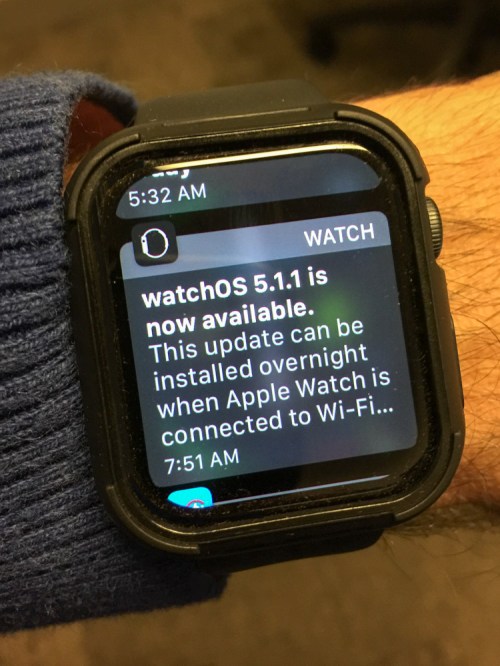
How to Update Apple Watch’s Operating System

When your Apple Watch stops displaying sweet nothings about your potential and starts talking business, it’s time for a software update. Here’s how…

My new Apple Watch has been reminding me every morning that an updated operating system is available, and I can install it overnight if it’s connected to Wi-Fi.
(That’s a nice way to say that I really should be taking some responsibility as a human and keep my technology up to date!)

And of course, I forget about it the next day, and the cycle has been repeating itself.
(It would help if my Apple Watch reminded me right before I went to sleep.)

But wait a minute… my Apple Watch is connected to Wi-Fi overnight….
Why doesn’t it just update itself?

Is there something more you need to do?

Find the watchOS Update
Well, of course.
It’s just like any Apple operating system update. You’ve got to actively opt in…

For the GPS model:

  • Open Apple Watch app on your iPhone
  • In “My Watch…”
  • Tap “General”
  • Tap “Software Update”
  • Tap “Install”
  • Enter your password

And then, your iPhone begins the software download process.
…followed by the update to your Apple Watch.

Get it Done Overnight
So, much of the heavy lifting actually takes place on your iPhone.

Do you really need to do the update overnight?
(Is it that slow?)

Not necessarily, but any Apple operating system update takes some time… so, I think it’s a great practice to do it overnight when you’re not waiting for it to finish up.

Those Compliments are Nice
Happily, my Apple Watch is now updated and free to display its morning affirmations again.

I must admit, those little encouraging messages from my Apple Watch do help to perk me up as I’m working through my cup of Joe in the morning.

And yes, by the way… that’s an Apple Watch Series 4 plastic bumper I’m sporting in the photo above. I’m not proud of these training wheels, but this little third-party ‘Frankensteinian’ cover has helped me to stop worrying that I’m going to whack my wrist and scar my beautiful Apple Watch.
(It’s made by Alritz and costs $9.90 on Amazon Prime.)

So, now my Apple Watch is both up to date and protected.

#happyhuman

Diary of a New Apple Watch User

I’ve joined the growing crowd and strapped an Apple Watch to my wrist. Now, I’ve just got to figure out how it works! Here’s my experience so far…

I was in a meeting at work, and I must have leaned on my new Apple Watch. Suddenly, Siri loudly proclaimed, “Is there something I can help you with?” The whole meeting stopped, and everyone looked at me.

I apologized for Siri, (literally) and we continued.

I’m not exactly sure what happened, but let’s just chalk it up to human error.

Wearing HAL on Your Wrist?
It’s moments like these which remind me that wearing my Apple Watch Series 4 takes some getting used to. It’s not difficult to figure out the basics, but I’ve definitely had to go through a learning curve as a first-time Apple Watch user (GPS-only model).

Case in point:
I like displaying the weather complication that shows off the day’s predicted temperature range. But I’ve realized when you travel to another city… the watch’s complication doesn’t automatically update its location. Sure, you can easily select the new city to check out the weather, but my Apple Watch always defaults back to my ‘home city.’

I discovered this little frustration when I traveled to Orlando last week. I figured the fix had to be buried in the settings somewhere. It was… but not in the Apple Watch. It was in the Apple Watch app on my iPhone…

  • Scroll down and tap on ‘Weather’
  • Tap ‘Default City’
  • Choose your town!

Easy, right?
Well, it is…now.

Prepare for Impact
My biggest problem has centered around my fear of accidentally whacking my wrist against a wall’s edge or a door handle and scratching up my precious Apple Watch. I know the thing is supposed to be impervious to daily bumps and bruises, but I’ve read enough online commentary to know it will eventually show wear and tear just like any watch.

I’ve definitely banged up some of my other watches over the years. So, I know it’s just a matter of time for my Apple Watch.

Over these early weeks, I’ve found myself consciously leading with my body’s right half to protect my left wrist.

That’s kind of silly, right?

So, I made the decision to Frankenstein my Apple Watch and give it a little armor with ‘bumper’ protection. I know that kind of move totally destroys the beautiful design of the Apple Watch, but I figured any hideous add-ons could be discarded as training wheels down the road.

As I looked on Amazon to review my choices, I realized there weren’t many options available yet due to the slightly different sizing of the Apple Watch Series 4. All of the existing third-party Apple Watch cases and bumpers had to be redesigned and rushed into production.

I went with a “Shock Resistant Bumper Cover” From Alritz.
$9.90 on Amazon

It’s a plastic bumper that’s rigid in some parts and rubbery in others. It covers the watch’s sides and also sports a raised bezel, which for me is the key. I’m figuring the greatest dangers to my Apple Watch will come from side or edge impacts as opposed to a direct assault to the screen.
(That said, I know I can always add on a screen protector to further shield my Apple Watch from life’s dangers.)

And how would I rate my Alritz bumper…?
It’s absolutely fine…
(In Amazon speak, I’d give it 4 stars.)

I wouldn’t exactly call it a design triumph, although I do like its raised bezel. The bumper fits properly, and blends in with my Apple Watch’s form factor.

Most importantly, it’s given me a whole lot more peace of mind.
I’d say that’s worth ten bucks.

Down the line, I’m sure there will be other choices to considering buying.
For now, I’m happy.

Technology That’s Good for You
One other realization I quickly discovered is how many other people are wearing Apple Watches or other fitness trackers. It’s not at all something unusual anymore.

What makes it special is how you integrate it into your own life. And yes, I’m paying a little more attention now to my fitness and how many steps I’m taking every day. And yes, I’m pleased when I hit my ‘Move’ goal for the day.

So, I’m enjoying my Apple Watch, and it helps me to be healthier. I’d say that’s worth the price right there!

…Now, I’ve just got to figure out how to make Siri behave when I’m at work!