At Home with Tech

Unlock the power of all your technology and learn how to master your photography, computers and smartphone.

Tag: GoPro

Four Ways Technology Changed My Life this Year

I’m happy to report that my use of these tech devices has indeed improved my day-to-day life. Here’s why…

Technology is usually meant to make your life better. While it can often be more frustrating than anything else, I find that it does occasionally have a clearly positive impact.

Here are the four tech innovations that made a meaningful difference for me this year…

#1
Apple Pay on My Apple Watch Replaced My Credit Card

I didn’t really feel the impact of Apple Pay when I had access to it on my iPhone. I still had to pull my iPhone out of my pocket… so the physical exercise was mostly the same as sliding a credit card out of my wallet.

Plus, I was still locked into the mindset of having to use my credit card and chipping/swapping it. The concept of contactless payments still felt foreign, and I just couldn’t get comfortable with it.

Then I tried Apple Pay with my new Apple Watch, and I finally experienced my ‘breakthrough.’

By simply double clicking the side of my Apple Watch to activate Apple Pay and then holding my wrist near the payment terminal to complete my payment… that simplicity and convenience really opened my eyes to the obvious benefit of Apple Pay.

It’s so fast. Plus, I don’t have to play roulette with the payment terminal to see if my credit card’s chip (or the payment terminal) is going to malfunction again.

#2
GoPro Became My New Family Vacation Camera

My GoPro allowed me to finally go on vacation with my family and not stress over the possibility of destroying my camera if I tried to snap a photo.

I used to treat the beach like the landscape of a hostile foreign planet. The corrosive nature of salt water was clear and if nothing else , the salty, moist air would quickly cloud the lens. A tiny molecule of sand could fly by and wedge itself into the lens mechanism, immediately immobilizing it.

In short, the beach was a clear danger zone for my vacation photography.

But my new GoPro was essentially impervious to these threats.

  • Sand? HA!
  • Underwater? Now we’re talking!!
  • How about some slow motion video? Yes, please!

I should mention it’s a good idea to wash your GoPro with fresh water after a day of action at the beach.
(Dried salt moisture can seal the little watertight doors in place, making it difficult to pop the battery or memory card out.)

This year, I was finally able to capture some fun family shots at the beach and also have fun while doing it…

Thanks, GoPro!

#3
I Generated Whole-House Wireless Internet Using Mesh WiFi

I lived for years with spotty WiFi in our house. The weakest WiFi signal was actually in our bedroom. That’s such a bummer, right?

I thought about extending the signal of my Apple Airport Extreme many times, but I was concerned about degrading my WiFi. So, I did nothing…

Until I read that Apple had exited the WiFi router business. And I finally decided to make a change…

I retired my Apple Airport Extreme.

And upgraded to a new WiFi mesh system:

My Orbi consists of a base unit, which essentially replaced my Apple Airport Extreme and a satellite device, which I placed in the center of my house. Together, the two devices successfully created a large enough WiFi bubble to reach all corners of our little house.

Suddenly, whole-house WiFi became the standard throughout the Lester universe.

I can’t tell you how satisfying it is to check your email before your head hits the pillow and see strong WiFi bars.

#4
YouTube TV Made Me Cut the Cord

I cut the cord this year.
…Can I say that again?

Yep, I cut the cord this year.
(Thank you.)

I replaced my cable service with YouTube TV, which is an app that streams all of the cable networks I want for just $40/month.

Yes, I’m still paying Cablevision for my internet… so technically the cord is still technically tethered.

But I returned my cable box, and my decades long relationship with an industry that helped to define my existence finally entered a more enlightened reality.

I’m saving money, only paying for what I want, gaining a sense of control and successfully trying something new.

I highly recommend it.

Don’t Forget the Human Factor
I know these ‘headaches’ that technology has helped to alleviate are First World problems.
(I do understand that.)

And I’m thankful I get to complain about these particular issues.

That said, if you’re fortunate enough to have the resources to play with technology, then technology should simply play nicely with you.

And sometimes, you’ve got rely on the human equation to figure out how to really make technology work… for you.

4 Ways to Get the Most Out of Your GoPro

I’ve enjoyed carrying my GoPro around in my pocket on vacation to capture the moments my other cameras wouldn’t be ready for. Here are a few tips I’ve discovered to help ensure your GoPro gets it done!

I recently returned from a week’s vacation on Cape Cod where I put my new GoPro HERO6 Black to work documenting my family’s beach and lake adventures. I especially enjoyed capturing my 8-year-old boy underwater.


But there was one problem…
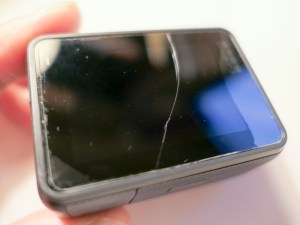
A crack somehow showed up on the back LCD screen!
(There was no moment of impact that I was aware of.)

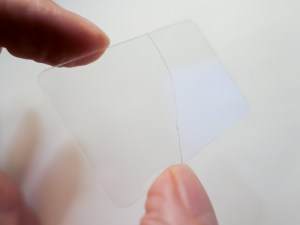
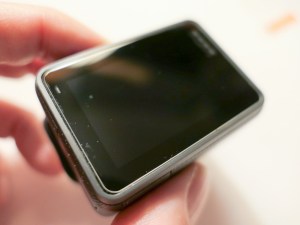
Previously, I had attached a plastic screen protector to the LCD in anticipation of this kind of unsettling moment.

The question was whether the top-to-bottom crack was on the plastic protector…
…or on the screen.


Phew!

Protect Your LCD
I think it clearly makes sense that if you’re going to put your GoPro in harm’s way, you have to give it some additional ‘armor.’
(They’re not tanks.)

I originally went with a lens and LCD protection kit made by GoPole. It comes with a lens cap and two clear covers for the lens and LCD. These near-invisible shields are made out of ‘shatterproof, tempered glass.’

But, clearly, they’re not ‘crack proof.’

Not that anything is… but I still decided to choose a different manufacturer for my second attempt at GoPro protection.

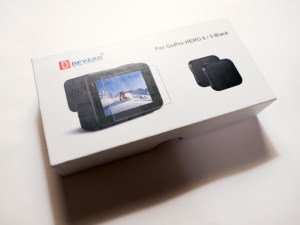
I landed on a similar kit made by Deyard.


It’s received good reviews on Amazon and costs less than half of the GoPole kit. Plus, it comes with two sets of screen and lens protectors and two lens caps.

$8.99 on Amazon
Click.


The Deyard protection plan may not necessarily be any better than GoPole’s. The fact that there are backup items in the Deyard kit perhaps reflects the reality that any screen protector is not impervious to in-the-field abuse.

As for having multiple lens caps… that’s a super idea, because lens caps have their own special way of disappearing…

If you want to avoid risking unnecessary damage to the glass on your GoPro, you’ll probably need to spend a few bucks every so often replacing these protectors, no matter which manufacturer you go with…

Minimize Ghosting by Turning Off HDR
In a portion of my vacation photos showing people, I ran into the problem of ghosting, where certain body parts displayed echoes. It was as if my GoPro had trouble locking in the action.


It’s so weird, because this happened in bright sunlight where most cameras don’t have this kind of problem.

So, I had originally turned on the HDR mode when I set up my GoPro. I figured… “Why not?”
HDR quickly takes several photos at different exposures and stitches them all together to create the best image possible.

But that extended sequence can lead to the ghosting problem… which makes total sense.

So, turn off HDR if you’re having issues freezing the action in your GoPro photos.
(And don’t forget to hold the camera steady!)

If you continue to use HDR, you’ve also got to pay attention to whether you’re moving!

Did I mention you might want to turn off HDR?

Keep People Towards the Center of Your Shot
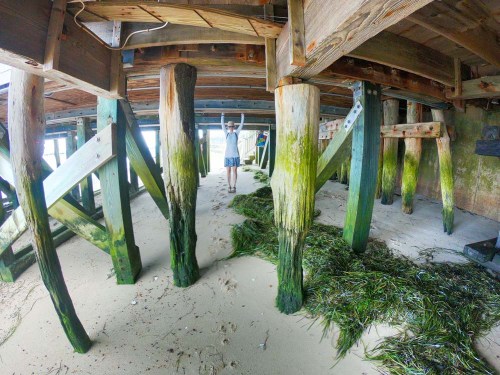
I’ve previously mentioned my infatuation with my GoPro’s wide angle lens and how it reveals so much more of an image’s story.

The challenge is keeping your subjects out of the distorted fringes of the wide angle. Otherwise, they’ll look like aliens with warped heads.

This can be especially challenging when you’re snapping a photo with multiple people crammed in. Those on the ends will be at risk.

The good news is the wide angle lens should naturally provide plenty of safe space around everyone in your shot unless you intentionally try to fill the frame by walking up really close.

Even if you’re going for a group selfie, you should be fine as long as you keep the shot centered.

Download a QuikStory Video
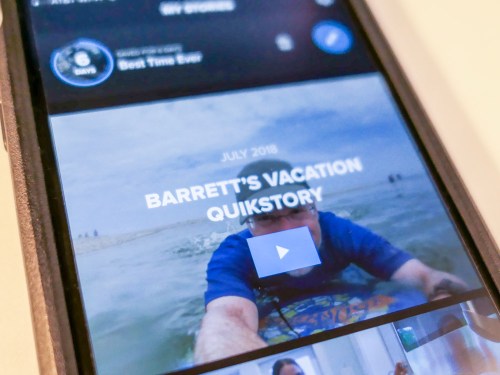
I’ve also talked about how impressed I am with GoPro’s QuikStories video-editing smartphone app, which quickly throws together and shares a short music video using your GoPro’s action videos and photos.

The only glitch you may experience when sending out web links of your Quikstories to your family and friends is that they may not know how to ‘save’ them.

Your videos will play back online embedded in a GoPro web page, which I believe will eventually disappear when you delete the specific QuikStory project from your smartphone.

So, the web link is not forever…
Some folks may want to save your video file for their ‘happiness’ archive.

To do that, they need to click on three really tiny dots on the bottom right of the page with the video. Doing that will reveal the download option.

Not that all of your GoPro QuikStories are forever masterpieces… but it could be important for someone to know how to save one of them…

The Human Factor Still Matters
My GoPro HERO6 Black has proven it has many tricks up its sleeve. But like any piece of tech, it’s not magic.
(Nor indestructible)

A little human care and operating knowledge can really make all the difference when you take it on your next family adventure!

Has this GoPro App Revealed the Future of AI Video Editing?

QuikStories is a GoPro video-editing app that you can download to your smartphone. It will independently edit together a slick movie from your GoPro’s vacation photos and videos. How quick and useful is it? Here’s my experience…

I recently returned from a wet and sandy family beach vacation to the North Fork of Long Island. Last week, I wrote about how I captured amazing wide angle shots of my son in the ocean using my new GoPro Hero6 Black.

Another benefit of playing in the GoPro universe is the opportunity to use GoPro’s QuikStories app to quickly generate edited videos of your vacation highlights using just a smartphone.

How quick?

A Video a Day
Well, I challenged myself to create a QuikStories video for each day of our vacation and immediately share it with our extended family. One ground rule was not missing any part of the daily fun, because I was too busy editing…

Here’s how I did it…

Every night, I snuck in fifteen minutes of ‘media management’ as our eight-year-old boy was reading before his bedtime… I wirelessly downloaded that day’s photos and videos from my GoPro to my iPhone’s GoPro app. Then, I activated the companion QuikStories app, which immediately began cooking up a little movie all on its own.
(Hello, HAL.)

From there, I began inserting a bit of my own creative direction, which included adding a title at the top, choosing different edit points for the video clips and deleting photos that weren’t necessary.

Editing Videos in the Palm of Your Hand
I found that I was able to quickly rough the videos together in the early evening and then pick up the project the next morning with my cup of Joe and finish tweaking. I easily got these little bursts of video fun out the door before anyone else was up.

My first videos took a little longer to generate, because I was trying to figure out the app’s interface. But once I knew what I was working with, I was able to complete each video in not much more than half an hour…

And that’s me being picky. I’m sure the target audience probably gets it done in 15 minutes or less…

Here are a couple of tips for new users:

  • You only get seven days to finish each project. After that, the GoPro app deletes your unused media to make room for more content on your smartphone. So, you’ve really got to be quick!
    (All of your photos and videos remain on your GoPro’s microSDXC card.)
  • You need to activate 1080p and 60fps in the app’s settings to export your final videos at that quality. Otherwise, it will default to just 720p and 30fps.
  • You can instantly share your new videos with GoPro-hosted video links, which remain active as long as long as you don’t delete your original project.
    (I think it’s also a good idea to also export and save your videos elsewhere for long-term storage.)

Check Out My QuikStory
For the purposes of this post, I quickly whipped up this 22-second video using a bit of my vacation content to show off what a QuikStory looks like…

Nifty… right?

The End of Video Editing as We Know It
Guess what? Through my QuikStories experience, I think I’ve seen the AI future of video editing…

QuikStories can edit photos and video action to a musical beat like magic. It’s pretty amazing.

If you’re just working with twenty or so photos, the app is fully capable of quickly taking an edit to the finish line.

But when you’re adding in videos with ‘sound bites,’ that where the app can hit a brick wall. You’ve got to go in and edit the beginning and ending of a spoken sentence manually. And that’s fine, until you realize you don’t have any of the flexibility of Final Cut Pro or Adobe Premiere Pro…

Sure, you can easily slide to the beginning of an edit point and watch that, but you’ve got to play it through to hear the ‘out point’ to make sure it’s right.
(Frustrating)

My insistence on perfect audio contrasted with the focus of the QuikStories platform… which is to give you something fun, rough and quick!

Everything was so much easier when I didn’t force the use of ‘nat’ sound.

There are predesigned editing style templates you can choose between. Many of them weren’t so useful.
(Ugly transitions)

But a few of them got the job done for me…. I particularly liked ‘Snappy.’

Quik is Quick… and Pretty Good
As someone who understands how to edit video as a profession, the experience of working with QuikStories was entirely imperfect. At best you’re able to nudge the software to only approximate what you really want to do.

And if you try too hard, you end up defeating the intended simplicity of the entire product.
You’ve really just got to let go…

The fact that one or two taps can get you a finished video (though hardly what you might consider ‘polished’) is pretty incredible…

And so I successfully completed my video-a-day challenge while drinking my cup of coffee and watching the sun come up over the water.

  • It was quick.
  • It was ‘easy.’
  • I wouldn’t say it was exactly ‘good.’
  • But it was fun!

The videos were what they were… and everyone loved them.
(I really had to wrap my head around that reality.)

The Future of the Video Editing Profession
To all of you professional video editors out there… I don’t think your jobs are going to be taken over by computer software anytime soon…

But if you’re just starting your career, I’d pay attention to this particular disruptive piece of digital evolution.

This software can already edit to music. It’s only a matter of time until future upgrades will be able to accurately spot clean in and out points for sound bites.

IBM Watson has already demonstrated the ability to select the scenes for a movie trailer.

If you’re planning out your next few decades, you might want to think about other career options…

GoPro has Ushered in a New Reality
When someone asks me what I did on my summer vacation, I could say that I’ve stumbled upon an impossible future that’s already here.

Being able to capture cool photos and videos…anywhere in the field or underwater with a device that fits in the pocket of your swimsuit…
And then quickly activating an app on your smartphone to create and share a slick video…

To me… that’s crazy.
And so delightful.

Soon enough.. that will just be the norm.

And I know for many of us… it already is.