At Home with Tech

Unlock the power of all your technology and learn how to master your photography, computers and smartphone.

Tag: photography

How to Prep Your Tech for a Vacation to Europe

The last thing you want when you’re on vacation is frustration with your tech. Either you leave it all at home and go off the grid or do some easy prep…

Bon Dia! My family and I are back from our little trip to Barcelona, and as you might expect, I ran across a few learnings that might be useful for your next holiday overseas…

Eight Tech Tips to Make Your Tech Work For You in Spain

1.
Before You Leave, Download Media for Local Viewing on Your iPad
I discovered that certain streaming video services didn’t work overseas. Amazon Prime Video failed the test. But Netflix worked like a champ! Before we left and without knowing which apps would work for sure, I downloaded a few episodes of my son’s current favorite video series… Amazon’s “Gortimer Gibbons Life on Normal Street.”
(My hedge paid off.)

2.
Not All Streaming Music Apps will Work Either
Pretty much the same story as video apps. Pandora choked in Barcelona, but Amazon Music worked just fine.
(I brought along my portable Logitech Bluetooth speaker to stream some local tunes during my morning coffee.)

3.
Avoid 3% Currency Conversion Fee When You Use Your Credit Card
The way to do that is pay in ‘Dollars’ instead of ‘Euros.’ I found that many of my MasterCard transactions in Barcelona offered the choice. You just have to tap the ‘Dollars’ option on the mobile terminal when it’s offered. (And sometimes for some reason, it wasn’t.)
Thank you, Mastercard for the suggestion.
(I had called customer service before I left to let Mastercard know I would be using the card in Barcelona.)

4.
Don’t Forget to Bring Your Earphones Onboard for Airplane Screen Time
I think by now… most planes that offer seatback monitor viewing are outfitted to use standard mini audio jacks. So your EarPods will work just fine. In fact, they’re a far superior option than using the free earbuds the airlines hand out with your free drink and snack.
(Actually, Delta fed us very nicely… and the stewardess also gave our son his very own Delta wings!)

5.
Clear Up Space on Your Smartphone for Vacation Photos and Videos
One quick way to find large files to remove is to delete a movie or two you’ve previously downloaded from the cloud.
(You can always reload them later.)
You really don’t want to run out of room on your smartphone when you’re snapping that amazing photo of la Sagrada Familia.


6.
Take an Extra Memory Card for Your Camera
If you also carry a separate camera beyond the one in your smartphone, (good for you!) the same rules apply as above. You don’t want your camera to run out of space either! Better yet… treat yourself and start with a brand new memory card! You’ve spent how much on your plane tickets? I say add an extra twenty bucks into your budget for a fresh flash card!

7.
Bring Portable Power to Keep Your Mobile Gear Going
Why risk it? Power stick for your smartphone. Extra battery for your camera. It’s a practical move but also designed to relieve stress. You’re on vacation… right?!

8.
Don’t Forget to Get Your Smartphone an International Plan Before You Leave
If you don’t, your next mobile bill is going to shock you. Alternatively, I don’t recommend hobbling your smartphone and only using the occasional free Wi-Fi hotspot to check in with your world. Again… you’re on vacation! Enjoy your smartphone if you want. Give it full access and stay connected.
(I signed up for the International Day Pass plan for $10/day from @AT&T.)

Release Your Photos!
And when you get back from your big trip, I’ve got one more suggestion for you…

Start sharing your pictures!
(People don’t care about last year’s vacation!)

How a Few Photos Will Frame the Story of Your Travels

You know the saying… a picture is worth a thousand words. How you integrate a few key photos into your post-trip conversations can be critical towards charting your saga.

You know the saying… a picture is worth a thousand words. How you integrate a few key photos into your post-trip conversations can be critical towards charting your saga.

The amazing experience of an overseas trip can quickly start to evaporate much like a dream as quickly as the next morning. How are you supposed to lock in all of those great memories and then share them with your family and friends?

Sure, it’s probably not too difficult to relay the major headlines, but what about all of the moments that made your little adventure your own?

I believe that quickly sharing a few photos (and videos) you captured is the best way to lock it all in and help provide the details of your story.

Don’t wait a month to go through your pics and figure out the best ones to share. That’s way too long. People are interested in knowing what just happened to you. Yesterday’s story is old news.
(Yes, even for you)

I say you’ve got a week… max, before your travel photos lose much of their impact in helping you tell your story.

And for those of you who may not be natural storytellers in front of a crowd, your photos can do a lot of the heavy lifting. From there, all you’ve got to do is provide a little more color with your own words…

Seven Days in Thirteen Images
Let’s do a little exercise together to demonstrate how using a little photographic tech can quickly bring your trip to life and easily frame your experience for others…

barrett-lester-in-davosA week ago, I returned from my trip to Davos, Switzerland. I snapped pictures with my new Panasonic DMC-LX10 ‘premium’ compact camera
and my old iPhone 6 Plus.

davos-mountain-view

Those Swiss Alps are really beautiful.

train-ride-to-davosThe train ride from Zurich was a bit surreal.

davos-at-nightDavos is a super cute town.

two-horse-powerSome of the local residents don’t lean heavily on modern tech.

davos-at-dawnIt was wicked cold.
(Like 2 degrees Fahrenheit in the morning)

muesli-yogurtI sampled some of the local cuisine. I made a point to have some Weiner Schnitzel and try the fondue. I really enjoyed muesli yogurt for breakfast.

tiramisuThe tiramisu rocked.
(We also ate some great pizza, which I wouldn’t expect to find in Switzerland.)

swiss-payphone-at-zurich-airportSome of the tech was kind of the same.

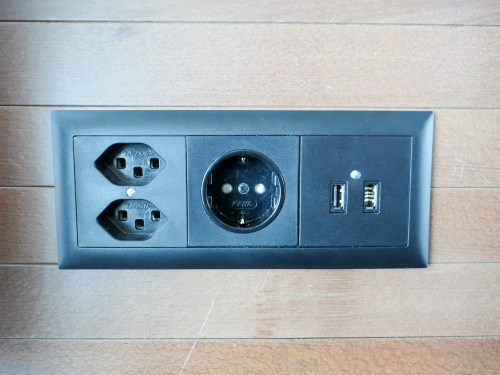
power-outlets-at-zurich-airportOther tech elements were expectedly different.

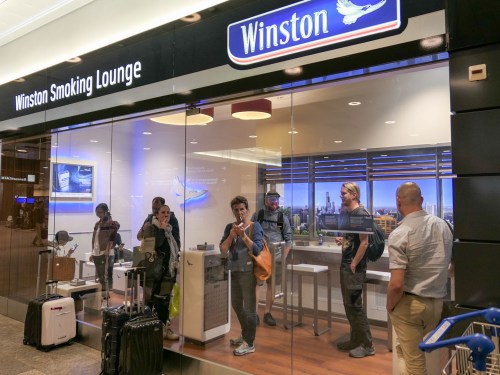
winston-smoking-loungeThey still have smoking lounges?!
(Zurich Airport)

freshly-baked-bread-at-2amWe passed by a closed bakery at 2am and spotted a mustached man in front of a wood-fired oven making bread for the next morning. He spotted us and sold us a hot loaf for three Swiss francs.
(Yum)

Show the Action!

Davos Tobaggan Race

…And after the end of a busy week on the job, we might have squeezed out a few moments to go tobogganing from the top of a mountain.
(Thanks to my friend Ichiro for capturing the GoPro footage.)

When to Know When
After these thirteen images, don’t you now have a decent sense of my experience?

One last piece of advice:
You’ve got to be deliberate when finding these ‘peak moments’ to capture. And be willing to endure a bit of blowback from others around you, who might be moving through these moments at a slightly quicker rate than you are.

That said, it’s always a balancing act.
There’s a time to take your camera out. And the times to put it away.

It’s always nice to capture a memory, but never forget to enjoy the moment!

How to Remove an Undead Zombie Eye from a Photo

halloween-eye

Sometimes a perfectly good-looking eye won’t reflect its twin in a camera’s flash. That can really ruin a picture. Bring it back to life in seven easy steps with some photo-editing voodoo from Adobe Lightroom!

I call it ‘Dead-Eye Syndrome.’ And it’s a killer. It can unexpectedly strike at the heart of your favorite photos.

We all know how ‘red eye’ is a common problem with flash photography.
And how that devilish defect tends to occur in low-light situations when someone’s pupils are wide open.
(Blue-eyed people have a greater problem with this than brown-eyed folks.)

But barring this complication, eyes tend to normally reflect the flash in the form of a glint or sparkle.
Totally expected…

In certain circumstances though, one eye may unfortunately reflect the flash less directly than the other eye. Or sometimes not at all….
Now that can look really weird!

And the otherwise best photo you’ve taken in years can make somebody look like an undead zombie.

This Dead-Eye Syndrome is definitely going to ruin that pic…

Time for an Eye Job
Red eye is so easy to fix these days. Cameras and computer software have simple tools to magically turn all that red to black.

But what are you supposed to do with a dead eye?!
Well, to bring it back to life, you’ve got to give it the similar glint of its partner.

And that’s going to take a little tech voodoo…

Dead Eye Surgery in Seven Steps
The basic task is to clone the glint from one eye and place it on top of the sickly-looking pupil in the other eye.

Here’s how you do it using Adobe Lightroom 6:

  1. Click on the ‘Spot Removal’ tool.
  2. Click on ‘Clone.’
  3. Adjust the Brush Size to exactly cover the reflection of the good eye.
  4. Move the tiny circular brush to the dead eye and click where the reflection should be.
  5. Lightroom will choose a section from the photo to clone and highlight it with a second circle.
  6. Drag that second circle to hover back over the flash reflection in the good eye.
  7. Click again on Spot Removal to repair the dead eye and lock in the change.

It’s a little counterintuitive, but what you’re essentially doing with ‘Spot Removal’ is removing the ‘dead spot’ that should have the glint in it, and then replacing it with the appropriate flash reflection from the other eye.
(As opposed to copying the glint from the good eye and then pasting it to the dead eye)

Voila! Both of your eyes now have matching reflections.
Normality has been restored in your picture.
You are no longer an undead zombie.

Take a look at this example:

daddy-zombie

This is cropped in from the original photo. I think part of the frame from my glasses is also a contributing culprit that’s blocking the flash’s reflection. But it’s still a good example to use.


no-more-daddy-zombie

After surgery – No more Daddy Zombie…


Illuminating the Darkness
I know there’s lots of debate about the appropriateness of touching up a face in a photo.

I don’t think this falls under the same category of concern.
You don’t really have a non-reflective dead eye.
(Right?)
There is no darkness to your soul.
(I hope.)

It’s more of an aberration created by technology.
(Unless your evil eye always photographs that way… if so, immediately run to your ophthalmologist…!)

We’re simply reversing a little error and letting your true beauty shine through…

You’re welcome.