
Best Lifetouch School Portrait Looks for 2018
If ordering your Lifetouch school photos feels a bit like the complexities of AP calculus, then I’ve got a few shortcuts to the best Portrait Looks…
It’s Picture Day! Your child is having his or her photo taken by Lifetouch at school. Congratulations. Now, it’s time to order your pictures. Are you overwhelmed with all of your Lifetouch photo choices? Well, join the party…
Last year, I rolled up my sleeves and tried to figure out which photo package was the best one to go with. If you’re interested, here’s my exceptionally detailed book report on the subject.
If you’d prefer to read the CliffsNotes version…
…Then, I say you should go with the Premium Package for $49.
You get:
- Twelve 2×3
- Four 3×5
- Four 5×7
- Two 8×10
- One 8×10 Calendar
- One 8×10 Class Picture
- And the Portrait CD
No, you’re probably not going to be able to hand out all twelve of those 2×3” wallet photos, but you’ll get less value with the less expensive packages. Plus, none of the cheaper packages include the Portrait CD with all of your digital photo files. And for me, that’s the most important item!
In this digital age when thousands of pictures can be taken of your little darlings for free using your own tech, It does feel a little crazy to be spending this much money for one picture. But granted, it’s a ‘professional’ shot, and yes, you’re paying for some photo paper stock.
So let’s move on and figure out how to make the most of what you’re getting…
Choose a Variety of Portrait Looks
I think the hidden trick to the ordering process is to pick as many different backgrounds (Portrait Looks) as you can. It’s easy to do that by selecting a different background in each of the photo sizes. And then… they all show up on the Portrait CD!
So that’s where you’re getting additional value, because suddenly you’ve got eight different photos on the CD. Granted, they’re all using the same shot, but they feel different with the variety of all the digitally inserted backgrounds.
Now, you’ve got a wide range of choices when you want to print any additional pics yourself…
The other important detail to keep in mind is some of the Portrait Looks use a wider version of your child’s photo and others use a cropped version. I think it’s nice to include both.
You Can’t Copy Last Year’s Choices!
Since I did my exhaustive research on this last year, I figured I would just copy my choices and be quickly done with the ordering process this time. But guess what…?
They changed the numbering for the Photo Looks this year!
Argh!
(That’s worse than “my dog ate my homework!”)
So, I had to go through it all over again online at mylifetouch.com.
But that wasn’t necessarily a bad thing, because there’s been some evolution to my thinking on the best Portrait Looks…
Go with the School Backgrounds
I say the backgrounds for the Portrait Looks you choose should specifically reflect the fact that these are actually school photos. And you should include Photo Looks that reflect the year or grade. Generic-colored backgrounds are so… generic. They can be taken anywhere at any time.
Sure, a colored background doesn’t date as quickly, but then again… why would you really want someone to be looking at last year’s photo anyway?
(You know how I feel about sharing old pictures of your kid.)
Barrett’s 2018 Lifetouch Order
Here’s what I ordered in my Premium Package
to celebrate my son’s third-grade year.
Please feel free to copy my homework…
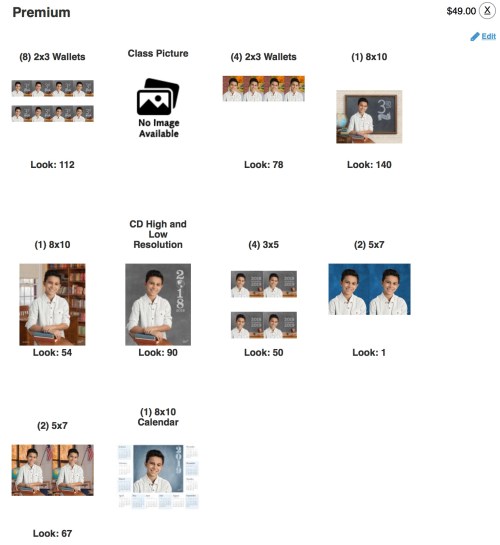
Eight 2×3 Wallets
Choose: Look #112 in ‘Pick Your Grade ‘
Blackboard with 3rd grade/Tight/Horizontal
(You need a tight shot of your child here, because these are so small.)
Four 2×3 Wallets
Choose: Look #78 in ‘Outdoor’
Edge of brick building/Sidewalk and tree/Tight/Vertical
(An outside shot is nice as long as it looks real!)
One 8×10
Choose: Look #140 in ‘Pick Your Grade’
Blackboard with 3rd grade/Wide/Horizontal
(This is the ‘money shot’ I like to frame at home. It says it all.)
The Other 8×10
Choose: Look #54 in ‘School Days’
Bookcase and window/Wide/Vertical
(Go with a vertical option, since the other 8×10 is horizontal.)
CD High and Low Resolution
Choose: Look #90 in ‘Special Edition’
Grey background/Wide/Vertical/2018/2019
(Go for a wide shot… that gives you the most flexibility in cropping.)
Four 3×5’s
Choose: Look #50 in ‘School Days’
Blackboard with year and apple/Tight/Horizontal
(Again, because it’s a small print.. go with a tight shot.)
Two 5×7’s
Choose: Look #1 in ‘Featured Looks’
Blue Background/Tight/Vertical
(Okay… for this one, I’m going with the classic blue background. You’ve got to have one, right?)
The Other Two 5×7’s
Choose: Look #67 in ‘School Days’
Classroom background with American flag and window/Wide/Vertical
(Go wider on this set.)
One 8×10 Calendar
They don’t give you a choice here. Please move on!
Pencils Down!
Phew! I hope that helped you get quickly through this complicated homework assignment. Enjoy your photos!
 At Home with Tech