At Home with Tech

Unlock the power of all your technology and learn how to master your photography, computers and smartphone.

Category: Technology

How to Build a Cloud Family Photo Archive for your Smartphone

It’s time to release the power of your best family photos! Here are four steps to help you create a family photo archive that you can carry around in your pocket.

Remember how your parents and grandparents liked to carry around wallet-sized photos of you when you were a kid? I think some folks still do that. How quaint… how silly…how unnecessary!

With smartphone tech that can house thousands of photos, why would anyone want to carry around a tattered physical family photo in a wallet?

Well, for one reason… you know exactly where that photo is. And when someone asks you about your family, you can pull it out on demand and show it off.

Can you boast that same super power?
…Right now?

Stop Looking for a Needle in your Visual Haystack
Yes, this topic may fall under the category of ‘super obvious,’ but you can’t simply hope to swipe through a mess of photos in your smartphone representing years of moments and successfully pull the desired image out of a hat whenever you need to.

You’ve got to tuck away a few of the really important ones in a place where you can easily access them (beyond your wallet).

And I’d say the best way to do that is to create a family archive photo album in the cloud that you can access from anywhere, including your smartphone.

Here are four easy steps to help get you going…

Step 1:  Create a Shared Cloud Photo Album
In the Apple ecosystem, of course that’s really simple to do…

You can create a ‘Shared Album’ either on your iPhone or in ‘Photos’ on your Mac and then simply pop in your top 50-100 pics that represent the entirety of your family and your life to date.
(Keeping the number down is much easier said than done, because you’ll find so many choices that you’ll want to include!)

The trick here is to only choose a small number of pics among the thousands you’ve got. Remember, you’re trying to essentially simulate the tattered wallet photo experience… with some obvious improvements. Simplicity and easy access are paramount.

Then after the heavy lifting of curating your little photo collection, simply share the album with your partner and whoever else you’d like…
How considerate of you!

Step 2:  Choose only a Few Photos
So which photos are you going to include?
Well, think about which pics best represent your family’s ‘story.’

Yes, that may take you some time to figure out…
(Our ancestors had it easy with only having to manage through a shoebox of disorganized photos.)

But once you go through your digital collection and pull together this new group of archive-worthy gems, you’ll realize the awesomeness of your accomplishment.

Step 3:  Include the Major Moments
I don’t think there’s one particular recipe to follow… you just need to take a little time to decide what those exact photos are…

For me, I wanted to include some of the obvious milestone family moments…

  • Our wedding
  • Our son’s birth and first days


Then show off a little of the ‘where…’


And then I realized, beyond the several landmark moments in life and fun places that anyone might want to display a picture from, there’s a blur of countless other experiences over the years that you really don’t need to consider.
(That’s sobering, right?)

So, what’s left…?

Step 4:  Focus Mostly on the ‘Who’
Well, it’s the people in your life… your family and friends.

The “who.”

Yes, we’re back to essence of the wallet photo phenomenon.

You’re going to want to carry around the pictures of the people in your life who have mattered most.

Those images are what I immediately felt the need to collect into my own cloud family photo archive…

And so I put those photos in a cloud folder titled ‘Family Portraits.’

Some were candid pics, but most were posed group shots taken at family events. The organic organization of the people in these photos nicely framed much of my family’s history.

Carry Your Family History in Your Pocket
Remember when I said that your photos have expiration dates and that your family and friends only care to see the most recent pics from your life?

While that’s certainly true at one level, some of your pics will defy that phenomenon and retain their long-term value as foundational explainers for your family’s history.

Just make sure you don’t lose them in the endless mass of digital freeze frames from your life.

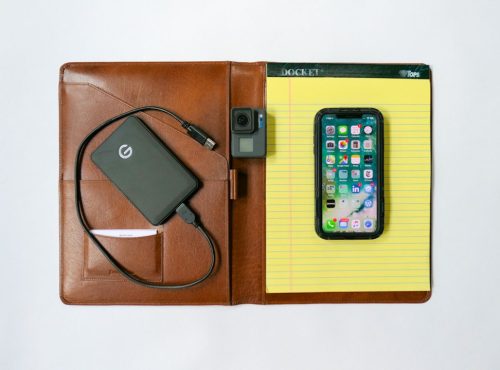
Sure, they might be properly archived in a portable hard drive somewhere, but if you can’t immediately access them when you want to on your smartphone, you’re going to miss most of the opportunities to share them throughout your life!

A cloud family photo archive that lives on your smartphone is a strategy lightyears ahead of using those tiny wallet photos.

You’ve just got to build it!
Essential Tech I Use and Why

Here’s my list of ten technology purchases I’ve made that creates my foundation for living and working in today’s digital world.

I see myself as an everyman (person) who successfully uses his tech (usually) throughout most days in life. I’ve done my research and also have a decent track record on my specific gear choices. While I’m hardly an authority… I’d like to think I offer an informed point of view.

There is also an ever-increasing amount of choice out there, and figuring it all out can be a complete time suck. The ‘best choice’ is an elusive and always-changing equation. So, my strategy has always been to find what works (at a competitive price where possible) and stick to brands that hold up over time.

Most of all: Keep it simple…

If you think that reading about the essential tech I’ve chosen (or covet) for myself might be useful towards your own tech-selection process, then I’ve got a little list to share…

Ten Technology Choices to Help Get You through Your Day

1.  Smartphone

I upgraded from my old iPhone 6 Plus and finally convinced myself there was no need to supersize it to 512GB. So far so good…

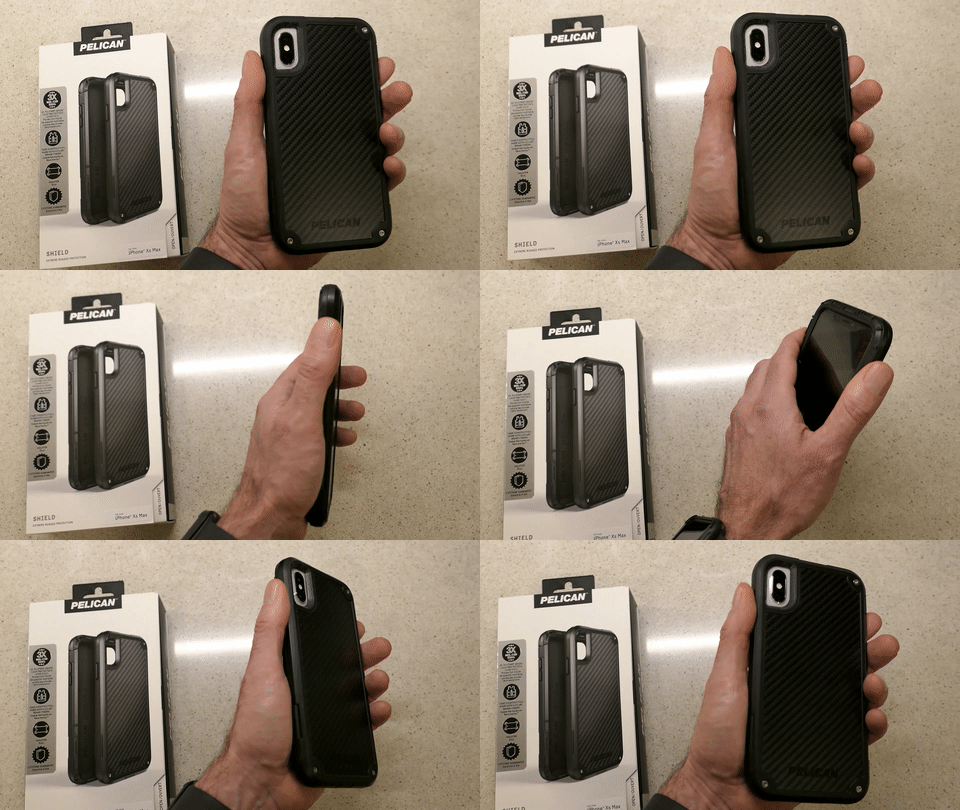
2.  iPhone XS Max Case

It’s tough and looks like it comes from the alternate universe in the TV series, “Fringe.”

Plus, I like saying it’s made with Kevlar.
Holding My Pelican Shield Case for iPhone XS Max

Enough said.

$41.73 on Amazon Prime

3.  Watch

After three years of self-control, I couldn’t stand not trying one of these out. It was an instant success… Not only have I been loving my Apple Watch, it’s also focused me on ‘getting my steps in.’


And now, I don’t have to think about what watch I’m going to wear tomorrow!

4.  Computer

I began using Macs fifteen years ago due to the advanced multimedia applications, and I never looked back.

Do I feel the need to upgrade to the 2019 model?
Nope. Not yet… I’m doing fine with what I have.

5.  Back-Up Drive for your Computer

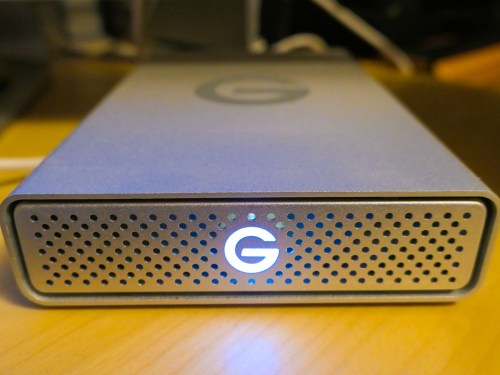
I’m a big fan of G-Technology Drives (now owned by Western Digital).

The G-Technology 4TB G-Drive USB 3.0 goes for $129.95 on Amazon Prime.

It’s what I use for my iMac’s Time Machine backups…

6.  Portable Back-Up Drives

  • G-Drive Mobile USB-C

Yes, I’m sticking with G-Technology again…
My go-to choice is the G-Drive Mobile USB-C.

I always grin and shake my head at how digital-storage pricing continues to drop…

7.  Cloud Backup

You do have a cloud backup plan in addition to your local backups, right?

I’ve been using Backblaze after CrashPlan broke up with me.

Offsite backup should always be a part of your strategy…

8.  Premium Point-and-Shoot Camera

Compact cameras that use 1-inch-type sensors can capture better photos than your smartphone…especially in low light.

Being able to freeze that July 4th fireworks moment is priceless!

Yes, these premium compact cameras are expensive, but if you’re serious about capturing great photos without blur and don’t want to carry around a big DSLR, this is the camera category for you…

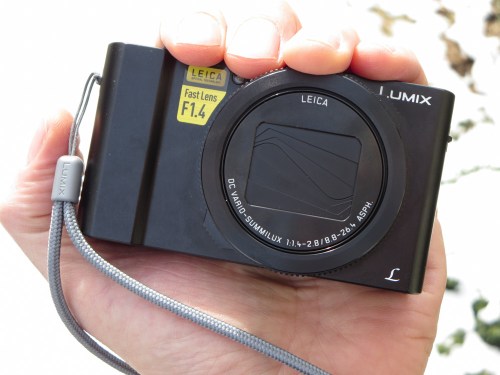
I use Panasonic’s Lumix DMC-LX10. It’s a couple of years old, but still on the market and now at a discount…
$497.99 on Amazon Prime

I enjoy using my LX10, but If you’d like to know the camera I really covet, and what I’d buy today…
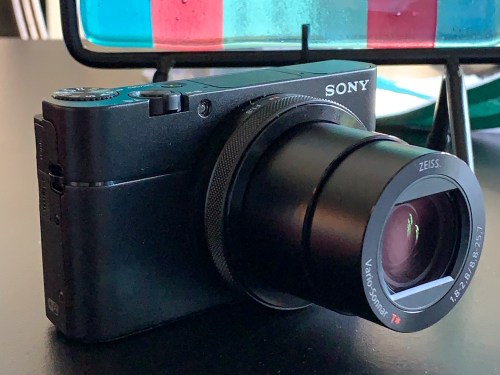
It’s the Sony DSC-RX100 VA… $898 on Amazon Prime.
(No… not the newer VI model. That’s because even though the VA has a smaller zoom, it‘s got a faster lens that can better capture action in low light.)

This is my friend’s new Sony DSC-RX100 VA.

The RX100 series has always seemed to set the gold standard for this category. Yes, it’s expensive, but I think it’s worth it.

9.  Action Camera

I picked up a GoPro last year as a family vacation camera, and I found that it really can enhance your vacation’s fun. A GoPro is small, durable and waterproof… so you can take it to the beach without worrying about a grain of sand crippling a retractable zoom lens. Plus you can snap great underwater shots!

It’s also incredibly fun to use during pool time!

The GoPro HERO7 Black is $343.68 on Amazon Prime.

10.  Wireless Mesh Router

When I replaced my old Apple AirPort Extreme WiFi router, I went with the two-unit mesh WiFi system made by Netgear Orbi.

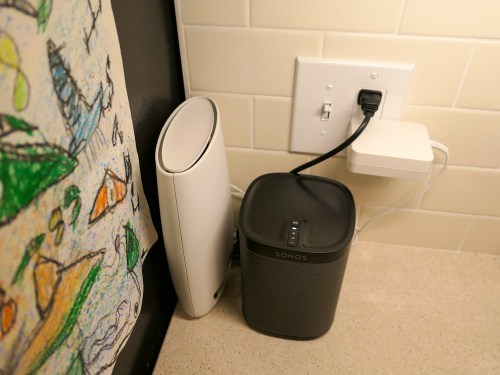
The Orbi RBK50 (next to my Sonos speaker) costs $279.79 on Amazon Prime.

Mesh WiFi is a game changer… bringing new meaning to the idea of whole-house WiFi.
(I highly recommend it.)

If It Fits Your Budget…
I imagine some of you might be questioning whether all of this gear appropriately belongs on an ‘essential’ list.

While it would certainly be difficult today to operate without a smartphone or computer… does anyone really need the always more-expensive devices made by Apple? Of course not.

But I would also add that there’s value in working within one digital ecosystem. And not that you couldn’t also do that with other brands… but, hey… Apple’s always been a good bet… Period.

And no, you don’t specifically need home WiFi or a GoPro to survive, but I think it’s fair to say they’ve contributed to maintaining a level of digital homeostasis in my life.

That’s a fragile equation and always worth acknowledging… and enjoying when you can.

4 Ways to Choose the Best Portable Power Bank for your iPhone

If you’re looking to pick up extra portable charging power for your iPhone, there are several important factors to consider. Here’s what to pay attention to…

Lately, my wife has been borrowing my little Anker Astro portable power bank for her iPhone. It’s clear her aging device now needs the ongoing battery support to get through certain hi-use days.

So, I decided to pick up another portable charger for myself. No big deal… right? Especially because I thought these batteries have become so cheap you can probably find them at the bottom of a Cracker Jack box.

Not true…
And to complicate matters, the countless choices out there are mind numbing…

Power Pricing Game
And I was shocked to find the price points from my favorite brands were $30-$50. But upon closer inspection, that’s due to the greater power capacities on the portable power bank market today.

You can easily get yourself 12,000-20,000mAh of portable power.

But do you need that much…?

Tip #1
Don’t Bring Along More Power Than You Require
My iPhone XS Max only needs 3,174mAh to totally recharge.

A little travel boost is really all I wanted. So, focusing on the smaller 6,700mAh category is more than enough to carry about for this particular purpose.

And I immediately identified a couple of good choices…

Same Price… Larger Capacity and Size
And after doing a little more research, I realized you can even up the capacity of the battery without really affecting the price…

Just be aware that these batteries are going to be bigger and heavier…

Tip #2
You’ll Likely Need to Provide Your Own Lighting Cable Solution
But then, I discovered a little secret in the portable power industry…
Most power banks don’t include the Lightning cable to actually power an iPhone. (That requires a separate purchase!)

So, you’ve got to spend more money for the cable!
Whoa!

For example, the 1-foot Anker Powerline II Lightning Cable is
$10.99 on Amazon Prime.

Too Good to Be True?
But I did locate one option from POWERADD that graciously packaged an included Lightning cable:

In fact, the clever design of this unit only requires the one cable… for both charging up and dispensing power.

Great, right?

And it’s got 12,000mAh!
(and 2 outputs)

All this for $26.99… Is this a dream?
So, where’s the catch?

Well… lots of Amazon reviewers have complained about the allegedly short life span for this model.

Hmmm…
My search continued…

Tip #3
Make Sure a Built-In Lighting Cable will Fit through your iPhone Case
Some manufacturers offer a design that includes an attached fold-out Lightning cable.
That’s thoughtful!

I found one choice from Jackery…

This external battery charger has a short built-in Lightning cable, which is simply awesome.

That is… unless you use a thick iPhone case like I do, which will likely prevent the Lightning plug from fitting.
(I’m happily using my Pelican case… so I’m going to pass on this option.)

Tip #4
Consider a Power Bank with a Built-In AC Plug
Then, I came upon a slightly different product category with a design that offers an integrated foldable power plug… so you don’t need to worry about having access to a separate wall charger.

Now, that’s certainly a nice bonus and an unexpected value-add.
(And yes, you’ve still got to buy your own Lightning cable.)

I found these two choices:

  • Anker PowerCore Fusion, Portable Charger 5000mAh with Dual USB Wall Charger, Foldable Plug
    $25.97 on Amazon Prime
  • RAVPower 6,700mAh Power Bank with Dual USB Wall Charger (Model RP-PB125)
    $23.99 on Amazon Prime
    (Each power port provides a full 2.4A.)

My Solution
So where does all of this leave us…?

I really liked the RAVPower 6,700mAh External Battery Pack with Dual USB Wall Charger plus integrated foldable A.C. plug. And the price was right…

Click.

So, that just left getting another Lightning cable…
And I finally came to the conclusion this additional purchase was inevitable.

If you also need to go that route, I suggest getting a short cable, which is simpler to use when you’re tethering the RAVPower battery to your iPhone while using it in the field.

AmazonBasics has a 4” Lightning to USB A Cable for $5.99.

Or you can go with the premium cable option for $2 more…
AmazonBasics Advanced Collection 4” Lightning to USB A Cable… $7.99.

I spent the extra couple of bucks.

Click.

Be Prepared
You should always carry around a little portable power to support your smartphone for ‘emergencies.’ If that unit can recharge itself without needing a separate power block and also easily supply some juice to your other devices, I’d say that’s a smart purchase!

RAVPower Power Bank Wall Charger + 4” Lightning to USB A Cable
= happy human.

Done.